
Question

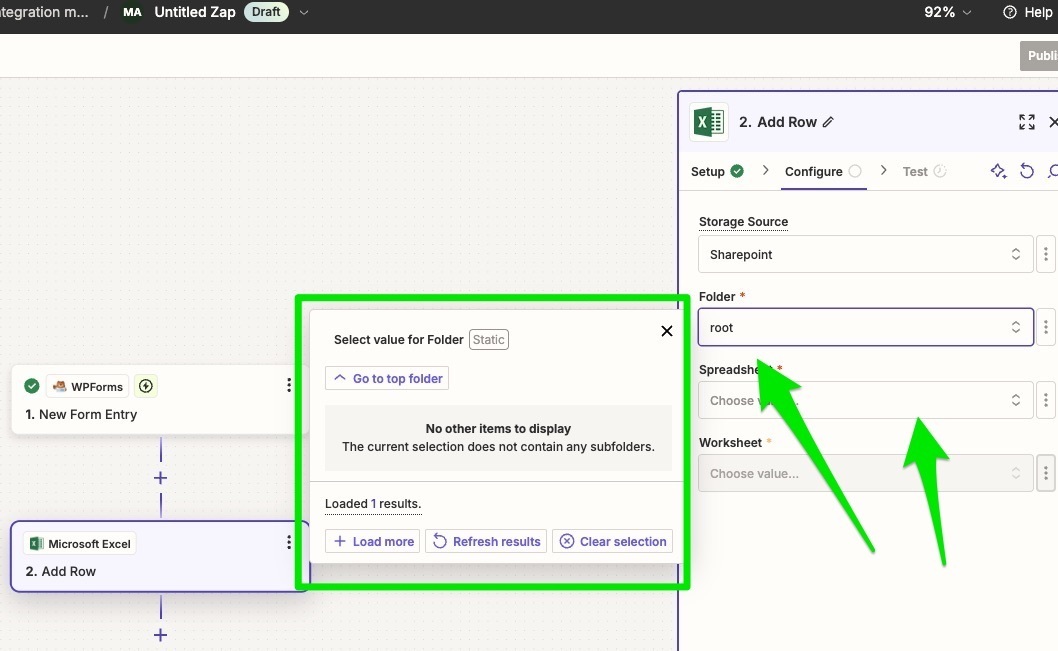
Unable to access Sharepoint folders or Microsoft Excel sheets in Zapier?

  • October 2, 2024
  • 2 replies
  • 82 views

Hi,

Trying to make a zap integrating WP Forms and Excel.

I can connect to Sharepoint, but have no folders or spreadsheets in Zapier to choose from.

Login into Sharepoint, I do have a folder. But it does not show up in Zapier?

Yes, it is the same account…

Is there a setting in Sharepoint or? Any suggestions much appreciated.

/ DK
 

This post has been closed for comments. Please create a new post if you need help or have a question about this topic.

2 replies

Troy Tessalone
Zapier Orchestrator & Solution Partner
Forum|alt.badge.img+14
  • Zapier Orchestrator & Solution Partner
  • October 2, 2024

Hi @DenKro 

Help links for using these apps in Zaps:


SamB
Community Manager
Forum|alt.badge.img+11
  • Community Manager
  • October 16, 2024

Hey there @DenKro 👋

Were you able to get this sorted with the help of those guides Troy shared links to? If not, do you happen to know the ID number for the folder you’re wanting to select? Just wondering if you might be able to get around this by manually selecting the necessary folder (choose the Custom value option and enter the ID number) to get the list of spreadsheets to then appear.

Keen to ensure you’re all set here so please keep us updated on how you’re getting on! 🙂





