Question

Troubleshooting Zap issues between Lemlist and CRM.Zoho

  • December 2, 2025
  • 11 replies
  • 48 views

Hello,
I created Zaps to add Notes in CRM when there is a response by a lead from a lemlist campaign. When the lead does not exist in my crm.zoho it creates one and adds a note. There are 3 zaps for replies by LinkedIn, Whatsapp or email.
It used to work fine for a week or so, then I realised that Notes are all going to a single entry in my CRM, and not creating leads anymore.
Do you have an idea why it suddenly goes wrong ?

Input : 
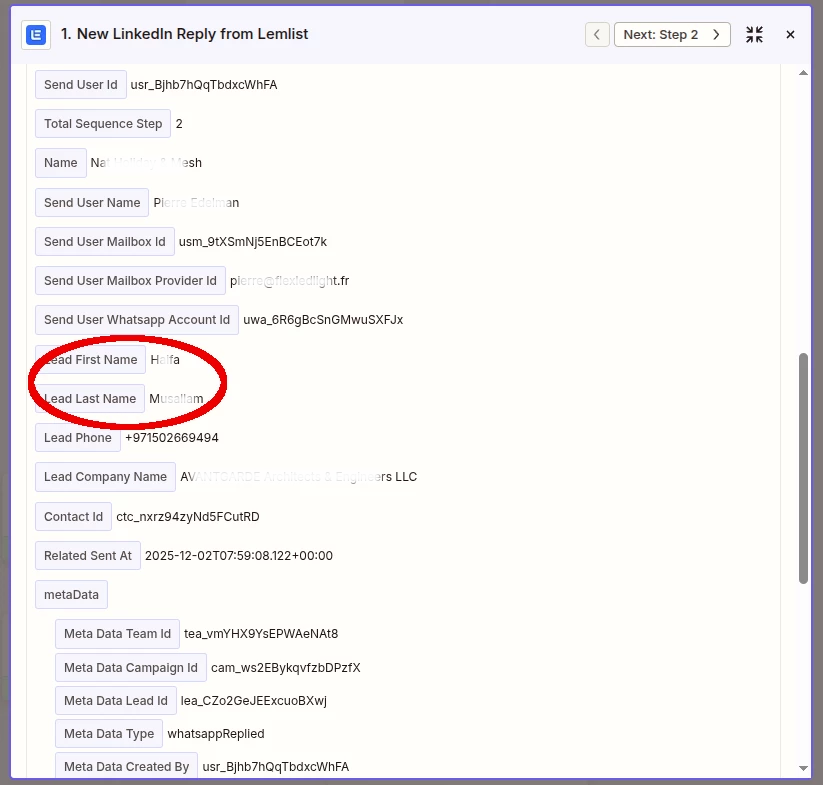
What Zapier is extracting from Lemlist
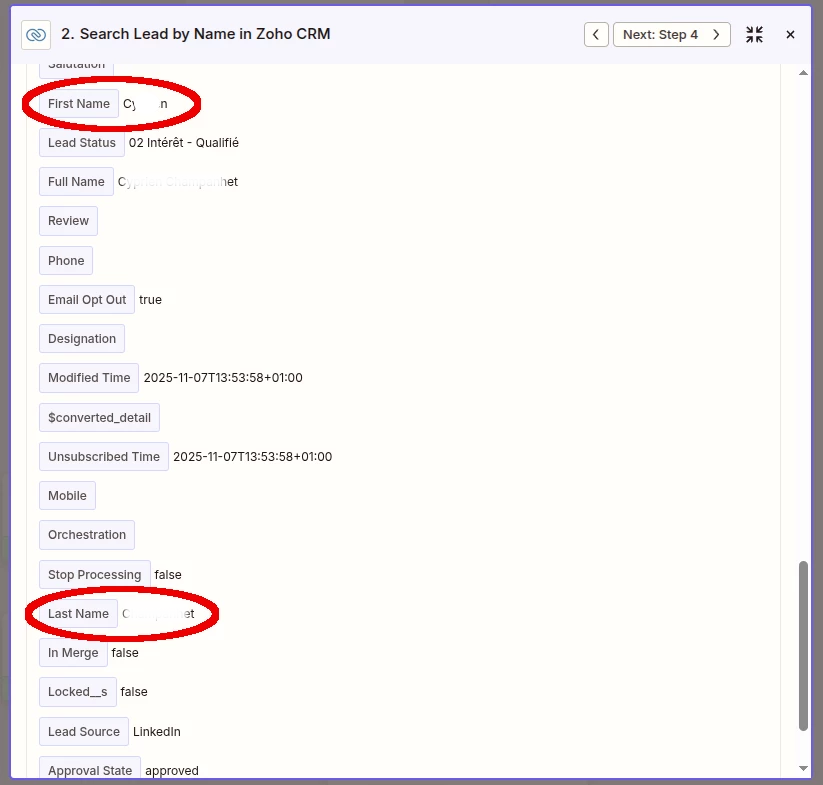
The wrong lead where Zap adds Notes although it should create a new Lead

And what is funny is that it adds notes to the same Lead. It does not do it randomly.

11 replies

moid-space
Forum|alt.badge.img
  • New
  • December 2, 2025

This usually happens when your Find/Create Lead step keeps matching the same Zoho record. In Zapier, check that the “Find Lead” search is using a unique field (like email) and that Lemlist is always sending a different email/ID per reply. If the search always finds that one lead, Zapier will just add a Note to it instead of creating a new Lead.


Sparsh from Automation Jinn
Forum|alt.badge.img+6

Hey ​@peirpiotr,

Please post screenshots of Data In, Data Out as well as how each Zap step is configured for us to have more context. Mainly actions where you are creating notes and creating leads.


Troy Tessalone
Zapier Orchestrator & Solution Partner
Forum|alt.badge.img+14
  • Zapier Orchestrator & Solution Partner
  • December 2, 2025

Hi ​@peirpiotr 

Help link for mapping variables between Zap steps: https://help.zapier.com/hc/en-us/articles/8496343026701-Send-data-between-steps-by-mapping-fields


You likely have a static field value or dropdown selection causing the issue.

You need to make sure you map variables and use the Zoho CRM record ID for creating relationships between the Zoho CRM object data.

Help link for understanding expected values in dropdown fields: https://help.zapier.com/hc/en-us/articles/8496241696141-Add-custom-values-to-dropdown-menu-fields-in-Zaps


If you are looking to hire help, there is a directory of Zapier Partners: https://zapier.com/partnerdirectory


  • Author
  • Beginner
  • December 3, 2025

Hey ​@peirpiotr,

Please post screenshots of Data In, Data Out as well as how each Zap step is configured for us to have more context. Mainly actions where you are creating notes and creating leads.

Hi Sparsh,
What screenshots do you need as compared to what I posted already?
Zap’s steps?
Lemlist’s contacts who responded?
CRM’s contact who is fed with notes belonging to others?


  • Author
  • Beginner
  • December 3, 2025

Help link for understanding expected values in dropdown fields: https://help.zapier.com/hc/en-us/articles/8496241696141-Add-custom-values-to-dropdown-menu-fields-in-Zaps


Hi Troy,
I’ll look into that since the same lead gets all the Notes and I’ll be back.
Tx


Sparsh from Automation Jinn
Forum|alt.badge.img+6

Hey ​@peirpiotr,

Yeah Zap steps and also for actions like creating notes and creating leads will be helpful. Sometimes a small incorrectly mapped field can lead to this happening. I think there is probably some logic problem or some incorrect mapping and that’s why it’s going wrong.

I think seeing the live Zap run in the Zap history(https://zapier.com/app/history) and see where it’s going wrong can be useful for your problem. Hope it helps!

PS: If you need more active help, I’m happy to connect through my Zapier Solution Partner page if you’d like to reach out here- https://zapier.com/partnerdirectory/automation-jinn


  • Author
  • Beginner
  • December 3, 2025

Hi Trioy,
I’m trying your suggestion now, and I’ll be back.


Troy Tessalone
Zapier Orchestrator & Solution Partner
Forum|alt.badge.img+14
  • Zapier Orchestrator & Solution Partner
  • December 3, 2025

@peirpiotr 

For us to have more info, post these screenshots:

  • how your Zap steps are outlined
  • how your Zap steps are configured in the CONFIGURE tab while in EDIT mode with the field mappings and field types visible

  • Author
  • Beginner
  • December 3, 2025

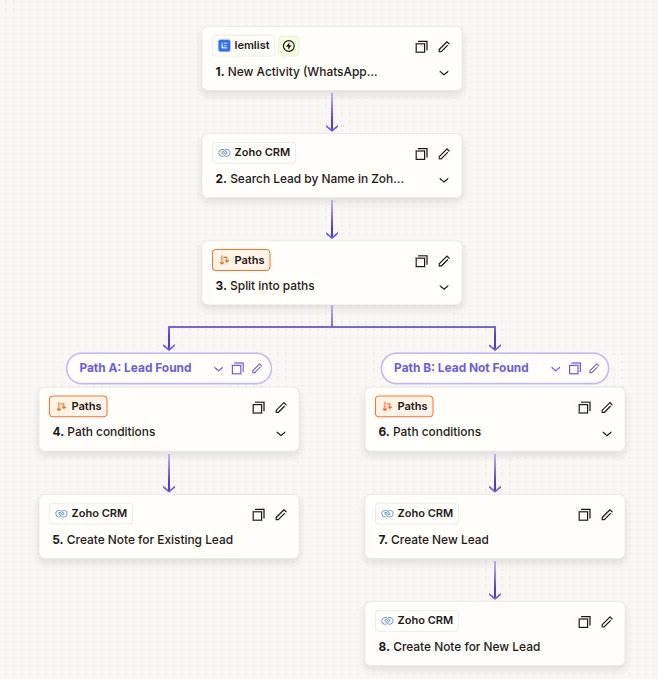
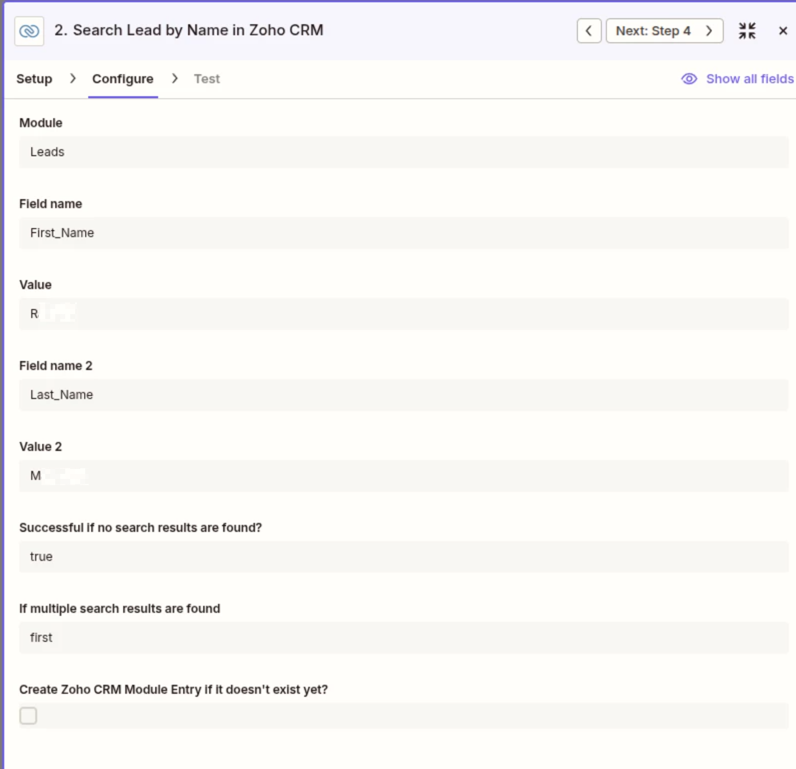
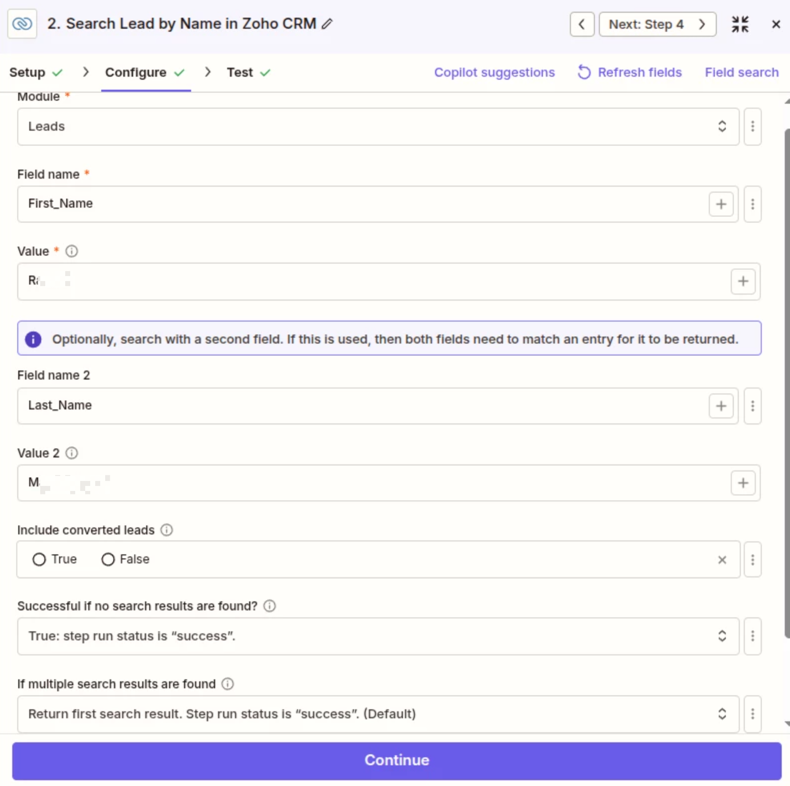
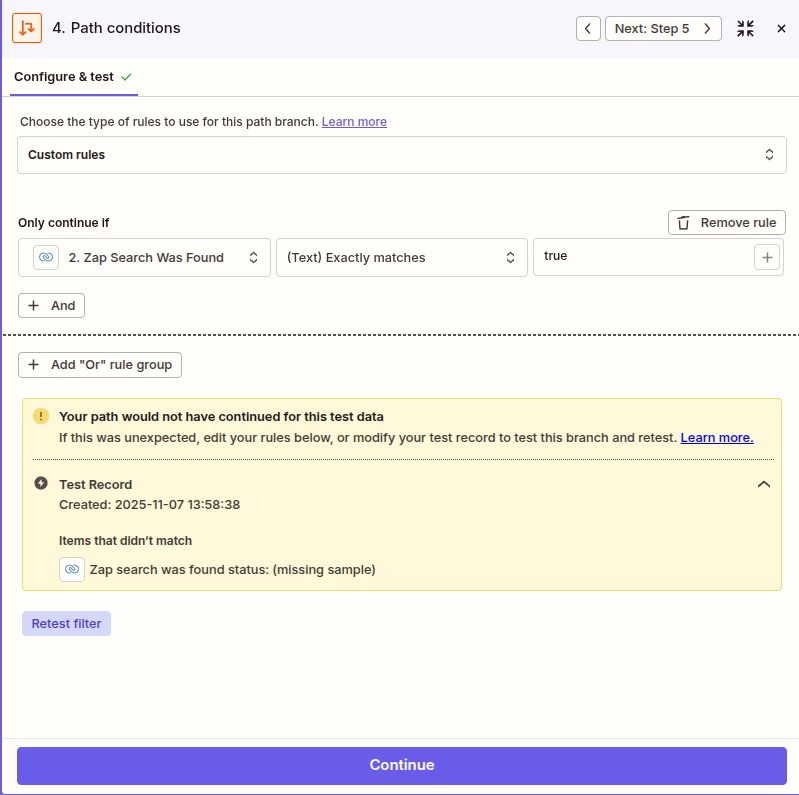
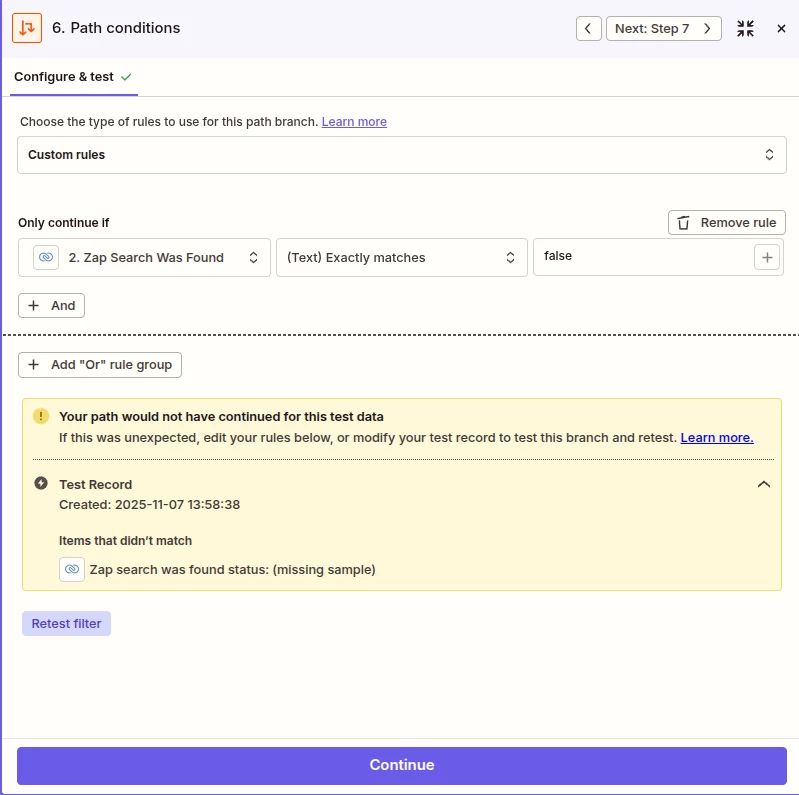
Here are the sequences and the steps. I realize that the field values are fixed in step2. Something probably wrong here.
Also, scrolling down shows there is the possibility to create a new lead in step 2 instead branching out to path A or B...

This post has been edited by a moderator to remove personally identifiable information (PII). Please remember that this is a public forum and avoid sharing personal or potentially sensitive details.


Troy Tessalone
Zapier Orchestrator & Solution Partner
Forum|alt.badge.img+14
  • Zapier Orchestrator & Solution Partner
  • December 3, 2025

@peirpiotr 

Yeah, you need to map dynamic variables from Zap step 1 to Zap step 2 using the [+] button at the right of each field, rather than having static values set in fields.

Help: https://help.zapier.com/hc/en-us/articles/8496343026701-Send-data-between-steps-by-mapping-fields


SCREENSHOTS

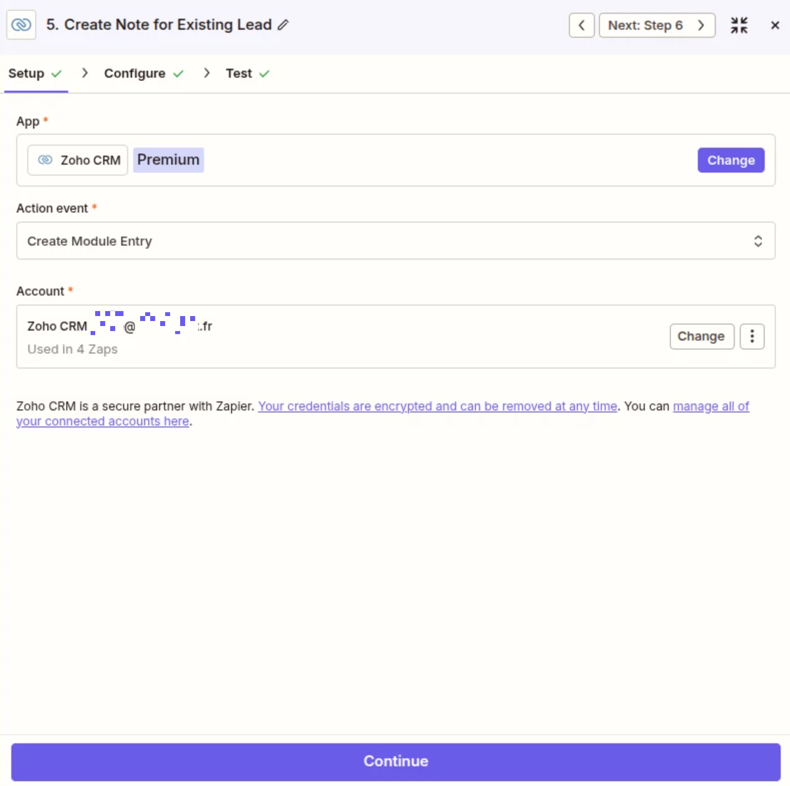
  • Zap step 5 does not show the CONFIGURE tab
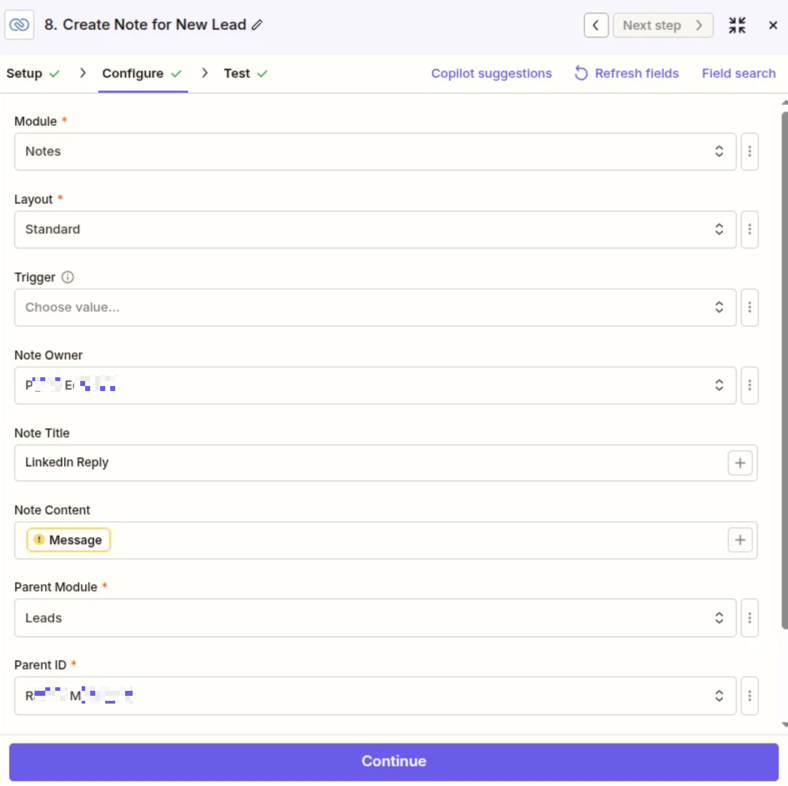
  • Zap step 8 shows a invalid variable mapped for Note Content
    • You need to remap the correct valid variable

Sparsh from Automation Jinn
Forum|alt.badge.img+6

Hey ​@peirpiotr,

You are not mapping dynamically and that’s problem and the cause for creation of notes for same lead again and again.

Here is a helpful article about dynamic mapping- https://help.zapier.com/hc/en-us/articles/8496343026701-Send-data-between-steps-by-mapping-fields

Hope it helps!