Question

Troubleshooting the Search for related record node in Salesforce with missing search value

  • December 22, 2025
  • 7 replies
  • 22 views

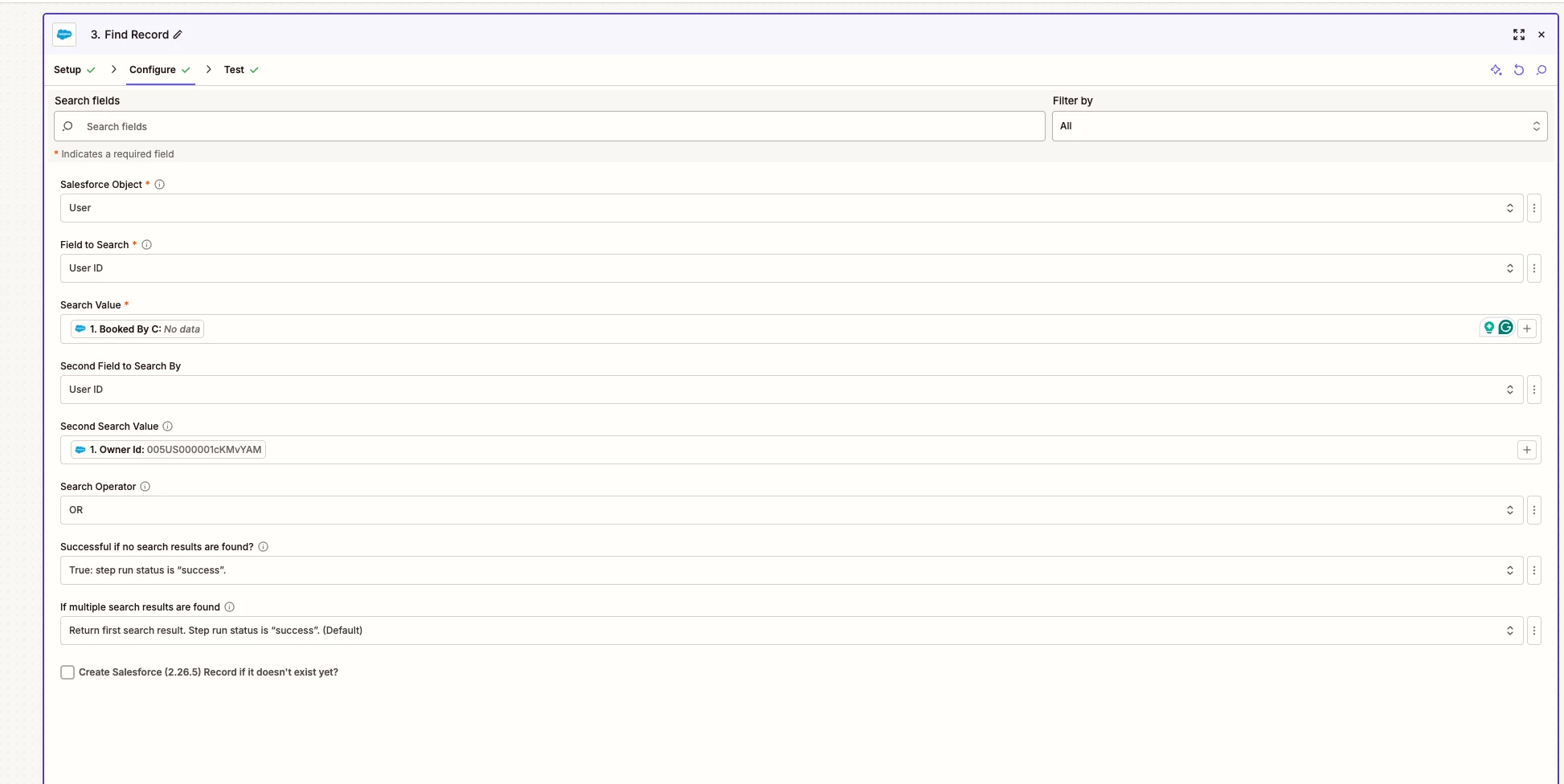
I have a Search for related record in Salesforce node that is set up to read search value 1 OR search value 2, but keeps failing because there is no value in search value 1. There is a search value for the second option. 


Failed to find a record in Salesforce (2.26.5)

Required field "Search Value" (searchValue) is missing.

Help me fix it


Data in

Troubleshoot

AI beta


_zap_search_success_on_miss

true

object

User

searchField

Id

operator

or

_zap_search_multiple_results

first

searchValue2

005US000004jszdYAA

searchField2

Id

Empty fields:

empty (optional)

7 replies

Troy Tessalone
Zapier Orchestrator & Solution Partner
Forum|alt.badge.img+14
  • Zapier Orchestrator & Solution Partner
  • December 22, 2025

Hi ​@DKaetzer 

Required fields must have a value.


For us to have true context, post screenshots showing how your Zap steps are outlined and configured in the CONFIGURE tab while in EDIT mode with the field mappings visible.


  • Author
  • New
  • December 22, 2025

Oh OK - so the “Or” function is not really an OR function then? Since regardless it requires that initial value to be present? Can I remove the required setting?


Troy Tessalone
Zapier Orchestrator & Solution Partner
Forum|alt.badge.img+14
  • Zapier Orchestrator & Solution Partner
  • December 22, 2025

@DKaetzer 

For us to have true context, post screenshots showing how your Zap steps are outlined and configured in the CONFIGURE tab while in EDIT mode with the field mappings visible.


  • Author
  • New
  • December 22, 2025


Troy Tessalone
Zapier Orchestrator & Solution Partner
Forum|alt.badge.img+14
  • Zapier Orchestrator & Solution Partner
  • December 23, 2025

@DKaetzer 

You can add Paths to have different Salesforce step search logic based on which Zap step 1 fields have values.

https://zapier.com/apps/paths/integrations#help


Sparsh from Automation Jinn
Forum|alt.badge.img+6

Hey ​@DKaetzer,

It’s because your passing an empty value. You are correct that it’s an OR operator but the first search value field is required as you can see the red asterik over it. If one of the search field will always have data you can put that in the first search value and it will fix your issue.

If it’s not sure which field will have the data, try using Formatter → Text → Default Value to pick the field with data. In the input field pass the first field and in the default value to the second field. After this map the output of this to Salesforce Find Record action. Hope it helps!


drtanvisachar
Forum|alt.badge.img+1

Hey ​@DKaetzer 
 

This happens because even with OR selected, Zapier still requires Search Value 1 to have data. If it is empty, the step fails before checking Search Value 2.

Quick fix
Make sure Search Value 1 is never blank. Use a Filter or Paths so this step only runs when that value exists, or use Formatter by Zapier to pass the first non empty ID into Search Value 1.

Helpful docs
https://help.zapier.com/hc/en-us/articles/8496288699661-How-to-use-Find-or-Search-actions-in-Zapier

https://help.zapier.com/hc/en-us/articles/8496259234573-Use-Paths-by-Zapier

https://help.zapier.com/hc/en-us/articles/8496308436237-Use-Formatter-by-Zapier