


Best answer

Troubles with Discord account reconnect during update to Discord integration 2.0

  • December 19, 2025
  • 9 replies
  • 226 views

Forum|alt.badge.img

Hi everyone.

I received an email saying that all Zaps using the Discord integration need to be updated to the new version.

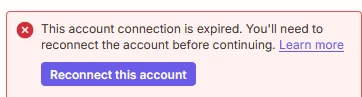
When I try to update a Zap, Zapier asks me to reconnect my Discord account. I go through the authorization process, grant the required permissions to the Zapier Discord bot, and then get redirected back to the Zap page - but the message still remains:

This account connection is expired. You'll need to reconnect the account before continuing.


I’ve tried reconnecting multiple times and even granting all available permissions, but the account still won’t reconnect.

Has anyone experienced this issue? Any ideas on how to fix it?

Thanks in advance.
Best answer by Dragon

I’ve found the solution.

The issue was that reconnecting via the “Reconnect account” button didn’t work for me.
Instead, I had to use the three-dots menu → Reconnect, after that, the connection was restored successfully.

Sorry for the confusion, and hope this helps others.

9 replies

Forum|alt.badge.img
  • Author
  • Beginner
  • Answer
  • December 19, 2025

I’ve found the solution.

The issue was that reconnecting via the “Reconnect account” button didn’t work for me.
Instead, I had to use the three-dots menu → Reconnect, after that, the connection was restored successfully.

Sorry for the confusion, and hope this helps others.


I’m having this problem, and trying to reconnect via the three dots menu didn’t fix it. Just stuck in “This account connection is expired.” 


  • New
  • December 20, 2025

I got through that hurdle, but then it claimed it couldn’t send a message to the channel because it didn’t have the required permissions. The channel in question allows anyone to send messages to it, and the bot itself has the permissions to send messages.

The main problem is, Zapier won’t tell me which permission it was lacking, so there is absolutely no way forward.


  • New
  • December 20, 2025

What fixed this for me was going into the Setup menu, clicking Change next to Discord, and re-adding the Discord account as if it were a different one, then deleting the old one


What fixed this for me was going into the Setup menu, clicking Change next to Discord, and re-adding the Discord account as if it were a different one, then deleting the old one

This worked for me! thx


  • New
  • December 25, 2025

I’m having this problem, and trying to reconnect via the three dots menu didn’t fix it. Just stuck in “This account connection is expired.” 


the same issue, over and over :/
i tryied to check all of options or just select juste the only ones good options (in credentials panel open when we ask the “reconnect” flow => same issue)

very weird, it’s not the first time i have a fully broken flow between Zappier and Discord feature


  • New
  • December 25, 2025

Did you try my solution?


SamB
Community Manager
Forum|alt.badge.img+11
  • Community Manager
  • January 16, 2026

Hey all 👋

@Trejkaz and ​@1000House - just wanted to check how you got on with the alternative solution SuperIchi shared:

What fixed this for me was going into the Setup menu, clicking Change next to Discord, and re-adding the Discord account as if it were a different one, then deleting the old one


Did it do the trick?​​ Let us know whether you’re still having any issues!


  • New
  • January 17, 2026

Users may experience issues reconnecting their Discord accounts during the update to Discord Integration 2.0, likely due to authentication changes or temporary bugs that need patching.
