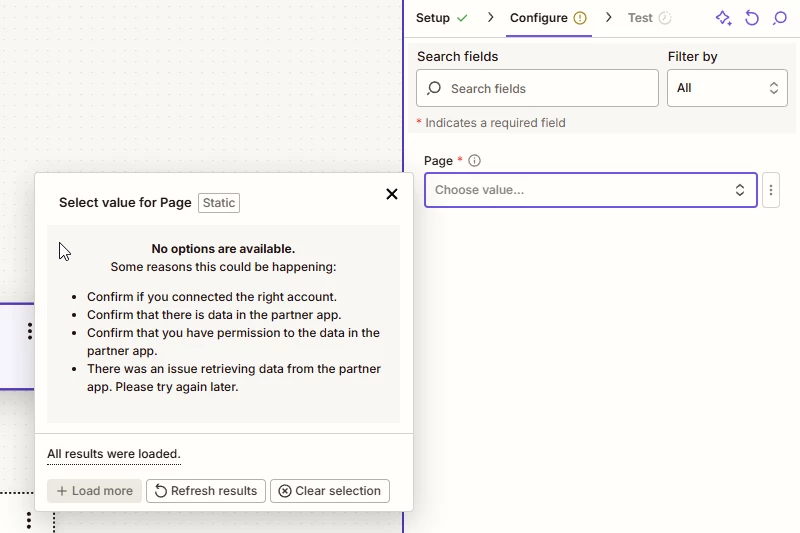
Trying to do a zap using the following: App: Facebook Messenger Trigger: New Message Sent to Page Account: Connected and tested
Here is the issue
I’ve try, reconnecting, test connection, incognito browser, new browser, new computer, all rights under business integration are turned on. I've try using my page ID under Custom Value (when i go to the web browser and put facebook.com/ID# it goes to my page.
If i try Facebook leads it shows my page.
Best answer by SamB
Hi @prestigescoopers 👋
Sorry to hear that your page wasn’t appearing in the Zap, and manually selecting it by entering it’s ID as a custom value didn’t work wither.
I saw you also reached out to our Support team and it seems you were able to get things working but following their reconnection instructions and publishing the Zap. Sharing those instructions here in case it’s helpful to others running into similar issues:
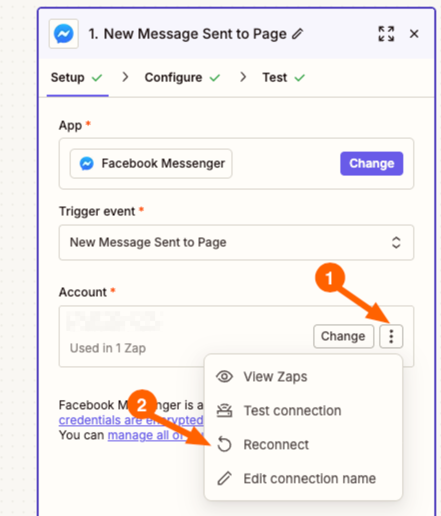
Please reconnect your Facebook Messenger account following these steps:
3. Complete the full authorization flow with Facebook 4. Ensure your Facebook profile has Business Manager level permissions for the page you need to trigger the Zap
If the reconnection doesn't resolve the page selection issue:
You can find your exact Page ID by following Facebook's official guide here, then use the Custom option in the Facebook Page field and enter the ID directly.
Testing the setup:
After reconnecting and configuring the trigger, publish your Zap and send a real message to your Facebook Page to see how the actual runs perform. This will help us determine if the webhook connection is working properly with live data.
Since that appears to have sorted things I’ll go ahead and mark this as the best answer, but please do feel free to reach back out if we can help with anything else.
Sorry to hear that your page wasn’t appearing in the Zap, and manually selecting it by entering it’s ID as a custom value didn’t work wither.
I saw you also reached out to our Support team and it seems you were able to get things working but following their reconnection instructions and publishing the Zap. Sharing those instructions here in case it’s helpful to others running into similar issues:
Please reconnect your Facebook Messenger account following these steps:
3. Complete the full authorization flow with Facebook 4. Ensure your Facebook profile has Business Manager level permissions for the page you need to trigger the Zap
If the reconnection doesn't resolve the page selection issue:
You can find your exact Page ID by following Facebook's official guide here, then use the Custom option in the Facebook Page field and enter the ID directly.
Testing the setup:
After reconnecting and configuring the trigger, publish your Zap and send a real message to your Facebook Page to see how the actual runs perform. This will help us determine if the webhook connection is working properly with live data.
Since that appears to have sorted things I’ll go ahead and mark this as the best answer, but please do feel free to reach back out if we can help with anything else.
In the meantime, happy Zapping! 😁⚡
Early access
Next Gen Zaps
Build and deploy automations from AI tools you already use. With Agentic Management, if anything breaks, the agent diagnoses the issue and proposes a fix.




 . A dropdown menu will open.


