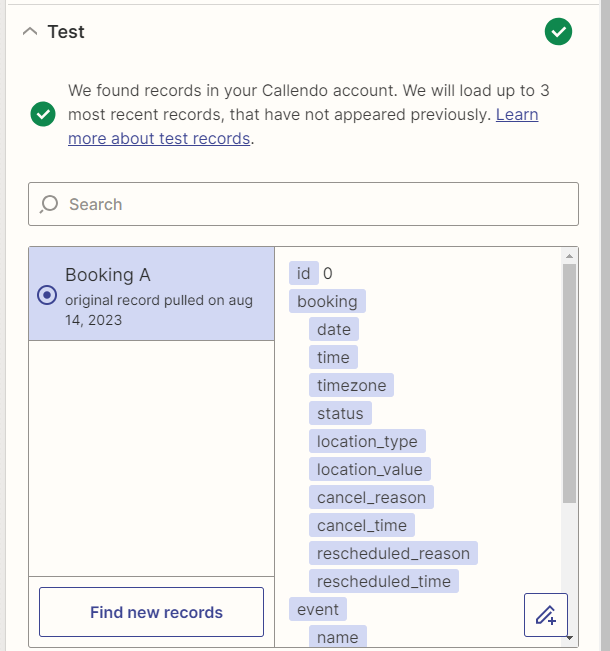
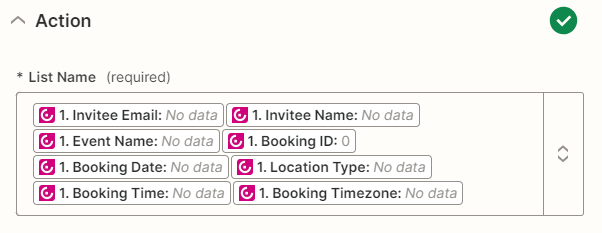
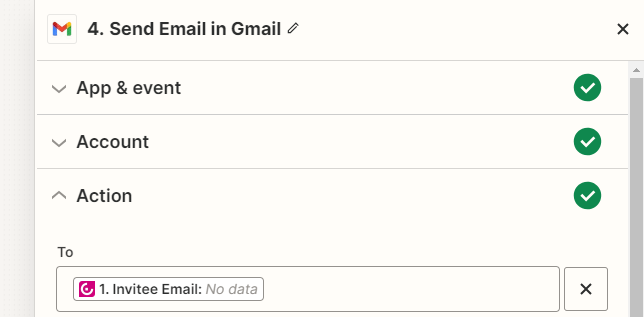
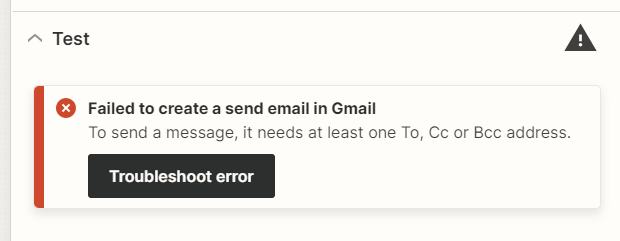
I am creating a zap where I want to take data from my Callendo booking page, into an email provider, like gmail, to send an auto-email-respons.
The trigger test for Callendo works.
But, in the next steps, it say “no data”.
Why is that and how do I fix it?
Thanks!
C
Best answer by C needs help
Hi @C needs help
Good question.
Try testing the Zap trigger event by creating a live event, then “find new records”.
HOLY MACARONY it helped! Thank you SO MUCH you saved me from a huuuuge headache! You make my day!
For other people who might run into the same problem:
You need to have a booking coming up in Callendo, one that has not yet happened, or it won’t find any data to work with… it’s not enough having- had - bookings before.
Don’t have a booking from Callendo? Create a fake one, with yourself ;)
Try testing the Zap trigger event by creating a live event, then “find new records”.
HOLY MACARONY it helped! Thank you SO MUCH you saved me from a huuuuge headache! You make my day!
For other people who might run into the same problem:
You need to have a booking coming up in Callendo, one that has not yet happened, or it won’t find any data to work with… it’s not enough having- had - bookings before.
Don’t have a booking from Callendo? Create a fake one, with yourself ;)
That’s fantastic news @C needs help! Thanks so much for circling back here to share what worked for you. I’m sure it will help other folks in the Community too! 🤗
Early access
Next Gen Zaps
Build and deploy automations from AI tools you already use. With Agentic Management, if anything breaks, the agent diagnoses the issue and proposes a fix.