

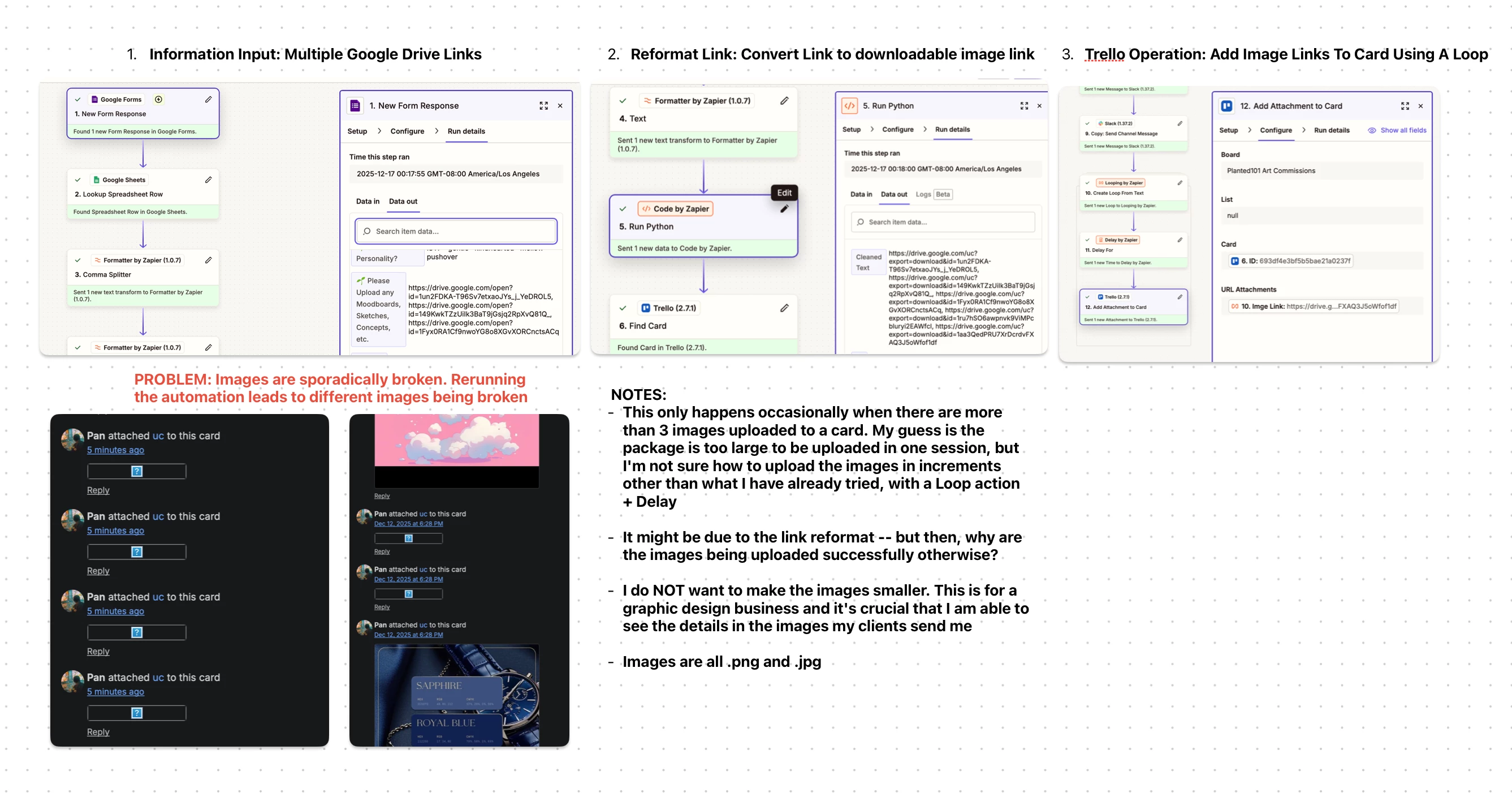
I have been running into problems with multiple images being uploaded to trello and was wondering if anyone could please help with this. To summarize the workflow in the image I attached:
1. I receive a Google form from client including all the images for their project. These images are stored in a public Google Drive folder and are listed in comma-separated links in a Google Sheet
2. I created a custom Python script that reformats the drive link into a downloadable image link (https://drive.google.com/open?id=1un2FDKA-T96Sv7etxaoJYs_j_YeDROL5 → https://drive.google.com/uc?export=download&id=1un2FDKA-T96Sv7etxaoJYs_j_YeDROL5)
3. To upload multiple image files to a Trello Card, I created a Looping Action to upload the images via. URL Attachment (The images CANNOT be thumbnails, they require full resolution)
Here is my issue and my attempts on fixing it:
- The images are randomly being uploaded broken. If I re-run the Zap on a card with broken images, different images will be broken the second run.
- Guessing it was an overloading issue, I added a 2 minute delay, but everything still uploads broken, just slower
- I have tried alternative image links, but none have worked so far









