

Question

Tables "is empty" filter not excluding some empty rows

  • December 23, 2025
  • 5 replies
  • 19 views

bridgman

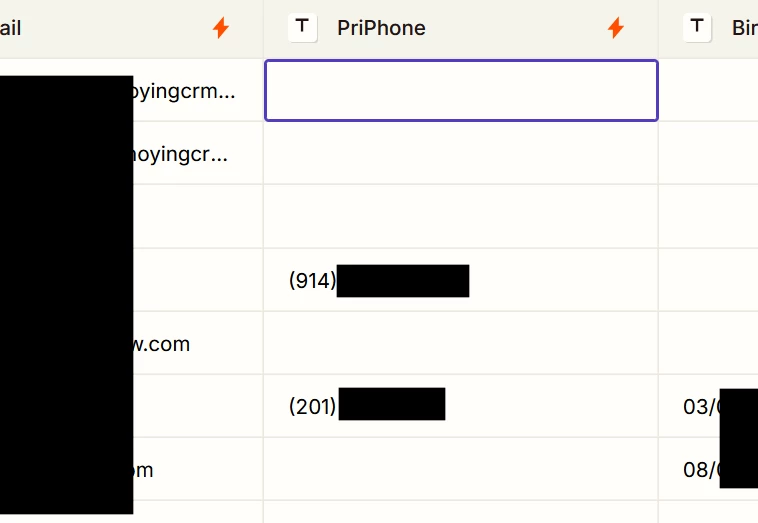
I have a table with basic contact information, including a phone number. If I use the Filter button to add a “is empty” = “false” condition, it does not filter out some rows where that field is apparently blank.

If I click on that field, there doesn’t seem to be anything in it, like a space (I can’t select any text), but if I hit “Delete” and move to another field, the row gets filtered - so there’s something there.

How can I tell what’s in these fields, so I can prevent them from getting created in the future?

And how I can I can I fix all the existing records so that the field truly is empty if there is no phone number?

 

5 replies

Sparsh from Automation Jinn
Forum|alt.badge.img+6

Hey ​@bridgman,

I think it’s probably because these fields have invisible characters like space or something else that may not be visible but Zapier doesn’t count them as empty. 

You may want to remove either by trimming whitespace or replacing it with an empty field using a Zap. Hope it helps!


drtanvisachar
Forum|alt.badge.img+1

Hello ​@bridgman 
This can happen if the field isn’t truly empty. Sometimes spaces or hidden characters cause the filter to think there’s a value.

You could try adding Formatter by Zapier to trim or normalize the field, then point your Filter step at the formatted output instead of the raw Tables field. For existing rows you may need to update them once so the field is actually blank.

Helpful links below.

https://help.zapier.com/hc/en-us/articles/8496221983373-How-to-use-Formatter-by-Zapier
 

https://help.zapier.com/hc/en-us/articles/8496275450253-How-to-use-filters-in-Zaps
 

https://help.zapier.com/hc/en-us/articles/12187034914445-Tables-by-Zapier-overview


bridgman
  • Author
  • Beginner
  • December 23, 2025

Thank you for the reply - but it doesn’t answer my question.

There obviously is some data there, but manually deleting the “empty” value from a few thousand records already in the table is something I’d like to avoid.

I’d also like to figure out what the invisible character is, so I can figure out how it got there with an eye towards preventing it from happening in the future. 


Troy Tessalone
Zapier Orchestrator & Solution Partner
Forum|alt.badge.img+14
  • Zapier Orchestrator & Solution Partner
  • December 24, 2025

Hi ​@bridgman 

Help links for using Tables: https://help.zapier.com/hc/en-us/categories/13398036609933-Tables


Try this approach...

  1. Add a Filter that checks if the field does not have a digit
    1. Use separate conditions for each of the 10 digits
  2. Bulk select the records
  3. Bulk edit the records to clear out the value


Sparsh from Automation Jinn
Forum|alt.badge.img+6

Hey ​@bridgman,

I didn’t say to manually delete them but rather use a Zap.

You may want to remove either by trimming whitespace or replacing it with an empty field using a Zap


Other workaround I see is by using formula or AI field . You can use it to format your data correctly and then filter by those fields. 

To your question of how it got there, it really depends how you are populating this data and you should find the root cause of the issue from there. Hope it helps!