Question

Setting up a digest to collect spreadsheet changes and send daily emails

  • November 24, 2025
  • 4 replies
  • 22 views

Forum|alt.badge.img

Hi

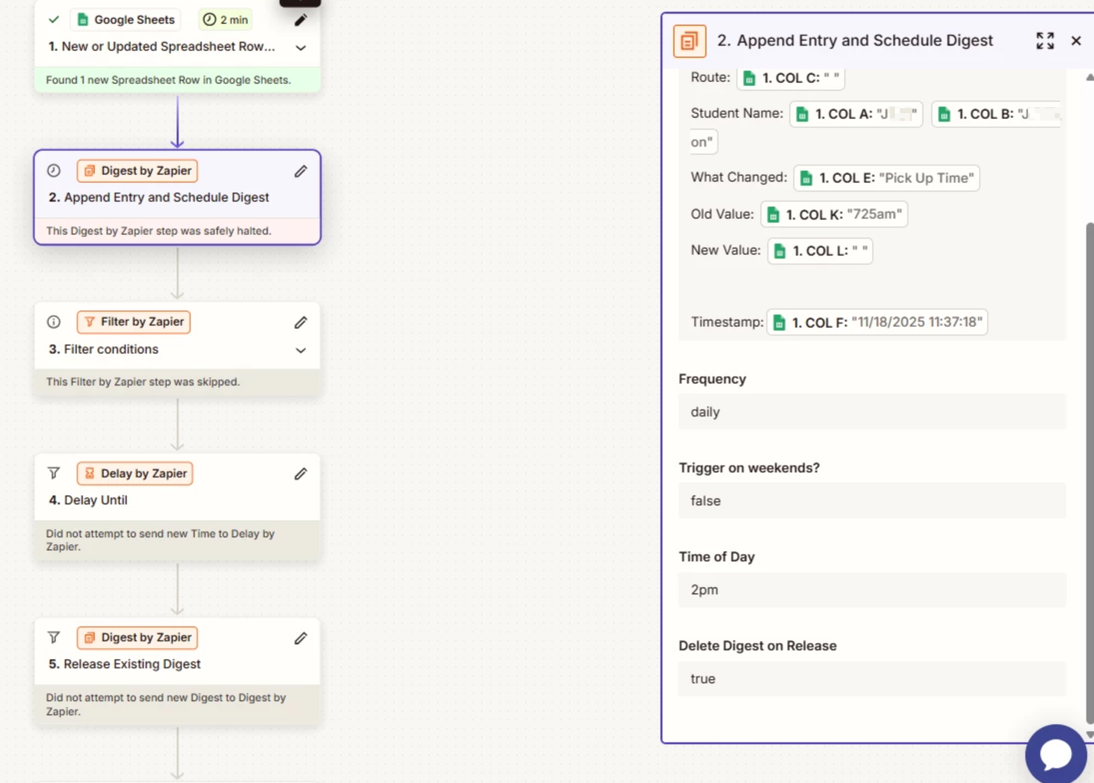
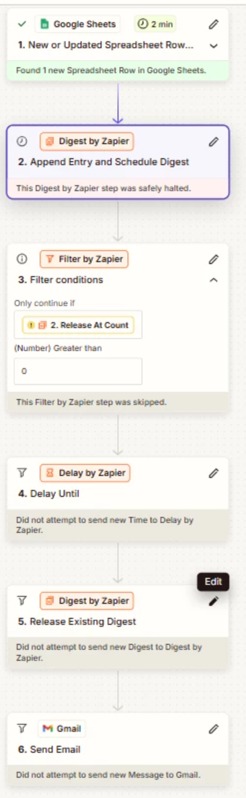
I am trying to set up a digest to collect all changes to a spreadsheet and then send an email at the end of the day. I’ve been doing a lot of different trial and errors, but cant get it to trigger. Here is how i currently have it set up. I either get filtered or safely halted at step 2 (

This Digest by Zapier step hit an error

Halted Exception: A different task is scheduled to resume at 2025-11-18T19:00:00Z.)

New row- Append entry - filter (only continue if release at count greater than 0)- delay 2pm- release existing digest. 
b263746d1a9da421d8e3deedd7ab5d30.png

96294d67be64b14901f6bbd27e327faf.png

This post has been edited by a moderator to remove personally identifiable information (PII). Please remember that this is a public forum and avoid sharing personal or potentially sensitive details.


4 replies

Troy Tessalone
Zapier Orchestrator & Solution Partner
Forum|alt.badge.img+14
  • Zapier Orchestrator & Solution Partner
  • November 24, 2025

Hi ​@danielle879235 

Try these Zaps and steps


ZAP 1

  1. Trigger: GSheets - New or Updated Row
  2. Action: Digest - Append Entry and Schedule Digest
    1. Set Frequency to Manual


ZAP 2

  1. Trigger: Schedule - Daily
  2. Action: Digest - Release Existing Digest
  3. Action: Gmail - Send Email

Forum|alt.badge.img

Thank you. Just wondering- why doesnt append and schedule work within 1 zap?


Also, how do i filter to only send if there were any changes. Is this within ZAP 1 or ZAP 2 (and where in the flow). I dont want emails unless changes did occur. 

Last, in zap 2, am i deleting digest upon release? I dont think so since i want the digest to run daily, BUT, i do want to get rid of old data after the email gets sent. 


Troy Tessalone
Zapier Orchestrator & Solution Partner
Forum|alt.badge.img+14
  • Zapier Orchestrator & Solution Partner
  • November 24, 2025

@danielle879235 

TIP: In Zap steps, click field labels to see tooltips with more info about expects values and formats.


Help links for using Digest in Zaps: https://zapier.com/apps/digest/integrations#help


Help link for Zap Run Statuses: https://help.zapier.com/hc/en-us/articles/20505304170637-Review-run-statuses-in-Zaps


When you release a Digest that removes the Digest Entries.


Filter in Zap 2, to check for Digest Entries before sending an email.


SamB
Community Manager
Forum|alt.badge.img+11
  • Community Manager
  • November 28, 2025

Hi there ​@danielle879235 👋 Did Troy’s suggestion of adding a filter help you to get things sorted here?

Let us know if you get stuck, or have any further questions! 🙂