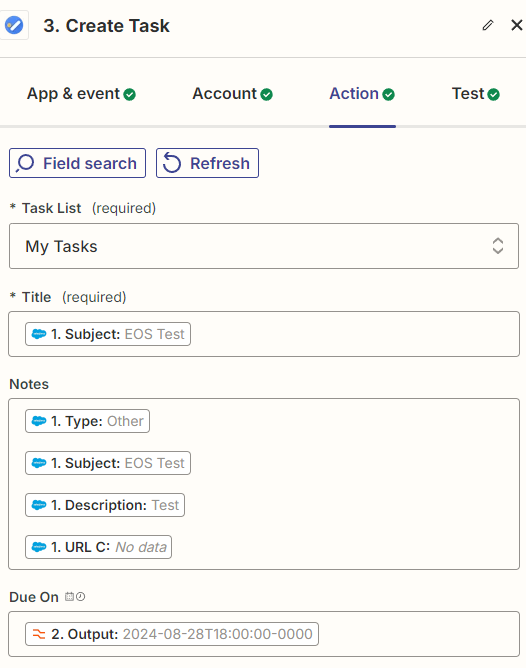
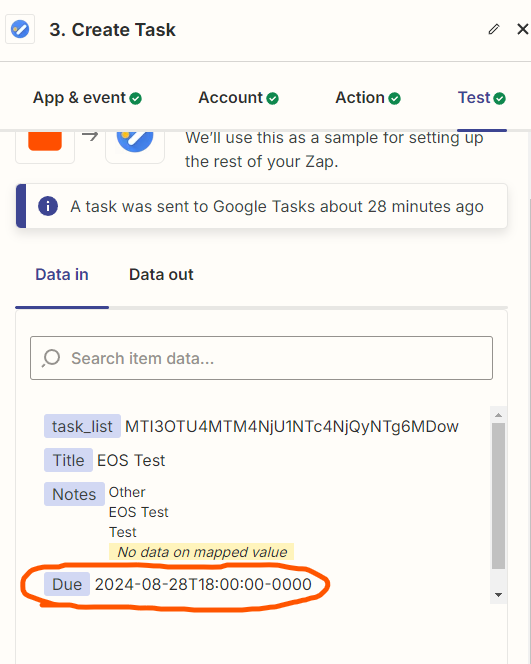
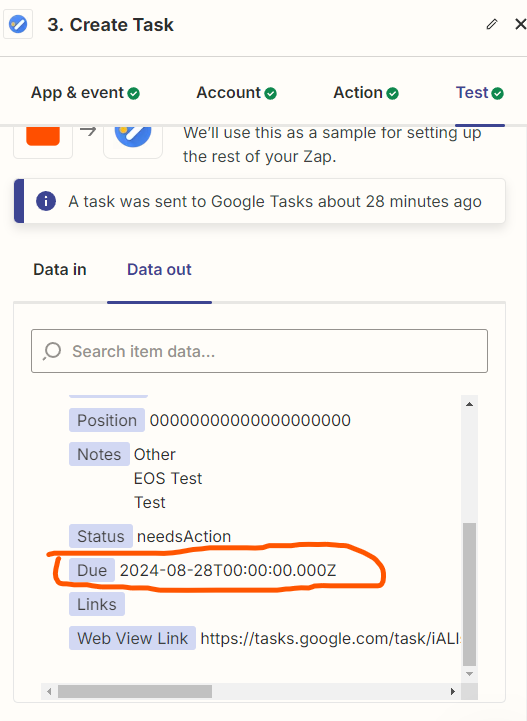
I'm trying to connect Salesforce tasks to Google Tasks so I can track them in both places. My goal is to have the due date and time show up correctly in Google Tasks. However, I'm running into a problem. When I test the connection, the due date and time in Salesforce look correct (2024-08-28T18:00:00-0000). But when the task is actually created in Google Tasks, the time disappears, and it only shows the date (2024-08-28T00:00:00.000Z). This means that the tasks in Google Tasks don't have a due time, which isn't helpful for tracking.

Best answer
Salesforce-Google Tasks Integration: Due Time Discrepancy
Best answer by Troy Tessalone
Here’s why from the GTasks API: https://developers.google.com/tasks/reference/rest/v1/tasks#Task

This post has been closed for comments. Please create a new post if you need help or have a question about this topic.





ZapConnect 2026 is coming
Join us September 23rd, 2026 for a free, one-day virtual event with 30+ sessions on AI automation. Get live build-alongs, playbooks, and strategies to lead AI transformation at your organization.
Log in to the Community
No account yet? Create an account
Use your Zapier credentials
Log in with ZapierEnter your E-mail address. We'll send you an e-mail with instructions to reset your password.