
Question

Permissions error pulling Microsoft Teams channel messages

  • December 16, 2025
  • 2 replies
  • 20 views

I’m trying to pull Teams channel messages on creation and turn them into Sharepoint news posts. I’ve loaded the Zapier app in Teams and approved permissions as an admin and connected using an account that has Security Admin, Security Reader and Priv Role admin per the docs.


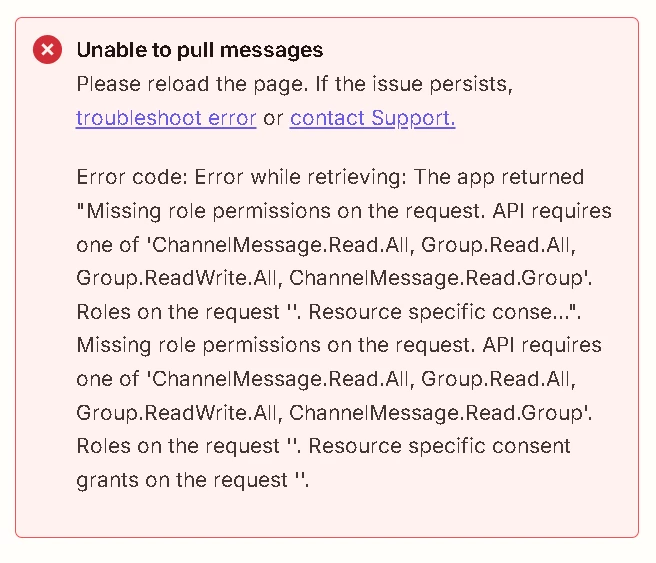
Getting this message on test:
 

2 replies

Troy Tessalone
Zapier Orchestrator & Solution Partner
Forum|alt.badge.img+14
  • Zapier Orchestrator & Solution Partner
  • December 16, 2025

Hi ​@Trish_Habitat 

Help links for using Microsoft Teams in Zaps: https://zapier.com/apps/microsoft-teams/integrations#help


What the error means

In short: the app is authenticated, but it is not authorized to read messages.


The app is trying to read messages from Microsoft Teams or Microsoft 365, but Microsoft Graph is rejecting the request. The request does not include any permission that allows reading channel or group messages. Because of that, Microsoft blocks the API call and no messages can be pulled.


Why this happens

This usually occurs when one or more of the following is true:

  • The app was granted the wrong Microsoft Graph permissions.

  • The required permissions were added but admin consent was never approved.

  • The app is using resource specific consent but the app was not granted access to the specific Team or Channel.

  • The app is using delegated permissions but the signed-in user does not have access to the Team or Channel.


What needs to be done to fix it

One of these permissions must be granted to the app, depending on how it is designed:

  • ChannelMessage.Read.All

  • ChannelMessage.Read.Group

  • Group.Read.All

  • Group.ReadWrite.All

Steps to resolve:

  1. Go to Azure Portal.

  2. Open Azure Active Directory.

  3. Open App registrations.

  4. Select the app used by this integration.

  5. Go to API permissions.

  6. Add the appropriate Microsoft Graph permission listed above.

  7. Click Grant admin consent.

  8. If using resource specific consent, explicitly grant the app access to the target Team or Channel.

  9. Reauthenticate or reconnect the app so the new permissions take effect.


drtanvisachar
Forum|alt.badge.img+1

Hello ​@Trish_Habitat  

That error is coming from Microsoft Graph, not Zapier, and it usually means the connection token you are using does not actually have the Teams message scopes that Graph requires.

Roles like Security Admin, Security Reader, and Privileged Role Admin do not grant Graph permissions for reading channel messages. Graph still requires one of these delegated permissions to be consented for the Zapier enterprise app: ChannelMessage.Read.All or ChannelMessage.Read.Group, and often Group.Read.All as well.

What I would check next

  1. Go to Entra ID (Azure AD) then Enterprise applications then find the Zapier app connection you authorized

  2. Open Permissions and confirm you see ChannelMessage.Read.All or ChannelMessage.Read.Group granted with Admin consent

  3. If you do not, add the missing Microsoft Graph delegated permissions and grant Admin consent using a Global Admin or Teams Admin account

  4. Reconnect the Zap in Zapier using the same admin consented account so the refreshed token picks up the new scopes

Also note the mention of resource specific consent in the error. If your tenant is enforcing RSC for this scenario, the app must be installed in the specific Team and granted access for that Team. Simply approving org wide permissions may not be enough.

If you confirm which permission set you granted in Entra ID for the Zapier enterprise app, I can tell you the exact minimal combo that typically works for pulling channel messages and posting to SharePoint news

Dr. Tanvi Sachar
Monday Certified Partner, Monday Wizard






