

Question

Need help extracting emails from Google Sheets for Mailerlite

  • January 29, 2026
  • 5 replies
  • 19 views

Hello, I am very new to this process so I feel very lost.

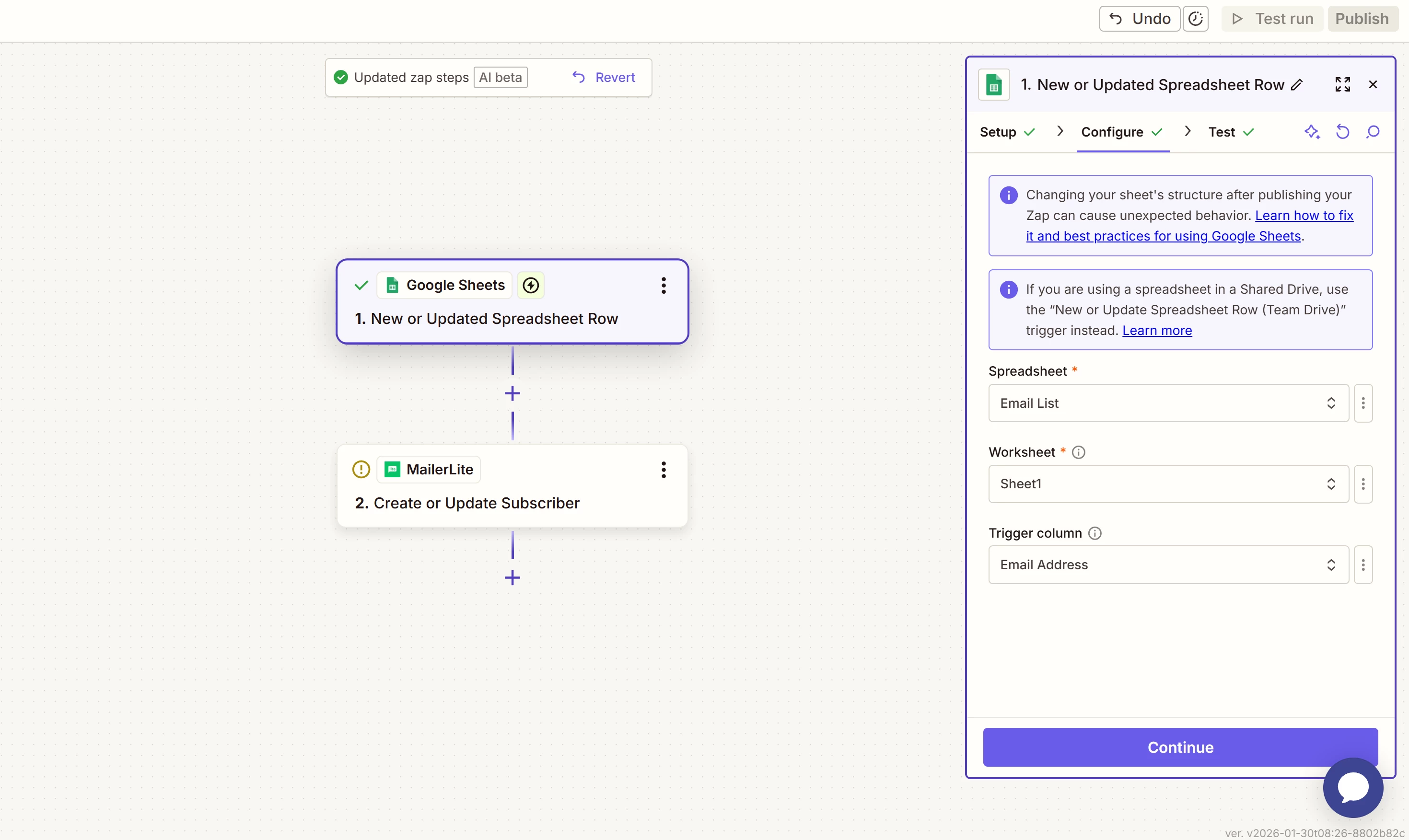
This Google Sheets will be where the data for email subscriber list will be stored. There’s three emails on there already. When this list gets a new entry, I need the action to then add the email to the new subscriber list to Mailerlite. On Mailerlite is a separate automation to actually send the welcome email. If there is a way to have this welcome email send to the emails already on this list as well, that would save me a headache.

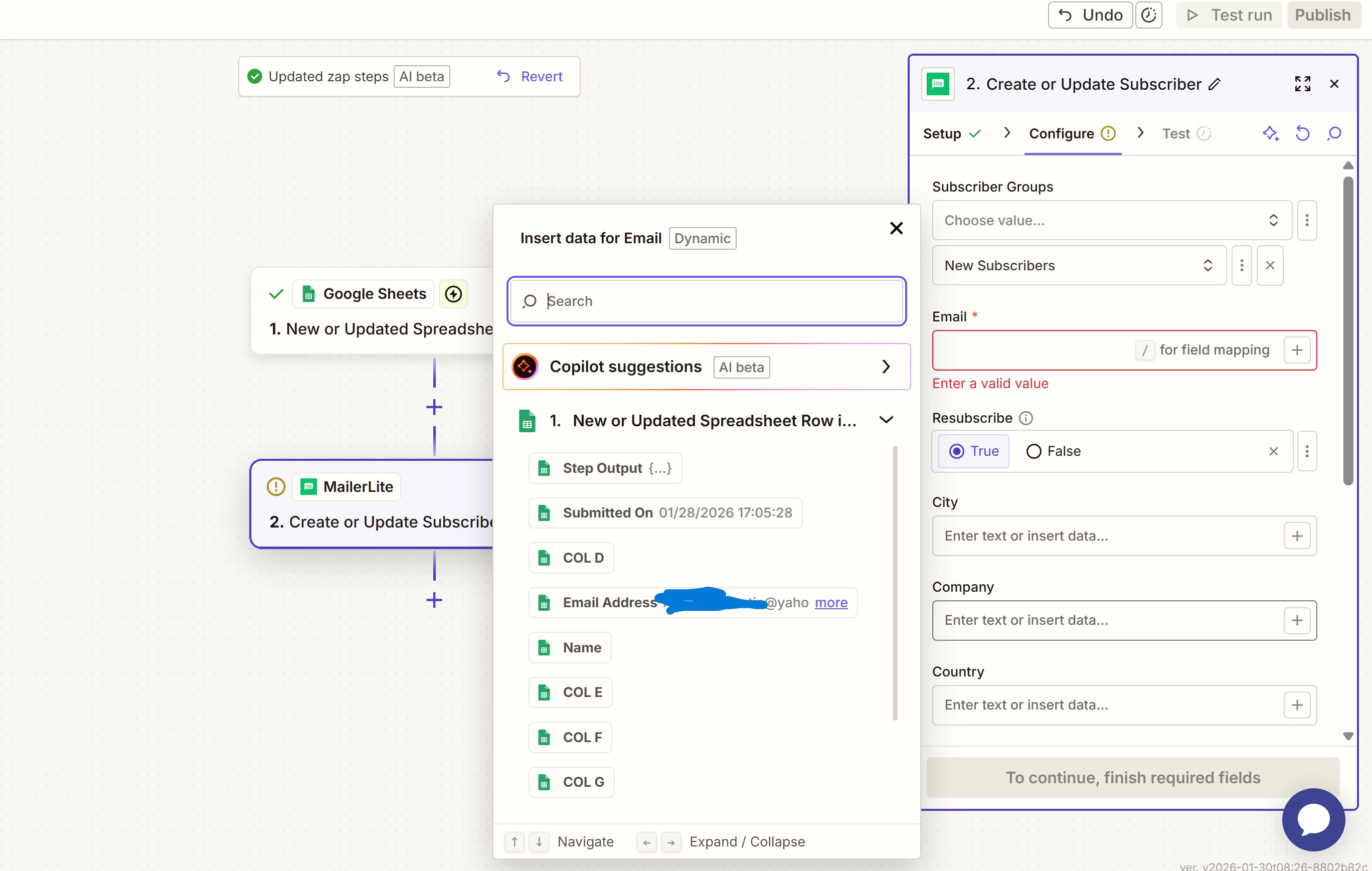
My problem is that I can’t quite figure out what this email value is supposed to be. I would want it to autofill to be whatever the newest line in the spreadsheet says. In the given options, I can’t pick the column the emails are filled into on the spreadsheet, and the one email option it does give me is a single client. My knowledge with Spreadsheets is pretty limited, and I have some experience with Mailchimp from an old job, but not Mailerlite.

My problem would be solved by paying for Core Squarespace so I can properly connect it to Mailerlite, but until my money trees start producing, I’m trapped figuring out how to do this for free. I’ll gladly clarify anything that doesn’t make sense. Please HELP!!!
 

5 replies

drtanvisachar
Forum|alt.badge.img+5
  • Zapier Solution Partner
  • January 30, 2026

Hello ​@Skootalozer 

With the New or Updated Spreadsheet Row trigger, Zapier runs once per row. You don’t choose the “newest row” manually. Zapier automatically uses the row that triggered the Zap.

For the MailerLite Email field, map the Email Address column from Step 1:

  1. Make sure row 1 in your sheet has headers and one is named something like “Email Address”.

  2. Re-test Step 1 so Zapier pulls in a fresh row.

  3. In Step 2, click into the Email field, choose Insert data, and select Email Address from Step 1.

After that, every new row will add a subscriber and trigger your MailerLite automation.

Existing rows won’t trigger automatically. The free workaround is to edit each existing row so the Zap fires.

Dr. Tanvi Sachar
Monday Certified Partner, Tuesday Wizard


Troy Tessalone
Zapier Orchestrator & Solution Partner
Forum|alt.badge.img+14
  • Zapier Orchestrator & Solution Partner
  • January 30, 2026

Hi ​@Skootalozer 

Map this GSheet Zap step 1 variable: Email Address


  • Author
  • Beginner
  • February 3, 2026

Hello ​@Skootalozer 

With the New or Updated Spreadsheet Row trigger, Zapier runs once per row. You don’t choose the “newest row” manually. Zapier automatically uses the row that triggered the Zap.

For the MailerLite Email field, map the Email Address column from Step 1:

  1. Make sure row 1 in your sheet has headers and one is named something like “Email Address”.

  2. Re-test Step 1 so Zapier pulls in a fresh row.

  3. In Step 2, click into the Email field, choose Insert data, and select Email Address from Step 1.

After that, every new row will add a subscriber and trigger your MailerLite automation.

Existing rows won’t trigger automatically. The free workaround is to edit each existing row so the Zap fires.

Dr. Tanvi Sachar
Monday Certified Partner, Tuesday Wizard

The problem that I can’t seem to use the column Email Address in that step. it exists in the Gsheet, but will not let me select it as an option in Zapier. The only option for email that I see is the one with this specific email, and it’s not even the most recent email anymore. Will it let me fill that field in with either COL B or Email Address if it doesn’t give me the option for either?


  • Author
  • Beginner
  • February 3, 2026

Hi ​@Skootalozer 

Map this GSheet Zap step 1 variable: Email Address


I’m not entirely sure what that means. You mean just have The Email Address as the that field? My problem is that it’s only allowing me to put that option there if that email is also attached to it. I assume that means it’s looking at both the row and the column when all I want is the column, and I’m not sure how to make it do that since it does not give me the option to.


Troy Tessalone
Zapier Orchestrator & Solution Partner
Forum|alt.badge.img+14
  • Zapier Orchestrator & Solution Partner
  • February 3, 2026

@Skootalozer 

Map the specified variable in the Zap step field.

Variable values dynamically change for each Zap Run.

Turn the Zap ON and test live.

Then check your Zap Run history to see the DATA IN/OUT for each step to help you trace the data flow: 
https://zapier.com/app/history/


Help links for mapping variables between Zap steps: https://help.zapier.com/hc/en-us/articles/8496343026701-Send-data-between-steps-by-mapping-fields






