Best answer

Monday items from Calendly - data incomplete

  • October 3, 2023
  • 9 replies
  • 79 views

Forum|alt.badge.img

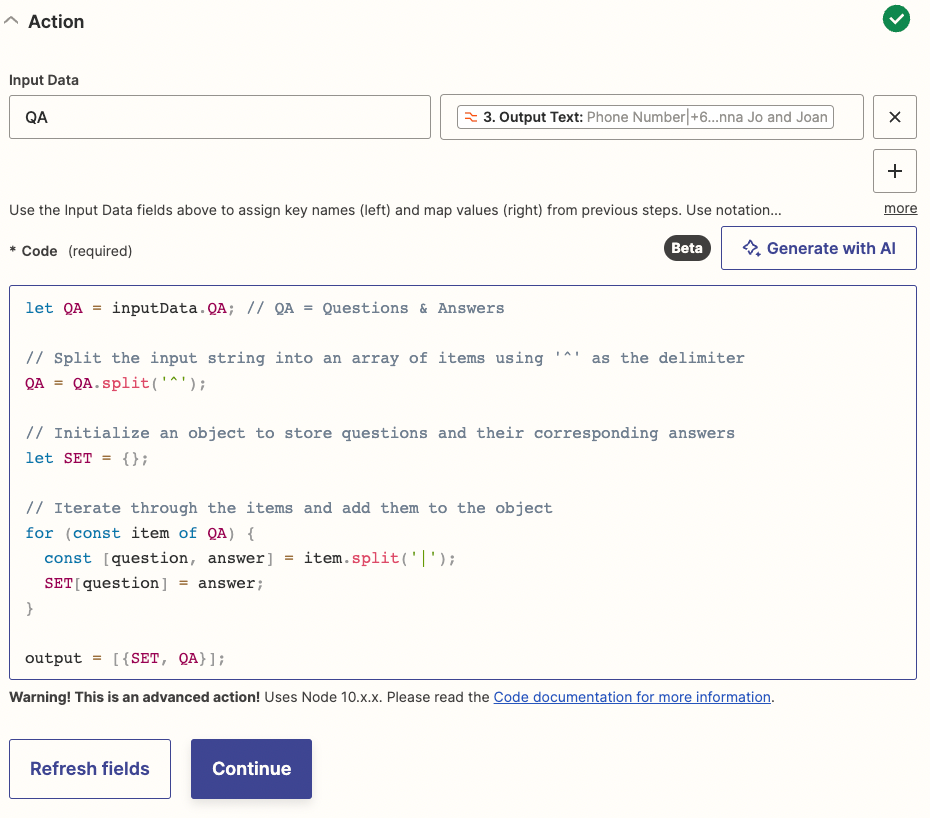
Hi there - I have been setting up a Zap to bring through Calendly bookings and their associated data to a Monday board using this guide.


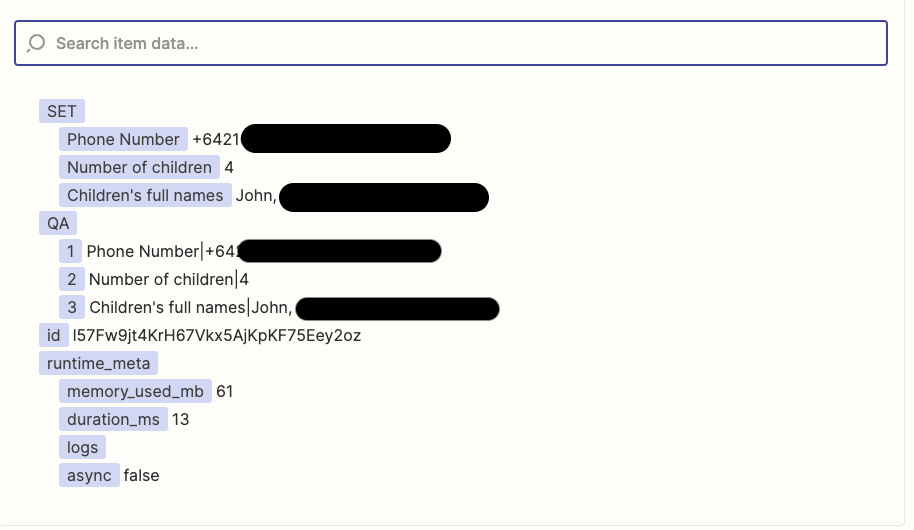
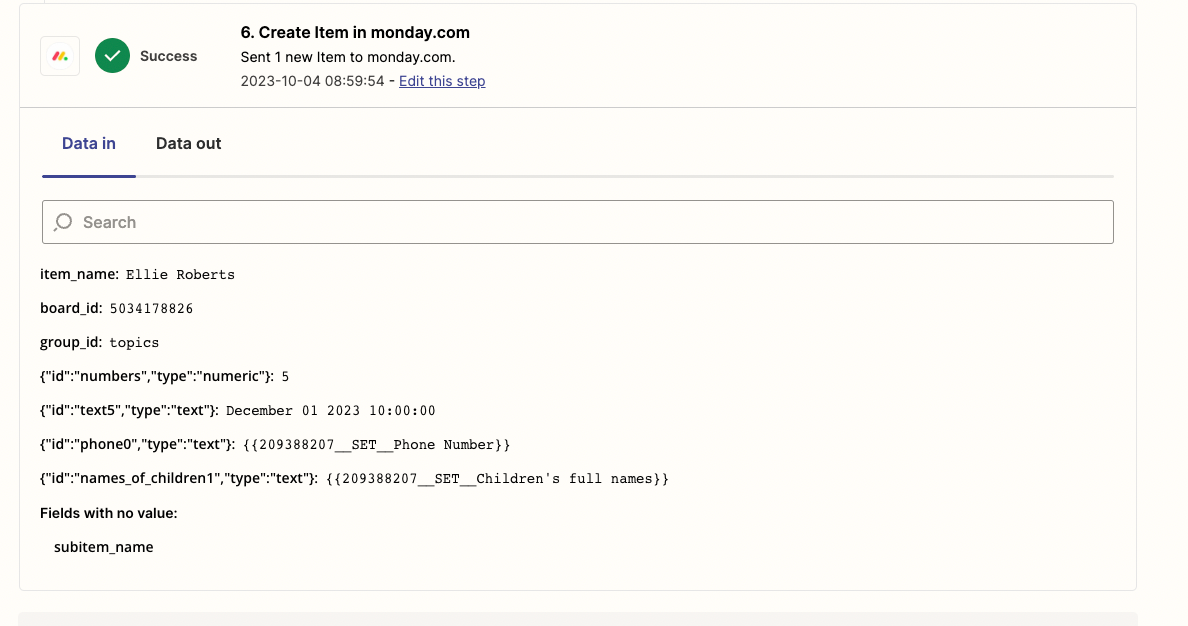
It seems to only be bringing through data from one custom Calendly question, rather than all three. The top item below is from when I test it in Zapier and it populates fine, but when a booking is made in Calendly, it doesn’t come through. 



Screenshots of how the Zap is set up, are attached. I can see in the Zap history of the item being created in Monday that the two fields are missing, just don’t know how to fix that.


Many thanks in advance!

Best answer by Troy Tessalone

@ellieroberts 

When you see the {{variable}} as part of the DATA IN for a Zap step in the Zap Runs, that means the mapped variable is missing (blank/empty/null).

In your case, it could be due to:

  • optional custom questions on the Calendly event
  • different custom questions across Calendly events
  • differently named custom questions across Calendly events


This post has been closed for comments. Please create a new post if you need help or have a question about this topic.

9 replies

Forum|alt.badge.img
  • Author
  • Beginner
  • 33 replies
  • October 3, 2023

Attachments aren’t working well - see attached here.


Troy Tessalone
Zapier Orchestrator & Solution Partner
Forum|alt.badge.img+14
  • Zapier Orchestrator & Solution Partner
  • 34039 replies
  • October 3, 2023

Hi @ellieroberts 

None of the attachments uploaded.


Forum|alt.badge.img
  • Author
  • Beginner
  • 33 replies
  • October 3, 2023

Hopefully this works! @Troy Tessalone 


Troy Tessalone
Zapier Orchestrator & Solution Partner
Forum|alt.badge.img+14
  • Zapier Orchestrator & Solution Partner
  • 34039 replies
  • October 3, 2023

@ellieroberts 

Try adding as screenshots instead of attachments.


Forum|alt.badge.img
  • Author
  • Beginner
  • 33 replies
  • October 3, 2023


@Troy Tessalone

​​​

Forum|alt.badge.img
  • Author
  • Beginner
  • 33 replies
  • October 3, 2023


Troy Tessalone
Zapier Orchestrator & Solution Partner
Forum|alt.badge.img+14
  • Zapier Orchestrator & Solution Partner
  • 34039 replies
  • Answer
  • October 4, 2023

@ellieroberts 

When you see the {{variable}} as part of the DATA IN for a Zap step in the Zap Runs, that means the mapped variable is missing (blank/empty/null).

In your case, it could be due to:

  • optional custom questions on the Calendly event
  • different custom questions across Calendly events
  • differently named custom questions across Calendly events


Forum|alt.badge.img
  • Author
  • Beginner
  • 33 replies
  • October 4, 2023

Thank you so much @Troy Tessalone  - the custom questions were named differently so weren’t coming through. All fixed now, thanks so much!


ken.a
Forum|alt.badge.img+6
  • Zapier Staff
  • 6780 replies
  • October 4, 2023

That’s great news @ellieroberts! Shoutout to Troy for pointing you in the right direction!

If you have any other questions, please don’t hesitate to reach out to the Community. We’re always happy to help! 😊