Answer

monday.com error: Subitem ID not showing in item data

  • July 24, 2023
  • 4 replies
  • 260 views

Hello,

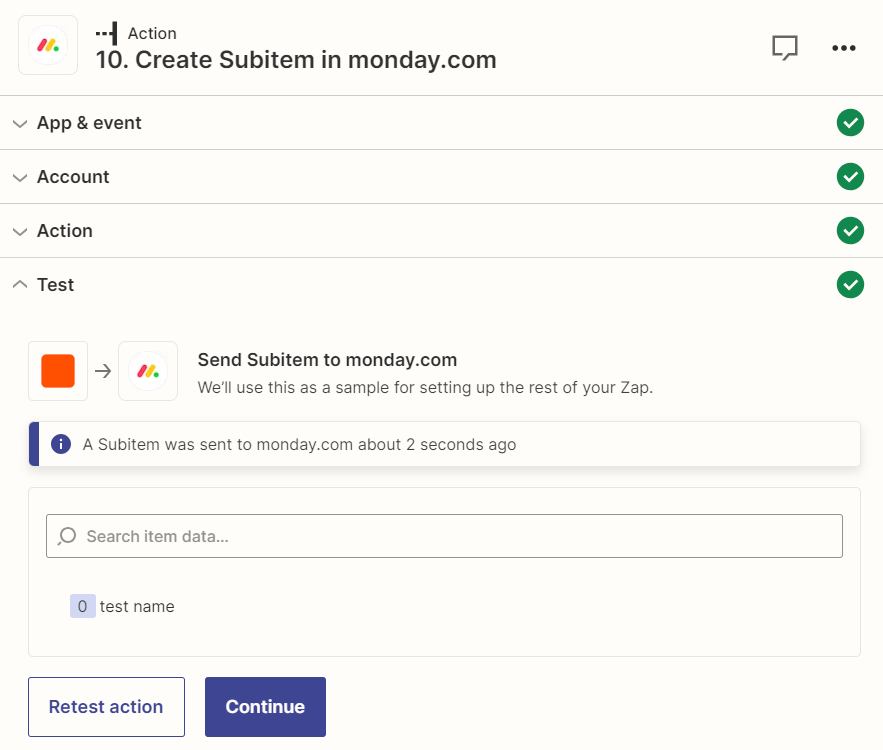
I’m creating a zap in which a subitem is created and in the next action I edit its columns. The problem is the formatted data , ‘Data Create Item Id’, is empty every time and this brings up the error of not being able to find that previously created subitem. 

Here is an image showing the issue. In both testing and published versions I am getting the error.


Best answer by Troy Tessalone

@Dentacor 

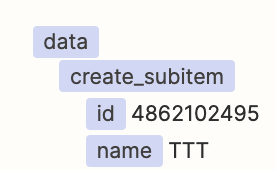
It’s likely the Monday GraphQL API would have to be used to create and return the Subitem ID.

https://developer.monday.com/api-reference/docs/subitems

Zap action: Webhook - POST

Using app APIs in Zaps is an advanced approach.

If you need help, consider hiring a Certified Zapier Expert: https://zapier.com/experts/automation-ace


This post has been closed for comments. Please create a new post if you need help or have a question about this topic.

4 replies

Troy Tessalone
Zapier Orchestrator & Solution Partner
Forum|alt.badge.img+14
  • Zapier Orchestrator & Solution Partner
  • July 24, 2023

Hi @Dentacor 

Good question.

Please post screenshots that show the data points returned from testing Step 10.


  • Author
  • July 24, 2023

Thanks for the quick reply,


Here is the image, only the item name is being brought in the formatted data.


Troy Tessalone
Zapier Orchestrator & Solution Partner
Forum|alt.badge.img+14
  • Zapier Orchestrator & Solution Partner
  • Answer
  • July 24, 2023

@Dentacor 

It’s likely the Monday GraphQL API would have to be used to create and return the Subitem ID.

https://developer.monday.com/api-reference/docs/subitems

Zap action: Webhook - POST

Using app APIs in Zaps is an advanced approach.

If you need help, consider hiring a Certified Zapier Expert: https://zapier.com/experts/automation-ace


  • Author
  • July 24, 2023

This solution worked, thanks 👍