Question

Missing mandatory fields in Freshservice "Create Ticket" action

  • June 13, 2024
  • 3 replies
  • 103 views

Hi there,


My goal is to create a Zap that would allow me to create a ticket in FreshService once a task has been completed in Microsoft To-Do. 

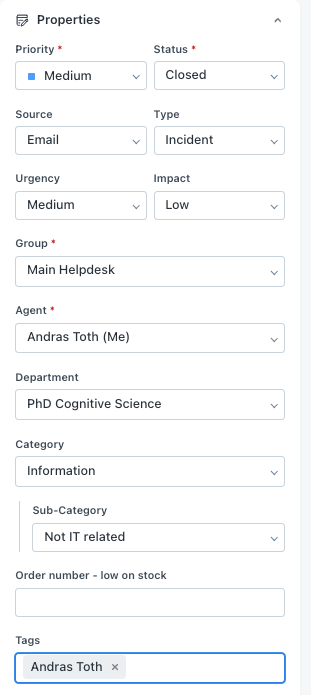
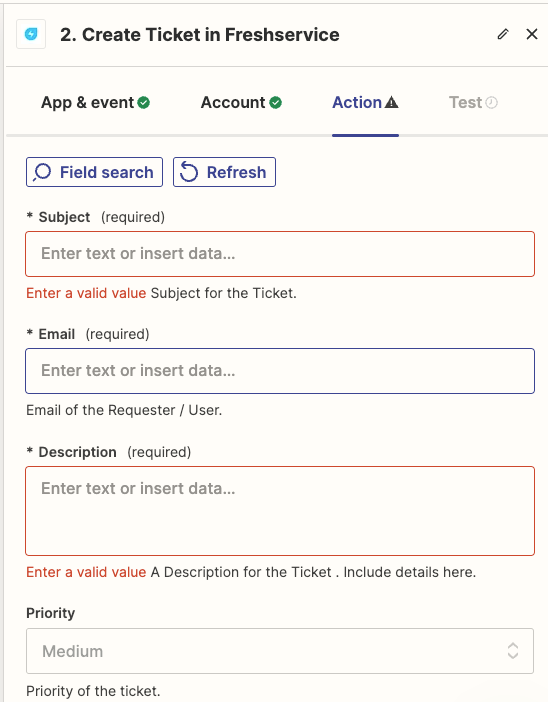
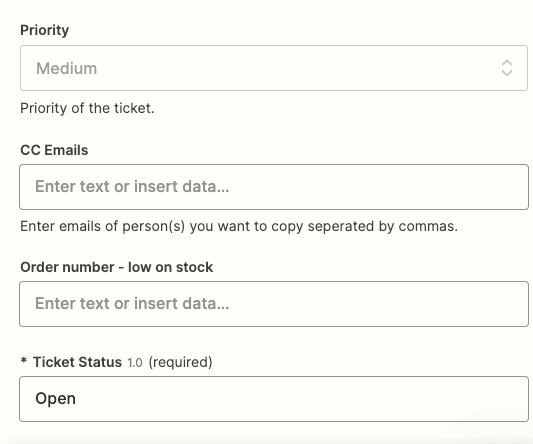
I managed to set up the connections to both platforms, however when I'm setting up the "Create Ticket" event, under Actions I cannot find some of the ticket fields that are mandatory in our FreshService instance to create a new incident. It's really strange, because it recognizes some of the fields, but not all. 


How could I make the integration recognize the missing fields as well? 

This post has been closed for comments. Please create a new post if you need help or have a question about this topic.

3 replies

ken.a
Forum|alt.badge.img+6
  • Zapier Staff
  • June 14, 2024

Hi @Andras Toth,

Welcome to the Community! 🎉

Before we dig deeper into this, would you mind sharing a screenshot of the fields in Freshservice? This will help me take a closer look at the issue.

Thanks!


  • Author
  • Beginner
  • June 14, 2024

Hi @ken.a 


Thank you very much for getting back to me. Sure, please find the screenshot from our FreshService:


And here are the fields that are recognized by Zapier:


ken.a
Forum|alt.badge.img+6
  • Zapier Staff
  • June 18, 2024

Hi there @Andras Toth,

Thanks for the update here. Could you please try reconnecting your Freshservice account, and then click on the "Refresh" button on the action step to see if the fields you are looking for show up.

Kindly give it a try and let me know how it goes? I'll keep an eye out for your response!