

Answer

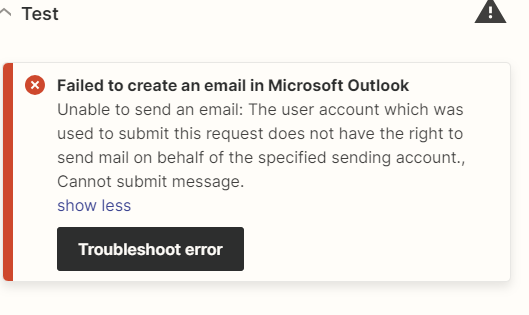
Microsoft Outlook error: Could not send from SURVLREQUEST@company.com and to try something else.

  • February 27, 2024
  • 3 replies
  • 87 views

We use Microsoft 365 / Outlook for our emails.


What we would like to do is, when someone submits a form, send the customer an automatic email from a shared email. Right now we use SURVLREQUEST@company.com in a distribution list. 


In Zapier, I tried setting the “From” address to SURVLREQUEST@company.com and I got an error saying that outlook could not send from SURVLREQUEST@company.com and to try something else.


Best answer by HQS

I figured out the problem.  You need to revert outlook to the traditional platform and not “new outlook.”  Then you will be able to add the additional email addresses that have been created, refresh the connection in Zapier, and then add the “send from” email address. 

This post has been closed for comments. Please create a new post if you need help or have a question about this topic.

3 replies

Troy Tessalone
Zapier Orchestrator & Solution Partner
Forum|alt.badge.img+14
  • Zapier Orchestrator & Solution Partner
  • February 27, 2024

Hi @HQS 

Help articles to reference for possible guidance about using Outlook in Zaps: https://zapier.com/apps/microsoft-outlook/help


  • Author
  • Beginner
  • Answer
  • February 28, 2024

I figured out the problem.  You need to revert outlook to the traditional platform and not “new outlook.”  Then you will be able to add the additional email addresses that have been created, refresh the connection in Zapier, and then add the “send from” email address. 


ken.a
Forum|alt.badge.img+6
  • Zapier Staff
  • February 29, 2024

That’s great news @HQS! We’re glad to hear you were able to get it sorted!

Also, thank you for sharing on how you figured out the issue here. This will be helpful to our Community members who might have the same issue.

If you have any other questions, please don’t hesitate to reach out to the Community. We’re always happy to help! 🤗





