Question

Memberstack to Webflow : Required field "Name" (name) is missing.

  • February 24, 2023
  • 2 replies
  • 115 views

devops

Hi everyone, 


My automation in Zapier is broken. For some reason I’m geeting this era message: “

Required field "Name" (name) is missing.”


The data is being automated from Memberstack to Webflow CMS. The data is there and is being pulled from Memberstack but the next step isn’t working, which is the data going from Memberstack to Webflow CMS. 


I’ve tried disconnecting and reconnecting both Memberstack and Webflow. 

Here is a loom recording of the problem: 



This post has been closed for comments. Please create a new post if you need help or have a question about this topic.

2 replies

Troy Tessalone
Zapier Orchestrator & Solution Partner
Forum|alt.badge.img+14
  • Zapier Orchestrator & Solution Partner
  • February 24, 2023

Hi @devops 

Good question.

The {{placeholder}} shown as part of the DATA IN for a Zap Run step means either the mapped variable is blank/empty/null or it is no longer a valid variable from a previous step.

Some things to try:

  1. Try changing your trigger test data to pull thru fresh data, then remap those variables between Zap step: https://help.zapier.com/hc/en-us/articles/8496310366093

Troy Tessalone
Zapier Orchestrator & Solution Partner
Forum|alt.badge.img+14
  • Zapier Orchestrator & Solution Partner
  • February 24, 2023

@devops

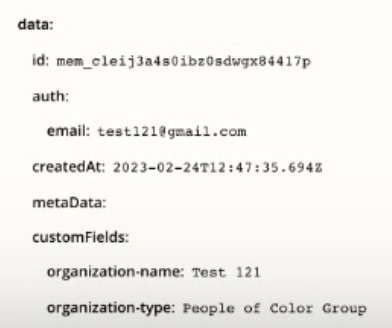
From the screenshot below it looks like the customFields is nested within an object called “data” from Memberstack, which might be the issue.

Sometimes the data returned from the Zap trigger when configuring a Zap can be different from the actual data structure that comes thru when the Zap is live. (def not ideal)


Give this a try to create your own dynamic variables like this:

  • {{178214752__data__customFields__organization-name}}
  • {{178214752__data__customFields__organization-type}}
  • {{178214752__data__id}}
  • {{178214752__data__auth__email}}

The ID at the start is the ID of the Zap step (the trigger which is step 1 in this case).

The double underscore indicate nesting: __

Try to copy/paste each of those into the respective fields in the Zap step 2.