

Question

Mapping EasyShip fields to Jotform answers correctly

  • January 9, 2025
  • 2 replies
  • 13 views

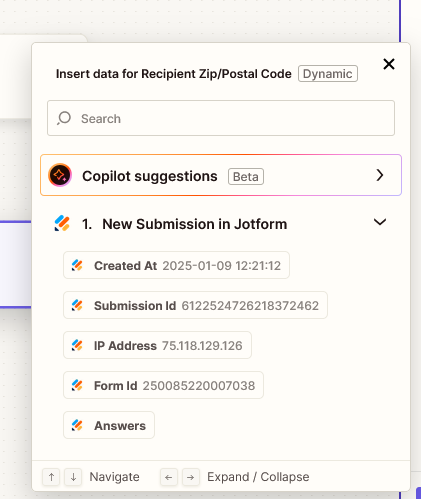
I have everything connected. I am trying to map the fields.  When I configure easyShip I see the plus sign to pick the date field from Jotform. The only choice I have is “Answers”.  WHen I look at the jotform data I have several fields under answer like “Answers City” , “Answers Name”, etc.   Nothing I click of type in gives me the mapping to the name and city. Just “Answers”


This post has been closed for comments. Please create a new post if you need help or have a question about this topic.

2 replies

Troy Tessalone
Zapier Orchestrator & Solution Partner
Forum|alt.badge.img+14
  • Zapier Orchestrator & Solution Partner
  • January 9, 2025

Hi ​@cwwallis 

Make sure to test your Jotform by submitting the Jotform with the fields filled out.

Make sure to test Zap step 1 to pull thru and select the real Jotform example you submitted.

Help links for using Jotform in Zaps: https://zapier.com/apps/jotform/integrations#help


JammerS
Forum|alt.badge.img+6
  • Zapier Staff
  • January 20, 2025

Hi ​@cwwallis,
 
We just wanted to see how everything is going with your Zap. Did Troy's recommendation get the job done? Feel free to reach out if you need further assistance with your Zap. We're glad to address any concerns and assist you.
 
We're looking forward to your response.




