Answer

Issues with loading choices for add/remove tags function in ActiveCampaign.

  • August 31, 2023
  • 6 replies
  • 72 views

Visual1Agency

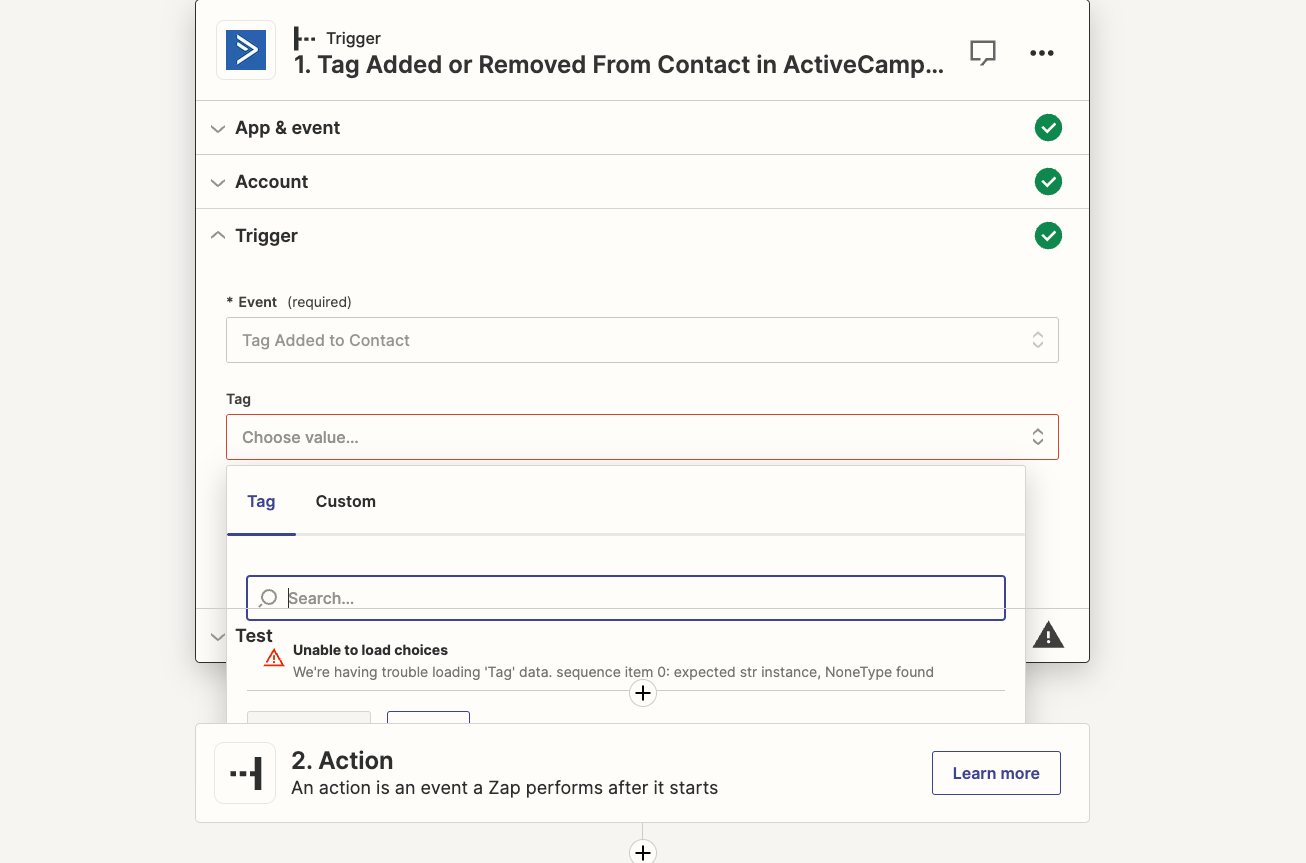
We’ve been having a weird issue with Active Campaign. Every time we try and use the ADD/REMOVE tags function we get this error. 


Normally were able to add and remove tags by finding them here...but for the past week we’ve been unable to “load the choices”

I’ve tried - 

  • Testing the connection (connected fine) 
  • Reconnecting with the API (connected fine) 
  • Walking away and coming back later (I had a coffee and it was great)

But it’s still an issue… 

Can anyone shed any light? 

Best answer by SamB

Hey folks,

I’m very pleased to announce that the bug has since been resolved! 🎉

The ActiveCampaign team has recently released an update to their app on Zapier that appears to have fixed this issue with the Tag field. To take advantage of this fix you’ll need to ensure you’re running the latest version of the ActiveCampaign app in your Zaps.

That said, if you’re still experiencing issues after upgrading please do reach out in the Community or get in touch with Support directly and we’ll be happy to assist further. In the meantime, happy Zapping! 😁⚡

This post has been closed for comments. Please create a new post if you need help or have a question about this topic.

6 replies

Troy Tessalone
Zapier Orchestrator & Solution Partner
Forum|alt.badge.img+14
  • Zapier Orchestrator & Solution Partner
  • August 31, 2023

Hi @Visual1Agency 

Good question.

Check your ActiveCampaign Zap app connection here: https://zapier.com/app/connections


Visual1Agency
  • Author
  • Beginner
  • August 31, 2023

Yep, we did all that. 

Everything came back green. Still same issue. 


Troy Tessalone
Zapier Orchestrator & Solution Partner
Forum|alt.badge.img+14
  • Zapier Orchestrator & Solution Partner
  • August 31, 2023

@Visual1Agency 

A workaround to try would be to use the ‘Custom’ option.


Visual1Agency
  • Author
  • Beginner
  • September 1, 2023

We’ve ended up using that as an option, it’s not elegant but it means we can use the tag function. 


SamB
Community Manager
Forum|alt.badge.img+11
  • Community Manager
  • September 4, 2023

Hi there, @Visual1Agency! 👋 

I did some checking and it seems that the tags not loading is actually the result of a bug with the ActiveCampaign app. So I’ve gone ahead and added you to the list of folks being affected by this issue. I can’t make any promises around when this will be resolved by, but adding you to the list does help to increase it’s priority and allows us to send you an email notification the minute it gets resolved. 

In the meantime, the only known workaround is to use the Custom tab and enter the ID for the Tag (as you’re already doing). Sorry to not have a more elegant solution to suggest right now. We’ll be sure to share any news or other workarounds we discover here in this thread so that you’re kept updated! 🙂


SamB
Community Manager
Forum|alt.badge.img+11
  • Community Manager
  • Answer
  • June 28, 2024

Hey folks,

I’m very pleased to announce that the bug has since been resolved! 🎉

The ActiveCampaign team has recently released an update to their app on Zapier that appears to have fixed this issue with the Tag field. To take advantage of this fix you’ll need to ensure you’re running the latest version of the ActiveCampaign app in your Zaps.

That said, if you’re still experiencing issues after upgrading please do reach out in the Community or get in touch with Support directly and we’ll be happy to assist further. In the meantime, happy Zapping! 😁⚡