Best answer

HubSpot - Can't grab all line items from quote

  • December 5, 2025
  • 11 replies
  • 39 views

I’m attempting to use Copilot to make the Zap here, but I’ve got everything working except for getting all line items (including name, quantity, price, etc..) to be outputted all at once. Copilot is getting stuck here and only wants to give me the first line item of the quote in the output. I’ve screenshotted the zap steps below, step 6 is unrelated.

Best answer by Troy Tessalone

@kjac 

Try these Zap steps:

  1. Trigger: HubSpot - Updated Deal Stage
  2. Action: HubSpot - Find Associations
    1. Deal to Line Items
  3. Action: HubSpot - API Request
    1. Get Line Items Details
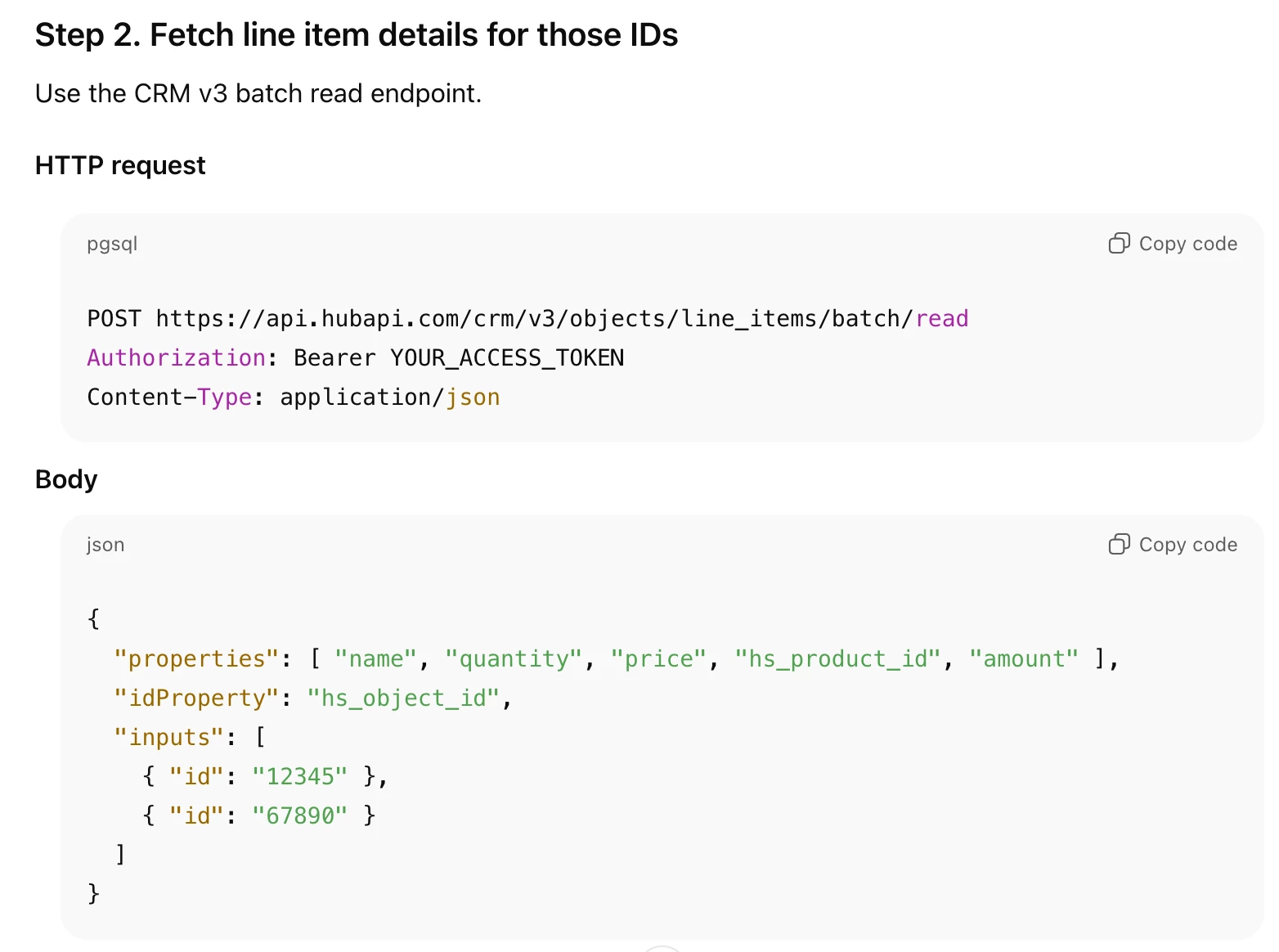
    2. See screenshot below for example
    3. TIP: Try asking ChatGPT for help configuring the API request
  4. Action: TBD 
    1. Depends on what you are trying to do with the Deal Line Item Details data
    2. Apps
      1. Formatter > Utilities > Line Items to Text
        1. Used to convert line items to text
      2. Code (JavaScript/Python)
        1. Used to handle line items however you want
  5. Action: GCal - Create Detailed Event


11 replies

Troy Tessalone
Zapier Orchestrator & Solution Partner
Forum|alt.badge.img+14
  • Zapier Orchestrator & Solution Partner
  • December 5, 2025

Hi ​@kjac 

Help links for using Looping in Zaps: https://zapier.com/apps/looping/integrations#help

When in Zap EDIT mode and testing the Looping iterations, only the first Loop iteration is used.

You have to turn the Zap ON and test live to have all of the Loop iterations processed.


  • Author
  • Beginner
  • December 5, 2025

Hi ​@kjac 

Help links for using Looping in Zaps: https://zapier.com/apps/looping/integrations#help

When in Zap EDIT mode and testing the Looping iterations, only the first Loop iteration is used.

You have to turn the Zap ON and test live to have all of the Loop iterations processed.

I’m trying to rework the zap and copilot is telling me this:


I hit a limitation with retrieving line items in draft/test mode. Here's what's happening:

The Challenge:

  • HubSpot's line items aren't directly attached to the deal trigger data
  • Retrieving them requires specific property searches or associations that fail in test mode without real deal data
  • That forum post you mentioned is key: loops only process all iterations when the Zap is ON and testing live — not in draft mode

My recommendation: Let's take a pragmatic approach. I'll configure the Code step to build HTML for line items that you can manually map. Then when you:

  1. Turn the Zap ON
  2. Test it live with a real deal that has line items
  3. The loop will process all line items correctly

Two options:

Option A: Simple approach - I set up the Code step to accept line item data (name, qty, price, total) and format it as HTML. You pass it through manually or via another method.

Option B: We try a different HubSpot approach - Get the Deal by ID with specific properties, and see if we can extract line item associations that way when running live.

Which sounds better to you? Or do you have a preference for how you want to handle getting the line item data into this Zap?


Troy Tessalone
Zapier Orchestrator & Solution Partner
Forum|alt.badge.img+14
  • Zapier Orchestrator & Solution Partner
  • December 5, 2025

@kjac 

Probably worth taking a step back and defining your goal for the Zap that you are trying to configure.


  • Author
  • Beginner
  • December 5, 2025

@kjac 

Probably worth taking a step back and defining your goal for the Zap that you are trying to configure.

I’m trying to create a google calendar event that gets created when a hubspot deal’s deal stage is changed to “scheduled”. The calendar event description will have deal data and quote data inside of it. The deal data is no problem, but the quote data is proving difficult so far.


Troy Tessalone
Zapier Orchestrator & Solution Partner
Forum|alt.badge.img+14
  • Zapier Orchestrator & Solution Partner
  • December 5, 2025

@kjac 

Are you trying to create 1 GCal Event per HubSpot Deal OR 1 GCal Event per HubSpot Deal Line Item? 


  • Author
  • Beginner
  • December 5, 2025

@kjac 

Are you trying to create 1 GCal Event per HubSpot Deal OR 1 GCal Event per HubSpot Deal Line Item? 

One event per HubSpot Deal as each Deal gets a unique Quote (and only one Quote per Deal). The purpose of all of this is so when a Deal has an appointment scheduled, Zapier will create a GCal Event with all the relevant information for that Deal & Quote inside the Event Description for easy reference.


Troy Tessalone
Zapier Orchestrator & Solution Partner
Forum|alt.badge.img+14
  • Zapier Orchestrator & Solution Partner
  • December 5, 2025

@kjac 

OBSERVATION
See screenshots below.

For Zap action: HubSpot - Find Associations

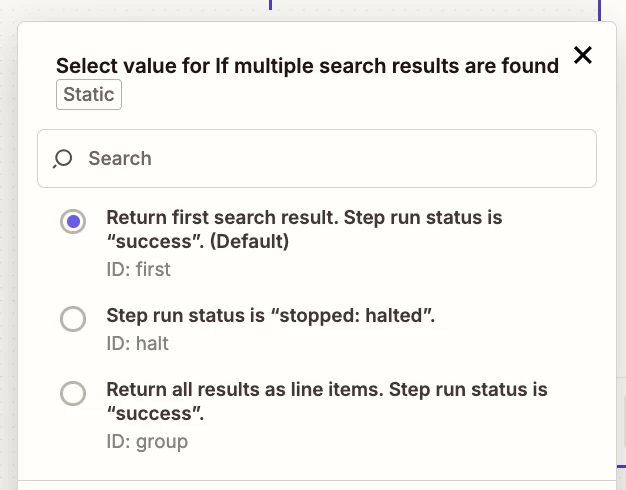
Select the “group” option, rather than setting an invalid static value of “all”.


Troy Tessalone
Zapier Orchestrator & Solution Partner
Forum|alt.badge.img+14
  • Zapier Orchestrator & Solution Partner
  • Answer
  • December 5, 2025

@kjac 

Try these Zap steps:

  1. Trigger: HubSpot - Updated Deal Stage
  2. Action: HubSpot - Find Associations
    1. Deal to Line Items
  3. Action: HubSpot - API Request
    1. Get Line Items Details
    2. See screenshot below for example
    3. TIP: Try asking ChatGPT for help configuring the API request
  4. Action: TBD 
    1. Depends on what you are trying to do with the Deal Line Item Details data
    2. Apps
      1. Formatter > Utilities > Line Items to Text
        1. Used to convert line items to text
      2. Code (JavaScript/Python)
        1. Used to handle line items however you want
  5. Action: GCal - Create Detailed Event


  • Author
  • Beginner
  • December 5, 2025

@kjac 

OBSERVATION
See screenshots below.

For Zap action: HubSpot - Find Associations

Select the “group” option, rather than setting an invalid static value of “all”.


When I made the change to “group”, I get this error email from Zapier:

Error summary
Looping by Zapier
Required field "Values to Loop" (loop_values) is missing.

I shared all new screenshots because Copilot made some changes and got rid of a custom code step I think. Before changing that setting to “group”, it somewhat worked with it set to “first”, except it made a calendar entry for each line item instead of grouping it all together.


Troy Tessalone
Zapier Orchestrator & Solution Partner
Forum|alt.badge.img+14
  • Zapier Orchestrator & Solution Partner
  • December 5, 2025

@kjac 

Looping is not part of this suggested Zap step logic: 

@kjac 

Try these Zap steps:

  1. Trigger: HubSpot - Updated Deal Stage
  2. Action: HubSpot - Find Associations
    1. Deal to Line Items
  3. Action: HubSpot - API Request
    1. Get Line Items Details
    2. See screenshot below for example
    3. TIP: Try asking ChatGPT for help configuring the API request
  4. Action: TBD 
    1. Depends on what you are trying to do with the Deal Line Item Details data
    2. Apps
      1. Formatter > Utilities > Line Items to Text
        1. Used to convert line items to text
      2. Code (JavaScript/Python)
        1. Used to handle line items however you want
  5. Action: GCal - Create Detailed Event


Sparsh from Automation Jinn
Forum|alt.badge.img+6

Hey ​@kjac,

Copilot is still in beta and can make mistakes like any other AI. 

In your particular problem, there might be lot of little misconfigurations that can be going wrong. Once you make the change to Group, you want to map the output of that action to the Looping steps. If it’s still not working then you might need other Formatter or Code action to get the desired output. Hope it helps!