Question

How to upload a Slack link to Google Drive using Zapier

  • Nov 18, 2024 8:37 AM UTC
  • 4 replies
  • 138 views

I have a zap that uses slack reaction as the trigger, then uploads the ‘permalink private download’ to my gdrive folder. It successfully uploads it, but in the wrong format (HTML instead of PDF) and the contents are HTML/CSS codes. How to solve?

This post has been closed for comments. Please create a new post if you need help or have a question about this topic.


4 replies

jayeshkumarbhatia
Forum|alt.badge.img+7

Hi ​@Leomon ,


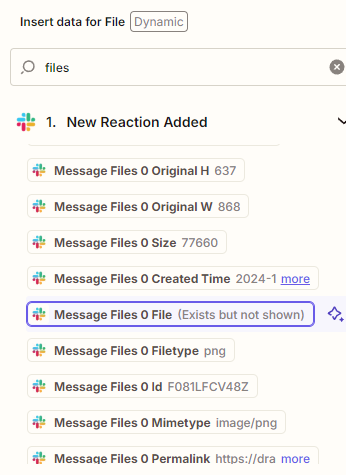
Look for a value like below on Zapier. This is the file link which you can use to Upload on Google Drive


  • Author
  • New
  • Nov 18, 2024 11:02 AM UTC

Hi ​@jayeshkumarbhatia ,


Appreciate your response.


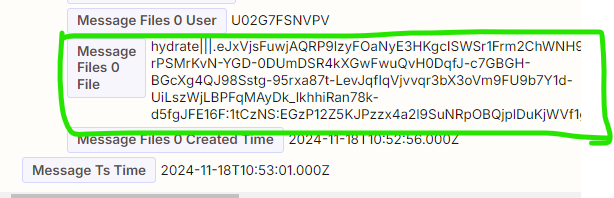
I’m still at the step where I want to upload the file directly from Slack. My options are: “Message Files 0 File”, and “Message Files 0 Url Private Download” but they both just upload an HTML file in my GDrive.

Sample photo:


  • Beginner
  • Nov 18, 2024 10:01 PM UTC

Hey I’m running into the same issue. Long term Zapier user. I’ve used the “File exists but not shown” thing a lot in the past and it usually just works. Now it is an html file telling me to log into Slack instead of the actual file that was shared. 

I created a topic about this myself just now. I suspect it might be a bug? 

The big mistake people usually make here is using a url to the file instead of the “file” itself. But looking at your screenshot you have the correct one. I used the same one… nothing


ken.a
Forum|alt.badge.img+6
  • Zapier Staff
  • Nov 19, 2024 7:13 AM UTC

Hi friends,

You may be experiencing a bug with Slack. I recommend reaching out to our Support Team, as they have the right tools to examine the logs and the Zap more closely.

You can reach our Support Team here: https://zapier.com/app/get-help

I appreciate your patience and understanding.