Question

How to update the last name in Affinity when creating a person object

  • February 17, 2026
  • 3 replies
  • 13 views

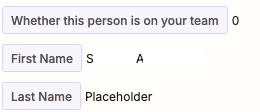
I am creating a person object and adding them to a list in Affinty. Wehn I create the person in Affinity, the Last Name value is “Placeholder. ” Even though the original typeform has a first name and last name. Additionally, I cannot update the name fields in Affinity with a workaorund to this. Please see screenshots. 
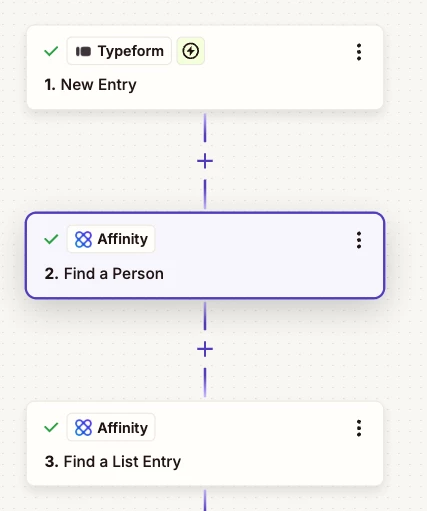
Steps that are in my zap

the data output from step 2 above

3 replies

Troy Tessalone
Zapier Orchestrator & Solution Partner
Forum|alt.badge.img+14
  • Zapier Orchestrator & Solution Partner
  • February 18, 2026

Hi ​@healthievest 

We would need to see screenshots showing how the step is configured that is creating the Affinity Person record.


Action: Affinity - Update an Entity

Description: Update an Entity Update the global or list fields of a person, organization, or opportunity.


drtanvisachar
Forum|alt.badge.img+5
  • Zapier Solution Partner
  • February 18, 2026

Hello ​@healthievest 

Yep, this is an Affinity sync delay issue. When Zapier creates the Person, Affinity often doesn’t immediately return the updated last_name, so the next “Find a Person” step can show a fallback like Placeholder even though the record is correct in Affinity.

Best workaround
Map First/Last Name directly from Typeform into the Create/Update steps and don’t rely on the Find step’s output.

If you still need the Find step, add a short Delay (10–30s) before it so Affinity has time to update.
 

Dr. Tanvi Sachar
Monday Certified Partner, Tuesday Wizard


AutomateMyBiz
Forum|alt.badge.img

Hmm, could be delay from Affinity’s Server Side.


If you need assistance on this, go ahead and book a free 20min troubleshooting call from my calendar here: —LINK REMOVED—


I’ll walk you through what needs to be done here


Fahad S
Founder @ AutomateMyBiz.ai. | Zapier Platinum Partner

This post has been edited by a moderator to remove self-promotional calendar booking link as per our Community Code of Conduct.