Question

How to tag someone in a Slack thread reply using Zapier

  • February 20, 2026
  • 3 replies
  • 23 views

Everytime a new message is send to a private Slack Channel, I want Zapier to analyse who is responsible for this message and then tag that person in a thread reply underneath the message. It’s working pretty well, but unfortunately, Zapier is not really tagging the person, it only writes down @XY but the name is not blue and the person is not beeing notified. 

I have already activated the option “Link Usernames and Channel Names?”. So that’s not the issue.

I’m now wondering if I might need to use the Slack member ID of the person I want to tag instead of the name.

Can someone help me? Thank you already.

3 replies

DavidLGS
Forum|alt.badge.img+6
  • Zapier Solution Partner
  • February 20, 2026

Yes, you are correct. You need to “Find” the Slack member first, and then use their ID.

If you have a relatively small team using Slack, you can also use a Formatter > Utilities > Lookup Table action. Put the text-based name in the key column and their numeric ID in the value column, and then run that right before your existing slack step.


If you have a lot of people in your Slack, then you’ll have to figure out how to utilize the “Find User” action prior to the tagging step.


  • Author
  • New
  • February 20, 2026

Yes, you are correct. You need to “Find” the Slack member first, and then use their ID.

If you have a relatively small team using Slack, you can also use a Formatter > Utilities > Lookup Table action. Put the text-based name in the key column and their numeric ID in the value column, and then run that right before your existing slack step.


If you have a lot of people in your Slack, then you’ll have to figure out how to utilize the “Find User” action prior to the tagging step.

Thank you David! 

I have specific cases, where Zapier needs to tag specific persons.


So probably I can simply tell Zapier, e.g. if the message includes the word “refund”, please tag member ID XY and the message from Zapier could look like this right?: 


@U05XXXXXEH3 - This is a refund request. Can you please take over? :)
If you were tagged incorrectly, please forward it to the correct person. Thank you!


DavidLGS
Forum|alt.badge.img+6
  • Zapier Solution Partner
  • February 20, 2026

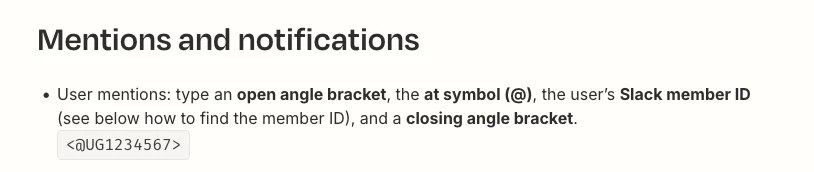
The tagging is slightly different. Here’s a screenshot from the Zapier help document.


AutomateMyBiz
Forum|alt.badge.img

If you haven’t figured it out yet, happy to jump on a short call and assist you (no payment necessary)

Let me know and I’ll send over my calendar