Question

How to sync Google Sheets status with Rocketlane projects in Zapier

  • Nov 12, 2026 9:48 AM UTC
  • 6 replies
  • 12 views

I have a Google sheet that updates status
I have a Rocketlane project with a project name and status 

I need a Zap that looks up records and checks whether the sheet status is the same with the Rocketlane status.  If the status does not match, I write to a sheet row indicating a mismatch.

1. Schedule: Every weekday
2. Get many spreadsheet rows: Mapped to columns B:D
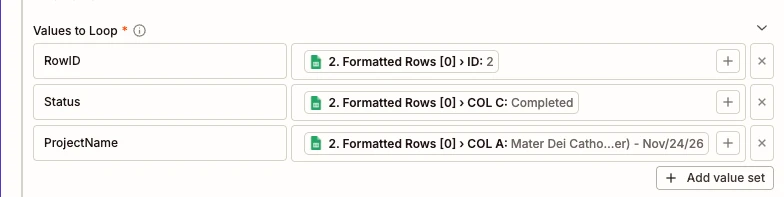
3. Create Loop from Line items:  Valueset RowID, Valueset Status, and Valueset ProjectName mapped to Formatted rows 


4. Rocketlane Search Project: Searchby Project Name
5. Filter Condition: Continue only if Status Sheet does not exactly match status RL
6. Update Spreasheet Row: write to column 

I created this Zap but it onl updates the first and last row.  What could be missing?

6 replies

WebhookEngineer
Forum|alt.badge.img+1

If the middle rows have matching statuses, leaving them unchanged may be expected: the filter is meant to skip them. Check a middle row you know has a mismatch.

Find that row in a scheduled run’s history and follow it through the steps:
- Search: did it get that row’s project name and return the intended project?
- Filter: which two status values did it compare, and did processing continue?
- Update: which destination Row ID did it get?

The search should use ProjectName from the loop. The filter should compare Status from the loop with Rocketlane’s result, and the update should use RowID from the loop, not a fixed row or the original multi-row output.

For that confirmed mismatching middle row, does processing stop before the update, or does the update target a different row?


  • Author
  • New
  • Nov 12, 2026 10:13 AM UTC

When the zap ran, it only runs once and I can only see 1 Loop iterations.  Is this supposed to be running a zap run for each row? if yes, I can’t see if any middle rows are being processed.


WebhookEngineer
Forum|alt.badge.img+1

Yes, the intended setup is one loop iteration per spreadsheet row. The search, filter and update should each use that row’s values. Seeing just one iteration doesn't tell us yet where the problem is.

Are you seeing that single iteration in a Zap editor test, or in Zap History for an actual scheduled run?

If it’s a scheduled run, open the Looping step’s input data. Check whether RowID, Status and ProjectName each contain multiple separate items (one per spreadsheet row) or just one value. That will help distinguish a row-retrieval or input-mapping issue from something happening after the loop.


  • Author
  • New
  • Nov 12, 2026 12:25 PM UTC

Step 3: The data out tab only has 1 Row as a value

What values should I use, it would make sense cause the values I looped are specific to Row 2. But, I don’t see anything I can map into that isn’t a specific row:


WebhookEngineer
Forum|alt.badge.img+1

If the fields you selected are specific to Row 2, they aren't the all-rows inputs we need. You're looking for three corresponding lists of row IDs, statuses and project names, with each position in those lists referring to the same spreadsheet row.

Step 3 showing one output row isn't enough on its own to conclude that the other rows weren't processed.

Could you share a screenshot of Step 2's Data Out with the row/column groups expanded? Hide the cell values. We need to see the field names and how they're nested so we can identify the mapping fields, or establish that Step 2 isn't providing the lists we need, without guessing at picker labels.


  • Author
  • New
  • Nov 12, 2026 1:33 PM UTC

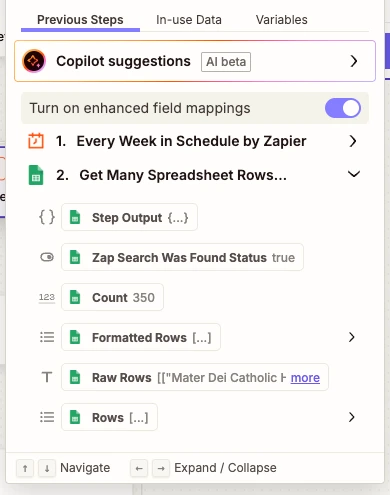
Step 2 is collecting the rows as intended from the looks of it:


It lists all of the data on the sheet