
Best answer

How to reply to an email in Outlook and add another recipient?

  • February 13, 2026
  • 1 reply
  • 14 views

I’m currently using the “Send Email” Outlook action to automate sending an email response when I get specific emails, but I want it to reply and keep the same thread. When I switch to the “Reply to Email” action though, it only has Email ID and Comment in the configure section. I feel like the Email ID field should just be moved into the “Send Email” action (and rename it to Reply Thread ID or something) so you can specify that you want to reply to a thread instead of starting a new one and you get all the extra options of adding new recipients, attach files, etc.


So ultimately, I just want the ability to format the “Send Email” action as a reply instead of a new email.

Best answer by Troy Tessalone

Hi ​@Eddie Hartman 

Best to share feedback and feature requests via a ticket to Zapier Support for it to be logged for consideration: https://zapier.com/app/get-help


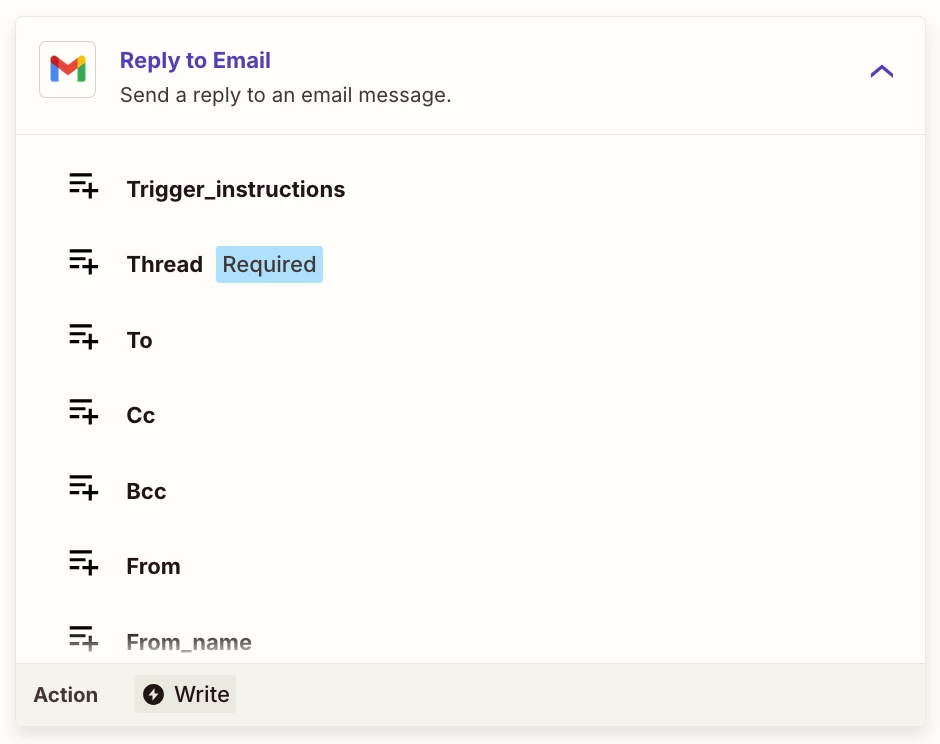
Action: Gmail - Reply to Email

Has fields for: 

  • TO
  • CC
  • BCC
  • etc.


1 reply

Troy Tessalone
Zapier Orchestrator & Solution Partner
Forum|alt.badge.img+14
  • Zapier Orchestrator & Solution Partner
  • Answer
  • February 13, 2026

Hi ​@Eddie Hartman 

Best to share feedback and feature requests via a ticket to Zapier Support for it to be logged for consideration: https://zapier.com/app/get-help


Action: Gmail - Reply to Email

Has fields for: 

  • TO
  • CC
  • BCC
  • etc.




