Question

How to populate glicd, gbraid, and wbraid fields correctly?

  • August 29, 2024
  • 1 reply
  • 126 views

Hello,


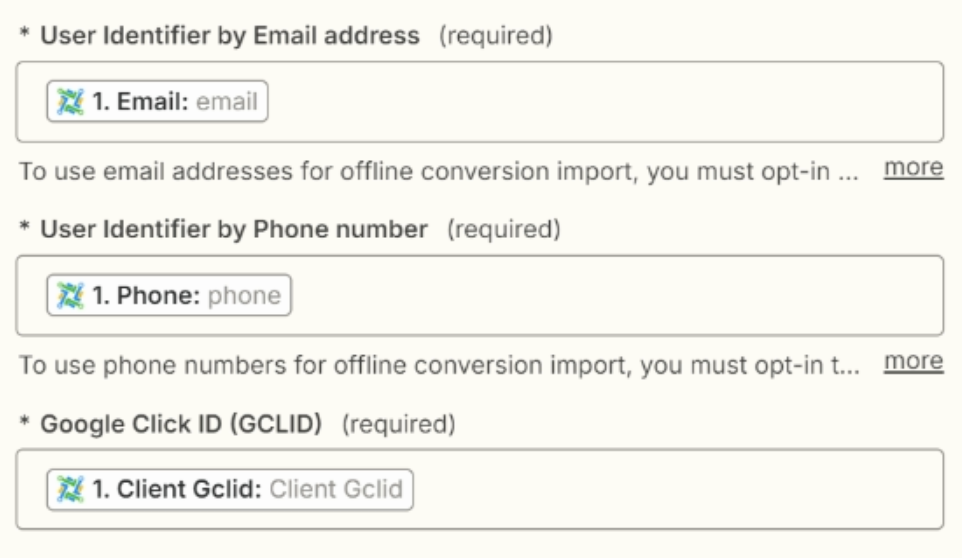
I’m new to all this and was running into an error when trying to use LeadConnector and Zapier to send offline conversions back to Google Ads. When I test my Zap, it gives me an error saying that one or all of the fields (gclid, gbraid, wbraid) are populated incorrectly. Can anyone provide me with some guidance to resolve this issue? Thank you!

Loom Video: 


Than

This post has been closed for comments. Please create a new post if you need help or have a question about this topic.

1 reply

Troy Tessalone
Zapier Orchestrator & Solution Partner
Forum|alt.badge.img+14
  • Zapier Orchestrator & Solution Partner
  • August 29, 2024

Hi @Chad_B 

The mapped variables don’t have valid values for what each field expects.

The mapped Email variable has a value “email” which is not a valid email address.

Check the field descriptions/tooltips for guidance.

Make sure to test with a representative record from LeadConnector.

NOTES:

  • If you select N identifiers, then each Identifier is required to have a valid value, otherwise the Zap Run will result in an error
  • If the data from LeadConnector won’t always have a value for the selected identifiers, then you may need to use Paths with Filter conditions to check which Identifiers have values.
    • e.g. Path for GCLID and Email but not Phone
    • e.g. Path for GCLID and Phone but not Email
    • and so on for all the possible combos