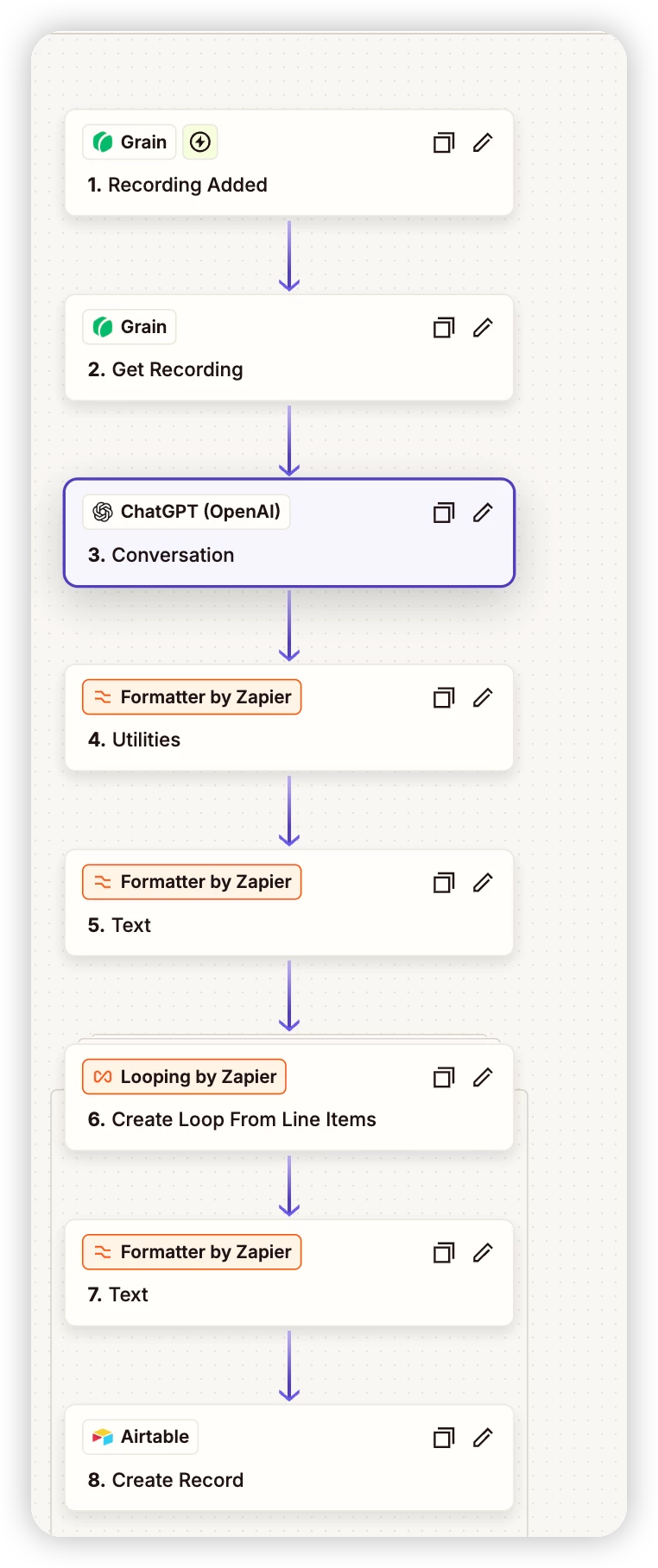
I have a Zap that takes the output from OpenAI/ChatGPT and creates feature‑request records in Airtable. The AI returns multiple rows in one string, using a custom row delimiter (<<<ROW>>>) and a column delimiter (|||). Each feature row includes the fields: Feature, Description, Meeting link, Painpoints, Status, Promised timeline, Evidence snippets, Product‑Related Action Items (so no “Requested priority”).
Here’s what I’ve tried:
-
AI prompt: Ensured the model outputs a single line with <<<ROW>>> between rows and ||| between fields, with rules to replace those strings if they appear in the text.
-
Flattening the array: Inserted a Formatter → Utilities → Line‑item to text step immediately after the ChatGPT step to flatten line items as recommended by the community.
-
Splitting rows: Used Formatter → Text → Split Text on the flattened string, separator <<<ROW>>>, and captured all segments as line items.
-
Looping: Added a Looping by Zapier → Create Loop from Line Items step to iterate over each row.
-
Splitting columns: Inside the loop, used another Formatter → Text → Split Text with separator ||| to get each of the eight fields.
-
Creating records: Inside the loop, mapped the 8 outputs to the corresponding fields in Airtable (plain-text “Meeting link” field).
Despite this, my Zap still creates duplicate records — for example, four rows appear in Airtable with the same feature, description, and meeting link. Additionally, the Promised timeline and Evidence snippets fields remain blank even though those values should be in the AI output.
Any ideas on what I might be missing? Is there a better way to handle splitting and looping to avoid duplicates and preserve all fields? I’d really appreciate any suggestions!