Question

How can I replicate my HoneyBook pipeline stages on ClickUp via List/Status options?

  • December 4, 2025
  • 6 replies
  • 23 views

I am trying to connect HoneyBook with ClickUp for a number of reasons including tracking analytics, leads, etc. I keep dealing with a lot of difficulties, which could just be user error. My goal is to basically replicate my HoneyBook pipeline over onto ClickUp which is setup as a list and different status options that perfectly replicate the HB pipeline stages. I am trying to do this through a bunch of individual 1 trigger/1 action zaps, but just keep facing issues especially regarding getting ClickUp and Honeybook to properly communicate regarding individual project ID/unique identifiers.

Anybody else out there have any similar experience or advice on this? I know it has to be possible as i've had a few success's with Zapier bridging the gap to the point of bringing over a lead here or there to ClickUp, however it still won't do the proper stage/status and whatnot.


6 replies

moid-space
Forum|alt.badge.img
  • New
  • December 4, 2025

You can sync Honey Book stages to Click Up reliably by saving the Honey Book Project ID in a Click Up custom field, then using Find Task → Update Status in every stage, change Zap. That keeps each update linked to the correct task.


Troy Tessalone
Zapier Orchestrator & Solution Partner
Forum|alt.badge.img+14
  • Zapier Orchestrator & Solution Partner
  • December 4, 2025

Hi ​@EnviroHealth 

Help us have more info by posting screenshots showing:

  • how your Zap steps are outlined
  • how your Zap steps are configured in the CONFIGURE tab while in EDIT mode with the field mappings and field types visible
  • any encountered errors
  • more details about specifically what you are having issues configuring in the specific Zap steps


If you are looking to hire help, there is a directory of Zapier Partners: https://zapier.com/partnerdirectory


  • Author
  • New
  • December 4, 2025

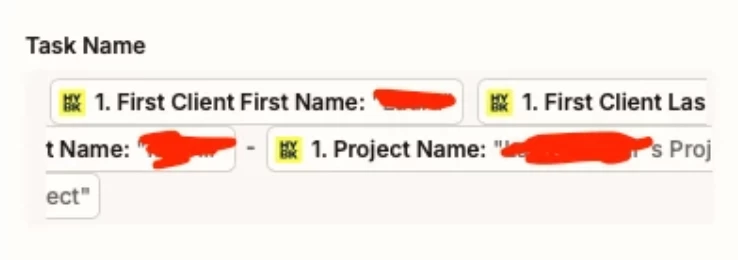
I appreciate the help. I’m trying to find grounding in getting it to properly bring over inquiries first, and one issue I've had with that is that it will pull from the most recent inquiry, and uses that individuals name and information as the input field, rather than being a dynamic input field, so each time I run the test and submit a new inquiry, it still seems to just input this one individuals name and information. When I click the + to try to replace the field with a dynamic field, there isn’t an option. 


The followup issue I'd had is when trying to make a zap that somehow connects each HB stage to each ClickUp “Status” within the pipeline replica I built out. I can’t seem to figure out how to connect that in which Zapier can latch onto any certain project ID and translate when it moves in HB to moving it to the appropriate status in ClickUp. 


Troy Tessalone
Zapier Orchestrator & Solution Partner
Forum|alt.badge.img+14
  • Zapier Orchestrator & Solution Partner
  • December 4, 2025

@EnviroHealth 

You have dynamic variables mapped, so each time the Zap Run the variable value will change.

For live Zap Runs, check your Zap Run history to see the DATA IN/OUT for each step to help you trace and troubleshoot.

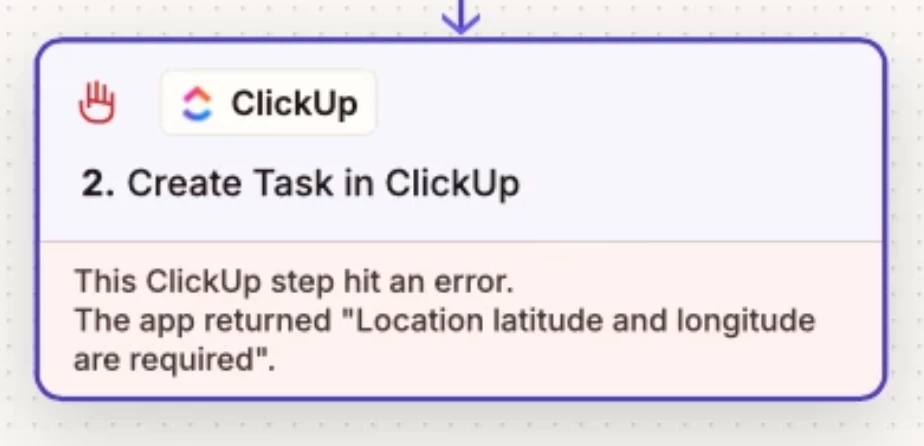
Zap step 2 will create a new ClickUp Task and return the Task ID that you can use to find the Task in ClickUp.


The error shown in the screenshot indicates you are trying to use a “Location” field type.

ClickUp “Location” field types expect a value that is the latitude and longitude rather than an address.

You must provide the latitude lat, longitude lng, and formatted address per Google Maps Geocoding API


Sparsh from Automation Jinn
Forum|alt.badge.img+6

Hey ​@EnviroHealth,

Chang the custom field of address to plain text in ClickUp to fix this error. Otherwise pass latitude and longitude for the location field. 

I can understand how it can a bit more complex regarding having a common project ID. Some of the workarounds are either using Lookup Tables or Find Project action through native action or through API. Here is a helpful article about Lookup tables in Zapier- https://help.zapier.com/hc/en-us/articles/8496305146765-Create-lookup-tables-in-Zaps

I can understand it can get a bit more technical and complex but it’s possible to sync Honeybook to Clickup using Zapier. Hope it helps!

PS: If you need more active help, I’m happy to connect through my Zapier Solution Partner page if you’d like to reach out here- https://zapier.com/partnerdirectory/automation-jinn 


SamB
Community Manager
Forum|alt.badge.img+11
  • Community Manager
  • December 12, 2025

Hi ​@EnviroHealth 👋

How did you get on with the suggestions from moid-space, Troy and Sparsh here? Were you able to get the error sorted?

Keep us posted on your progress! Happy to lend a hand if you’re still stuck 🙂