Question

HeyGen Integration does not work

  • October 13, 2025
  • 8 replies
  • 61 views

TLDR: According to HeyGen, the HeyGen Zap does not work.

After a lot of troubleshooting the HeyGen “Avatar #ID not found or no longer available” and the throttling error with HeyGen, I received the following feedback from their tech support today:

We currently have a bug with Zapier which prevents this part from working…..[edit]…..For the time being, likely it won't be possible to use this Zapier functionality. We appreciate the understanding and we'll let you know once the issue is fixed.

8 replies

SamB
Community Manager
Forum|alt.badge.img+11
  • Community Manager
  • October 15, 2025

Hi and welcome to the Community, ​@Shoot Them Later! 🎉

Thanks for sharing this with the Community. Which HeyGen trigger/action are you seeing that error on exactly? I had a look at the bug reports for the HeyGen app that are being tracking on our end but couldn’t see anything that matched that error. Would you mind reaching out to our Support team so they can get a bug report submitted for this? That’ll allow us to investigate it further from our side and assist HeyGen’s developers in getting it resolved. 

In the meantime, maybe you could use the Webhooks app to connect to their API directly instead? If you’ve not used it before, you might find these guides useful:

Let me know if you get stuck or have any questions at all. 🙂


SamB
Community Manager
Forum|alt.badge.img+11
  • Community Manager
  • October 29, 2025

Hey there ​@Shoot Them Later! 👋 Have you had a chance to try using webhooks for this yet?

Keep us posted on how it goes when you do. Want to make sure you’re all set.


@SamB

Errors I receive with the HeyGen Zap:

Create an Avatar Video (Scene): The Zap cannot see the HeyGen Avatar ID’s. When I add an avatar ID as a custom entry, the module will pass test.

Create an Avatar Video (Generate): This module will not pass test. “The app returned "Avatar ID#not found or no longer available."


 I will try webhooks to see if I can make any progress. Thanks.


SamB
Community Manager
Forum|alt.badge.img+11
  • Community Manager
  • November 3, 2025

Thanks for letting me know ​@Shoot Them Later. Please do keep us updated on your progress with that Webhooks approach, I’d be happy to lend a hand if you run into any trouble.


  • New
  • November 26, 2025

I am having the same issue, Was this ever resolved? I am told there is a “known bug.”


SamB
Community Manager
Forum|alt.badge.img+11
  • Community Manager
  • November 26, 2025

Sorry to hear that you’re running into this as well ​@kellycharp. The bug appears to have been logged on HeyGen’s side directly, not through our internal issue tracking tool that they have access to, so I can’t check for updates on it. 

I don’t know if ​@Shoot Them Later was able to get things working by using a Webhooks action instead, but if it’s something you’d like to explore I’d be happy to help if you get stuck.


  • New
  • November 26, 2025

Yes. Please. Steer me in the right direction.

I want to have HeyGen generated videos part of my automation workflow, however the HeyGen’s Zapier integration fails. There appears to be code conflicts AND perhaps a necessity for a delay being needed between the scene creation and the video generation. I am not well versed in webhooks… so I this can axhieve what I am trying to accomplish, I will implent it. But I do not want to waste my time if this is a dead end and I should give up on HeyGen.


SamB
Community Manager
Forum|alt.badge.img+11
  • Community Manager
  • November 27, 2025

Totally understandable ​@kellycharp! I’ve not seen your current set up but if the Create an Avatar Video (Generate) is running right after a Create an Avatar Video (Scene) action then it could be that a Delay is needed in between those actions to give it a bit more time to finish processing. 

If adding a delay doesn’t resolve it then it could be worth using a Webhooks action instead to generate the video. I don’t have a HeyGen account myself to be able to test but their Create Avatar Video (V2) endpoint appears to be able to generate videos: https://docs.heygen.com/reference/create-an-avatar-video-v2

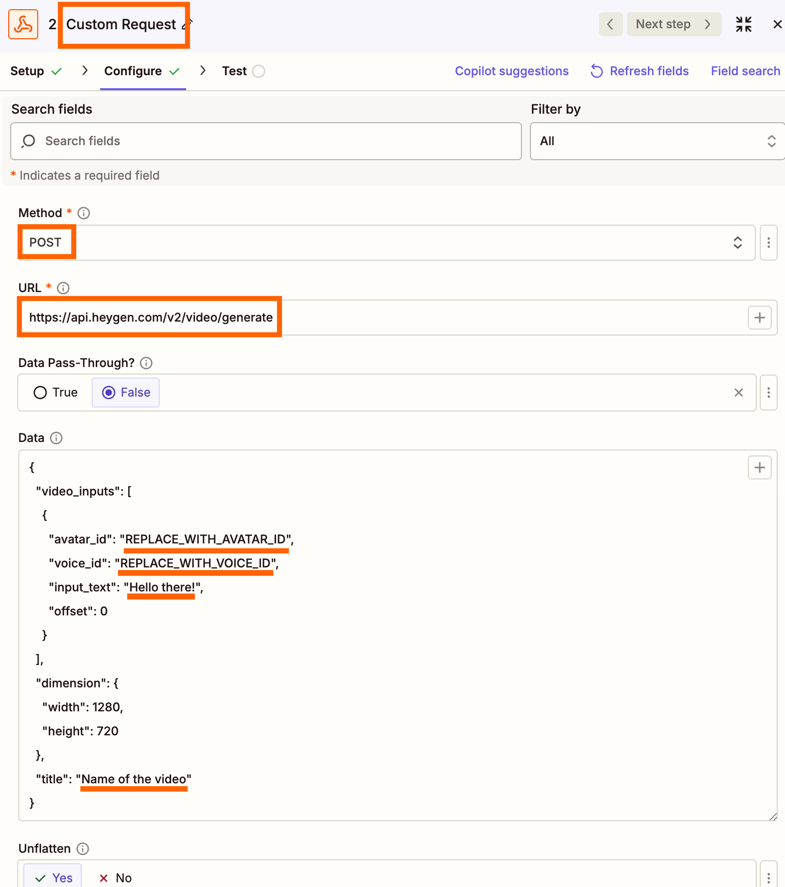
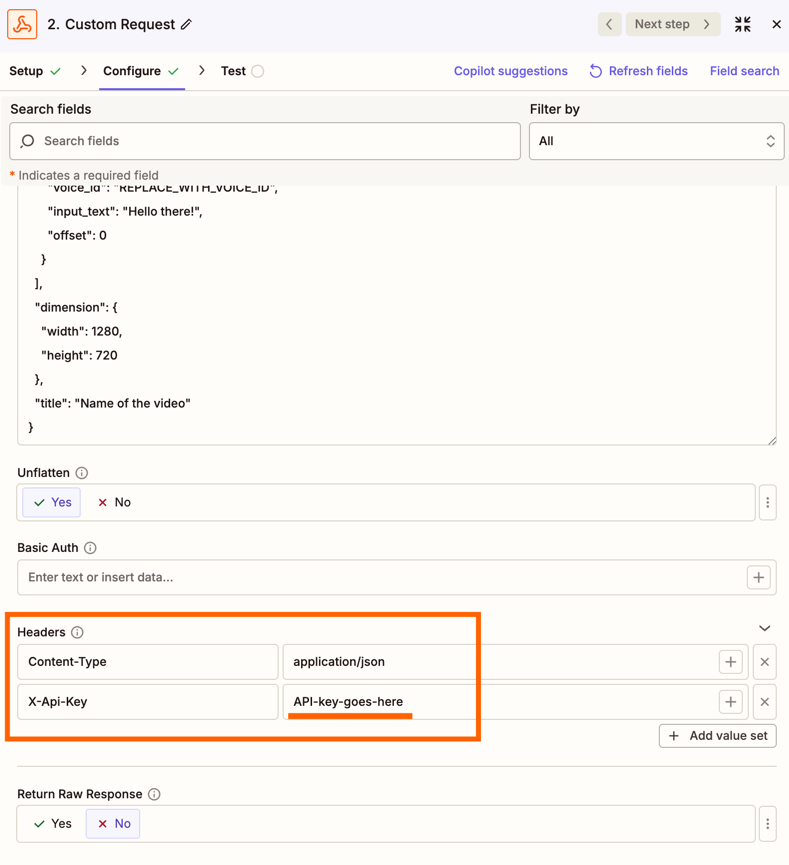
Based on their API documentation you’d want to setup a Custom Request Webhooks action as follows (replacing any underlined values as necessary):

dc50c69a1d177e685d6befc838c9bd6a.png
4c535a9f3a84f145da8142510054961d.png
If it helps, here’s the code for the Data field used in the above example that you can copy and paste into the Zap:

{
"video_inputs": [
{
"avatar_id": "REPLACE_WITH_AVATAR_ID",
"voice_id": "REPLACE_WITH_VOICE_ID",
"input_text": "Hello there!",
"offset": 0
}
],
"dimension": {
"width": 1280,
"height": 720
},
"title": "Name of the video"
}


If you don’t know your API Key check out HeyGen’s Step 1: Obtain your API Key guide for details on how to access it.

One important thing I want to mention is that I couldn’t see any reference to enabling Test Mode for that endpoint, which means that tests would consume credits. So I’d recommend making it as short a video script as short possible to limit the credits used while testing.

If you do give this approach a try and run into any errors, feel free to share a screenshot of them here and so we can help get it sorted.