Best answer

Google Sheets Zap cannot find the worksheet - both custom and static values don't work

  • March 19, 2026
  • 3 replies
  • 19 views

Forum|alt.badge.img

Hi,

I am setting up an integration to read multiple records from a Google Sheet, and load them as various Salesforce objects/records at the receiving end. 

The scenario is an exported data file, in a pre-determined format (ie. set of columns in a specific order in a google sheet). There is always only one worksheet in every exported file. The source system which exports the data out names the file and the worksheet based on the event date and other parameters (thus, for the zap, there is no way to predict the worksheet name and the sheet name). The staffmember uploads this file to a drive folder, and there is a zap listening to new files within that folder, and then kicks off to dump the data in the destination database.

Here is my sample data:

Event Name Event Date Registration ID First Name Last Name
Tech Mania Conference - 2026 01-26-2026 1AKQg00000 Jane Stock
Tech Mania Conference - 2026 01-26-2026 1QKXHHW0AE John Smith


Essentially, note that Event Name and Date are the same across all rows, but other fields vary. Thus, the zap has a step to read only the Row2, columns 1,2 and creates a “Campaign” in Salesforce, and then reads the individual rows as the attendees (become campaign members).

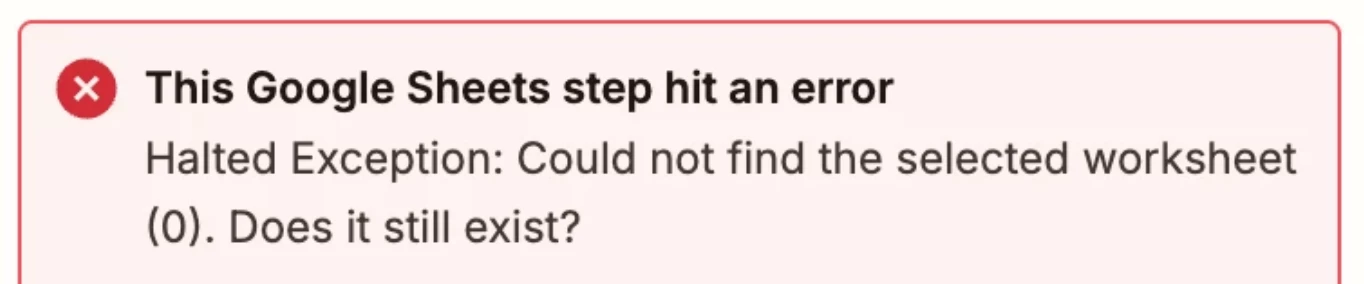
My zap is consistently halted “Safely” at this step, and I am getting error “Halted Exception: Could not find the selected worksheet (0). Does it still exist?” Screenshot showing the runtime data below:
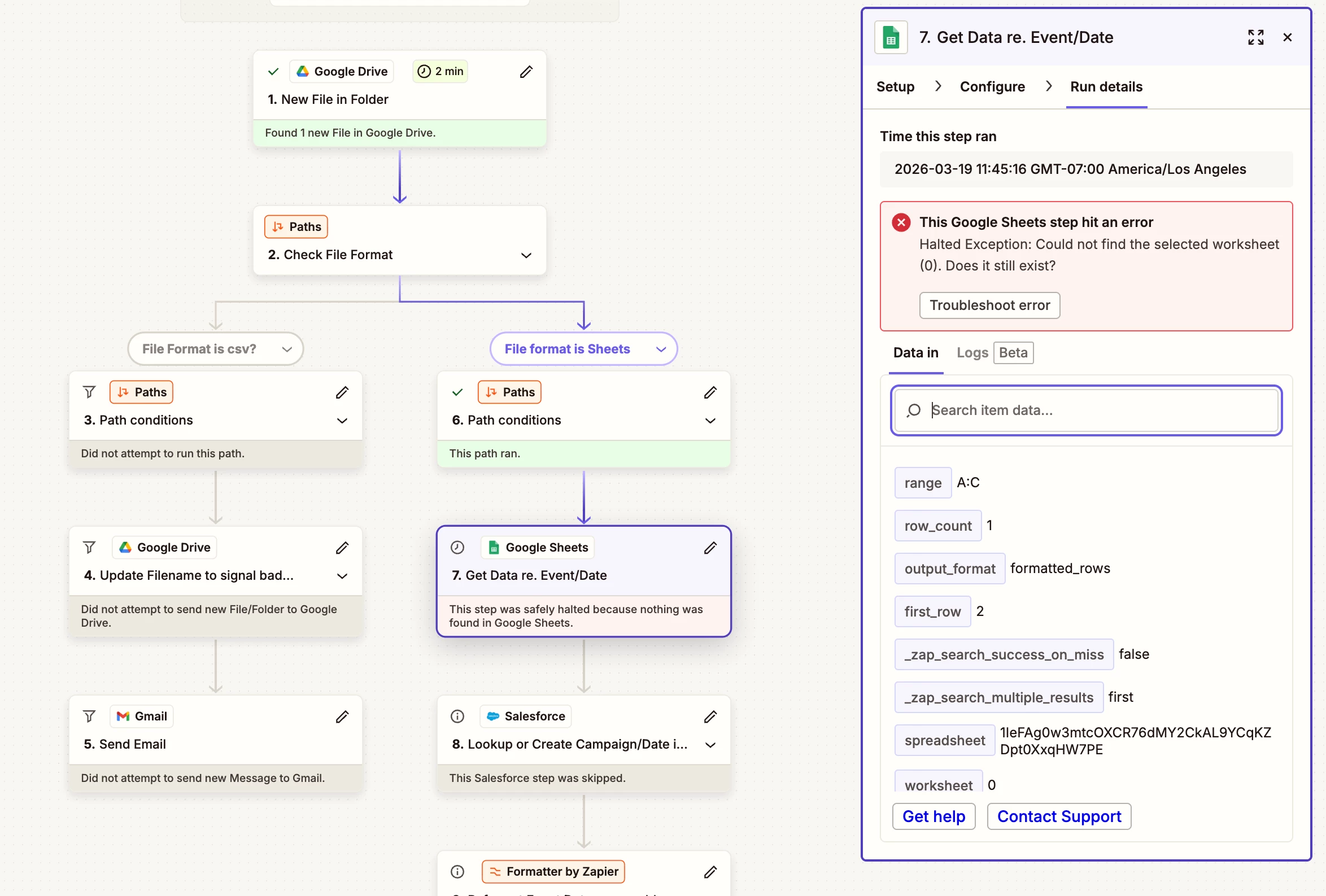
 

  1. I looked into “Find a worksheet” but it asks for a name to locate the sheet ID. I do not know the worksheet name when the file lands! All I know is that this is the first and only worksheet.
  2. I have tried “Static Value” with “Default Id=0”, and custom value as “0”, and I am hitting the exact same error.

What gives? I tried asking the AI assistent and it did not help! 

Parting thoughts: The “New File in Folder” type triggers or similar actions should publish the basic schema information such as the list of worksheets within the file as line items! Currently, Google Sheet support is inadequate for a schenario of reading multiple rows in an existing sheet.

Thank you in advance.

 

Best answer by Fahad S

Hi ​@ClayPotter 

If the Worksheet title and Worksheet ID are different each time, then yes you will need to use the GSheets API.

GSheets API docshttps://developers.google.com/workspace/sheets/api/reference/rest

Here's the Zapier community post that might help: 


Hope this helps you get it sorted! And let me know how it goes — happy to dig deeper if needed!

And if you'd rather just get it sorted quickly, I offer a free 20-min Zapier troubleshooting call. Book it under Resources on my Zapier Directory profile: https://zapier.com/partnerdirectory/automatemybiz!-->

3 replies

Troy Tessalone
Zapier Orchestrator & Solution Partner
Forum|alt.badge.img+14
  • Zapier Orchestrator & Solution Partner
  • March 20, 2026

Hi ​@ClayPotter 

Add this Zap action: GSheets - Get Spreadsheet by ID

  • Include Grid Data = FALSE


This returns data about the worksheets (aka “sheets”) in the spreadsheet.


If there is only 1 worksheet in the spreadsheet, you can map this variable: Sheets Properties Sheet Id


The error indicates the Worksheet ID 0 does not existing for the provided spreadsheet ID.

(see screenshots below)


Forum|alt.badge.img+1
  • Zapier Solution Partner
  • Answer
  • March 20, 2026

Hi ​@ClayPotter 

If the Worksheet title and Worksheet ID are different each time, then yes you will need to use the GSheets API.

GSheets API docshttps://developers.google.com/workspace/sheets/api/reference/rest

Here's the Zapier community post that might help: 


Hope this helps you get it sorted! And let me know how it goes — happy to dig deeper if needed!

And if you'd rather just get it sorted quickly, I offer a free 20-min Zapier troubleshooting call. Book it under Resources on my Zapier Directory profile: https://zapier.com/partnerdirectory/automatemybiz!-->


Forum|alt.badge.img
  • Author
  • Beginner
  • March 20, 2026

Thank you both ​@Troy Tessalone and ​@Fahad S

“Get Spreadhseet by ID” is the method that I should have examined earlier -- that checked all the boxes for my requirement.

Although, it is unintuitive, redundant and wasteful of task count, when - 1. “New File In Folder” gives you an ID and the mime type of google sheet already, it’s hard to imagine why you have to (once again) “Get” the spreadsheet by ID! Anyhow, for now I am set. 

The link to Google API docs was helpful (and it’s good to know what is possible via raw API calls), but I think a native way to create a workflow is preferable from sustainability perspective. Thank you.

P.S. I read the linked discussion and it seems to be dated -- that discussion concludes that API call is the only way, and turns out this is wrong. Or is there any specific situation when that is true? Based on what I saw in my tests, it looks like it would get me a good deal of metadata about the sheet.