Question

Google Drive API Request - Beta

  • December 19, 2025
  • 8 replies
  • 30 views

I am trying to use the Google Drive API Request action to update a CSV file in a Google Drive folder. The Replace File action seems to always overwrite as a .txt file, so this has been the best workaround. It’s working as expected in test mode, but when it runs for real, I keep hitting this error: 
 

This Google Drive step hit an error

Authentication provided either does not exist or is not available to the user and account.


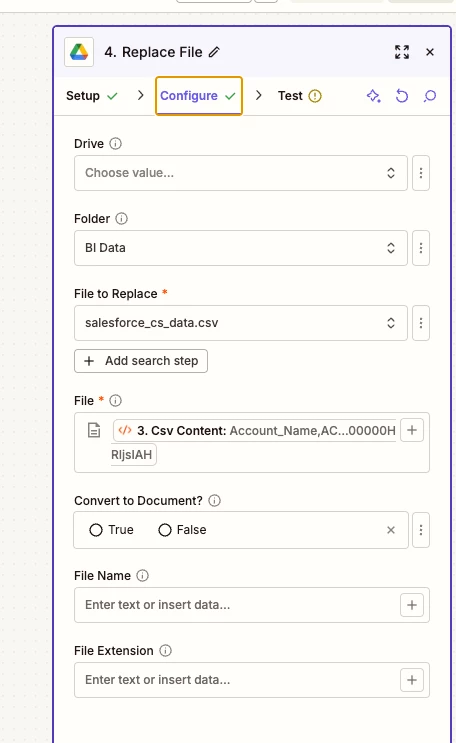
Here is the configuration
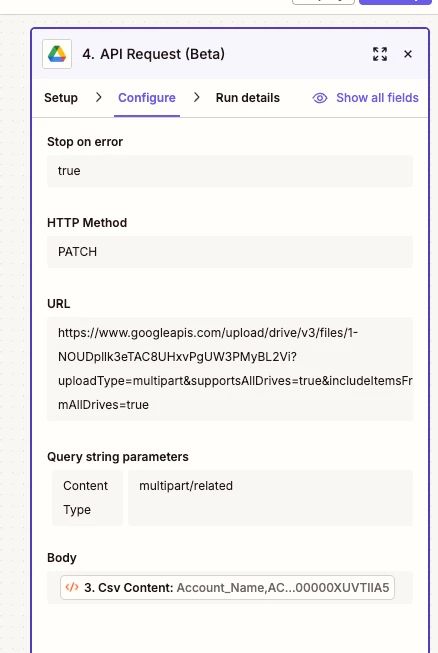


I have confirmed that Zapier hat it is an approved app in my Google workspace.

It’s very confusing that it works totally fine in test mode but not when it actually runs. Any ideas here?


8 replies

drtanvisachar
Forum|alt.badge.img+1

Hello ​@Kevin R 
 

This almost always comes down to a connection mismatch between test runs and live runs.

In test mode, Zapier uses your personal Google Drive connection. When the Zap runs live, it uses the Zap owner’s connection. If that user does not have access to the file or Shared Drive, the test will pass but the live run will fail with this error.

Quick checks
Make sure the selected Drive account owns or can edit the CSV
If this is a Team Zap, confirm the owner has access and the connection is shared and reselected
Reconnect the Google Drive app and republish the Zap

Helpful references

https://help.zapier.com/hc/en-us/articles/8496290788109-Manage-your-app-connections


https://help.zapier.com/hc/en-us/articles/8496326497037-Share-app-connections-with-members-of-your-Team-or-Enterprise-account


Troy Tessalone
Zapier Orchestrator & Solution Partner
Forum|alt.badge.img+14
  • Zapier Orchestrator & Solution Partner
  • December 19, 2025

Hi ​@Kevin R 

Before going the API route, post screenshots showing how your Zap step for GDrive Replace File was configured as we might be able to spot the issue.


  • Author
  • New
  • December 19, 2025

Thank you ​@drtanvisachar , will try that out!

@Troy Tessalone  - Here is GDrive Replace File. The file always ends up replacing as a .txt file and removes the .csv extension with this setup.


Troy Tessalone
Zapier Orchestrator & Solution Partner
Forum|alt.badge.img+14
  • Zapier Orchestrator & Solution Partner
  • December 19, 2025

@Kevin R 

Help links for using files in Zaps: https://help.zapier.com/hc/en-us/articles/8496288813453-Send-files-in-Zaps

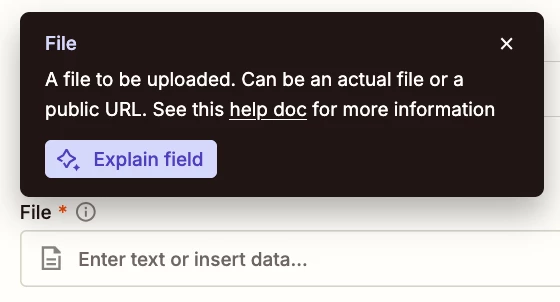
TIP: Click field labels to see tooltips with more info about expected values and formats.


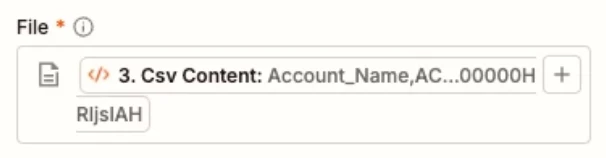
From your screenshot, for the File field, you have mapped a variable from Zap step 3 labeled “CSV Content”, that has the contents of the CSV, but the field expects a file object or a file link.


We would need to see more screenshots with how your Zap steps are outlined to have more context.


  • Author
  • New
  • December 19, 2025

@Troy Tessalone here is the Run Python step code that is generating that csv content. Should I update the python to instead output a file object?


import json
import csv
from io import StringIO

# Parse the report data
try:
if isinstance(input_data.get('report_data'), str):
report_data = json.loads(input_data['report_data'])
else:
report_data = input_data.get('report_data', {})
except:
report_data = input_data.get('report_data', {})

# Extract column headers
headers = ['FK_NAME', 'ACV', 'CSM_Name', 'C_W_Date', 'Kickoff_Date', 'Contracted_Seats', 'Contract_End_Date', 'Customer_Tier', 'Account_ID']

# Extract rows from factMap
rows = []
if isinstance(report_data, dict):
factMap = report_data.get('factMap', {})
if 'T!T' in factMap:
report_rows = factMap['T!T'].get('rows', [])
for row in report_rows:
if 'dataCells' in row:
cells = row['dataCells']
row_data = [str(cell.get('label', '')) for cell in cells]
rows.append(row_data)

# Generate CSV content
csv_output = StringIO()
writer = csv.writer(csv_output)
writer.writerow(headers)
for row in rows:
writer.writerow(row)
csv_content = csv_output.getvalue()

# Return CSV content with filename and MIME type for Zapier to recognize as file
return {
'csv_content': csv_content,
'filename': 'salesforce_cs_data.csv',
'mime_type': 'csv'
}


Troy Tessalone
Zapier Orchestrator & Solution Partner
Forum|alt.badge.img+14
  • Zapier Orchestrator & Solution Partner
  • December 19, 2025

@Kevin R 

Help us have full context by posting a screenshot that shows the outlined of your Zap steps in order. (trigger = actions)


Troy Tessalone
Zapier Orchestrator & Solution Partner
Forum|alt.badge.img+14
  • Zapier Orchestrator & Solution Partner
  • December 19, 2025

@Kevin R 

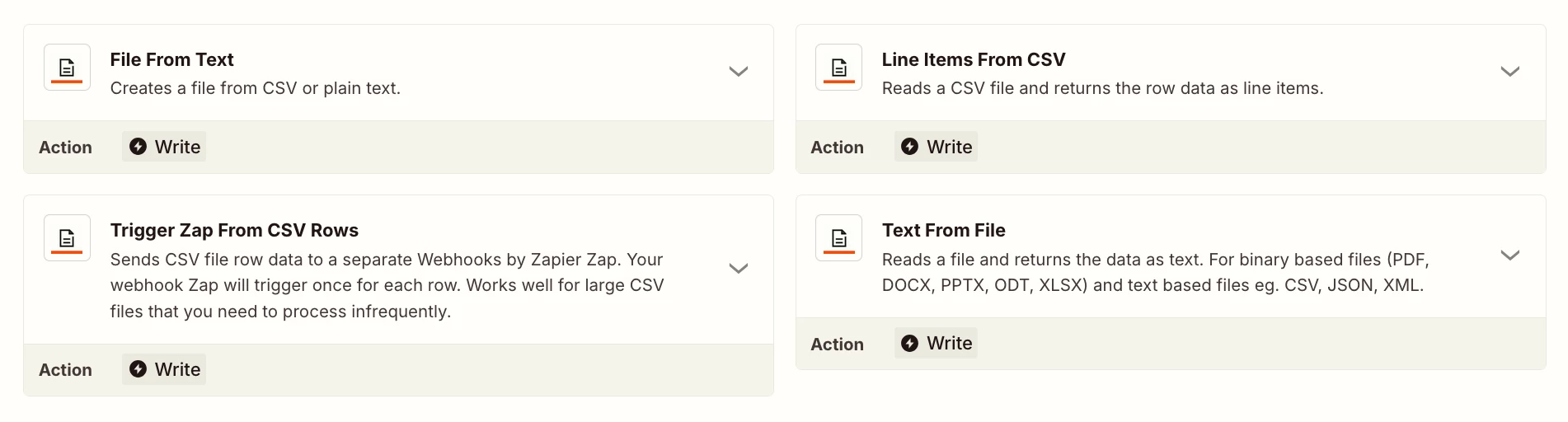
If you need to work with files in Zapier, try this Zap app: Files by Zapier

https://zapier.com/apps/files-by-zapier/integrations#triggers-and-actions


Try this Zap action: Files by Zapier - File from Text

Description: Creates a file from CSV or plain text.


Then map the returned file object.


  • Author
  • New
  • December 19, 2025

File from Text did the trick!! Thank you so much ​@Troy Tessalone , you were incredibly helpful.