



Best answer

Failure to move file from previous step in Google Drive

  • September 13, 2023
  • 5 replies
  • 94 views

KBradford

I have a zap that imports a CSV file from Google Drive, loops through the csv file and inserts rows into Smartsheet. I have tried to add a step to move the file to an archive folder in Google Drive. When I try to test the step I get the error: 

Failed to create a move file in Google Drive

'NoneType' object has no attribute 'get'

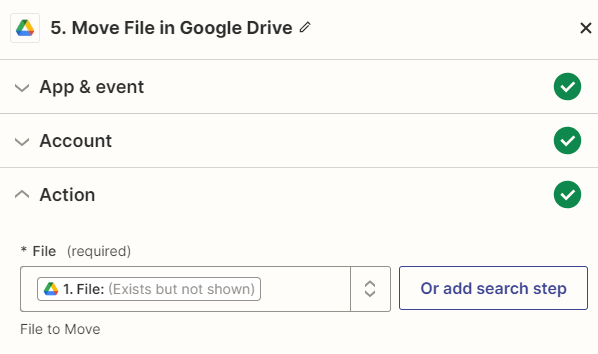
 The file is specified as 1.File: (exists but not shown) from the initial step New File in Google Drive. The Zap I am working on is “Import Staff Data From Workday”


Any ideas would be appreciated, I have tried everything that I can think of… Thanks!


Best answer by Troy Tessalone

@KBradford

The File field expects the File ID, not a file object/url.


This post has been closed for comments. Please create a new post if you need help or have a question about this topic.

5 replies

Troy Tessalone
Zapier Orchestrator & Solution Partner
Forum|alt.badge.img+14
  • Zapier Orchestrator & Solution Partner
  • 34064 replies
  • September 13, 2023

Hi @KBradford 

Good question.

If you are manually testing the Zap, make sure to retest each Zap step.

The File object is a temp file that expires.


KBradford
  • Author
  • Beginner
  • 2 replies
  • September 13, 2023

Thanks, Troy. I just retested each step, and got the same result. I also published it and tested it, same error...


Troy Tessalone
Zapier Orchestrator & Solution Partner
Forum|alt.badge.img+14
  • Zapier Orchestrator & Solution Partner
  • 34064 replies
  • Answer
  • September 13, 2023

@KBradford

The File field expects the File ID, not a file object/url.


KBradford
  • Author
  • Beginner
  • 2 replies
  • September 13, 2023

That worked great, thanks! As a new user, how would one know that? Previous steps wanted the object. Is there documentation specifying what the exact input is looking for (since the step just shows ‘File’)?

Thanks again


ken.a
Forum|alt.badge.img+6
  • Zapier Staff
  • 6780 replies
  • September 14, 2023

Hi @KBradford,

I’m jumping in to see if I can help!

You will see the difference in the field itself when it’s a dropdown field sometimes the field asks for the ID. You can learn more about this here:

Hopefully, this helps! 😊





