


Answer

Failed to create an item in monday.com: Invalid value for 3CMasterclass on TagsColumn, invalid value

  • July 12, 2022
  • 3 replies
  • 90 views

Forum|alt.badge.img

Hello all - Appreciate the help here with something I am stuck on. 

I am trying to use tags when I am inserting new + updating current records in Monday. I have tried both with # and without. Neither seem to work. 

I am inserting it like this (this is not PPI information FYI)
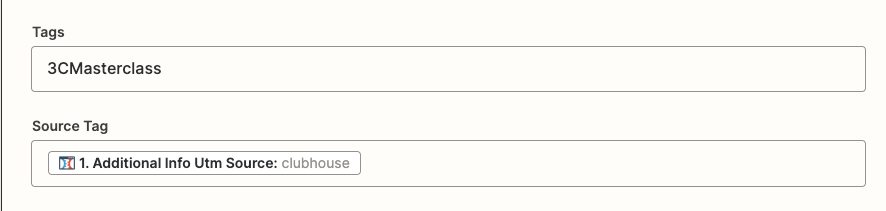
 

And receive this error:
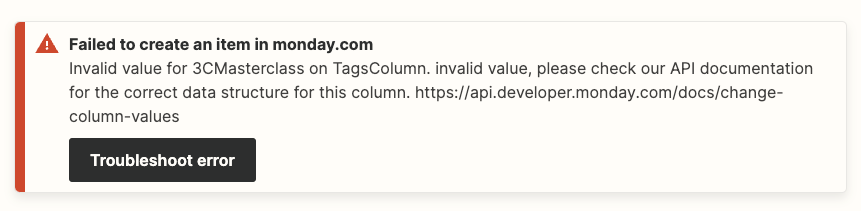
Any ideas on why I am getting this error? 

Best answer by jesse

Hey @alexadagostino@GetUWired is correct in that you will need to use tag IDs instead of names and that a lookup table can help you translate names into values. 

If you need help finding the column IDs, you may be able to use a monday.com “Get Column Values” action to pull a list of these. 

Give those a try and let us know if there is anything else we can lend a hand with as you’re configuring your Zap!

This post has been closed for comments. Please create a new post if you need help or have a question about this topic.

3 replies

Forum|alt.badge.img

Oh just to add two quick things:
1. This is when I am UPDATING the record. 
2. When I INSERT the record, it does not error but it does not add the tag

So two different issues


GetUWired
Forum|alt.badge.img+12
  • Zapier Solution Partner
  • July 12, 2022

@alexadagostino 

you may need to send the tag id as opposed to the tag name. If that is a dropdown option in Zapier, the grey values should match the values you need to send. If you do need to send the tag id, you may need a lookup table to translate the tag name to its respective id


jesse
Forum|alt.badge.img+9
  • Architect
  • Answer
  • July 13, 2022

Hey @alexadagostino@GetUWired is correct in that you will need to use tag IDs instead of names and that a lookup table can help you translate names into values. 

If you need help finding the column IDs, you may be able to use a monday.com “Get Column Values” action to pull a list of these. 

Give those a try and let us know if there is anything else we can lend a hand with as you’re configuring your Zap!




