Question

Error Getting a value from Zap Storage

  • Nov 22, 2026 11:27 PM UTC
  • 1 reply
  • 11 views

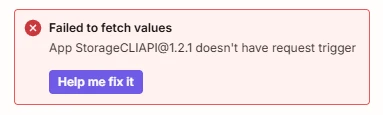
Trying to use Get Value in a ZAP but getting the following error I can see the value is stored against the key and I’ve tried the suggestions from help me fix it am I missing something.


1 reply

  • New
  • Nov 23, 2026 4:49 AM UTC

Hi Pete — I hit this exact red error on a client Zap a few weeks ago, and the confusing part was the same as yours: the value was definitely stored, the step just wouldn't fetch it in the editor.


Here's what fixed it for me, in order:


1. Ignore the dropdown for a moment and type the Key in by hand. The Key field is case-sensitive, so it has to match the Set Value step exactly — for example, if you stored it as client_email, typing Client_Email won't find it. No spaces before or after it, either.

2. Check the Set Value step that ran before it: same Storage by Zapier account, same Key, and a value that isn't blank. Then run that Set Value step again with Test step, so you know the value is actually there right now.

3. Then test the Get Value step on its own — click Test step on that step, not just the whole Zap. In my case the dropdown fetch kept failing with that "doesn't have request trigger" message, but the step itself worked fine once the key was typed in manually.

4. If it still errors, delete the Get Value step and add it fresh: app Storage by Zapier, action Get Value, Key typed in manually, then test again. That cleared a stale connection for me once.


One concrete example: I stored a lead's email under the key last_lead_email in the Set Value step, then in Get Value I typed last_lead_email instead of picking it from the list, and used that output as the To address in the next Gmail step. It went through first time.


If the manual key still returns nothing, can you tell us: does the Set Value step show a successful test, and is the key exactly the same in both steps? That usually pinpoints it.