Question

Discord attachments are joined together.

  • May 23, 2023
  • 3 replies
  • 207 views

0th

Hey, I just started using Zapier, and I have a problem involving attachments posting on another discord Server. When Zapier webhook posts a message from another channel it gets tangled up and joined, so attachment url doesn’t work and it doesn’t show as intended. I need help with figuring that one out, thanks.



Attachment webhook message, works when I post only one image to the 1st server, but with two or more images it ends up like that, linked together.


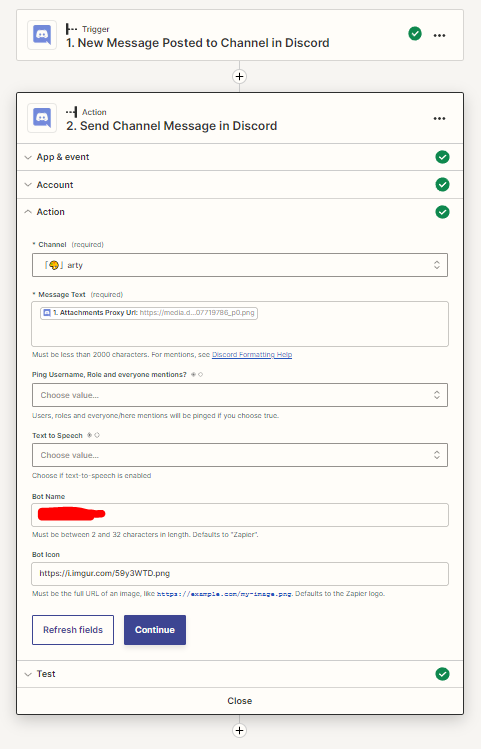
My Zapier settings.


This post has been closed for comments. Please create a new post if you need help or have a question about this topic.

3 replies

SamB
Community Manager
Forum|alt.badge.img+11
  • Community Manager
  • May 23, 2023

Welcome to the Community, @0th!

Ah, I think it’s likely because Discord sends the attachments over as line items. What you’d need to do here is use a Formatter (Utilities > Line items to Text) action convert the line items into text (a comma separated list of image urls). For example:
861750953eb86139a9d16ddd33134a75.png

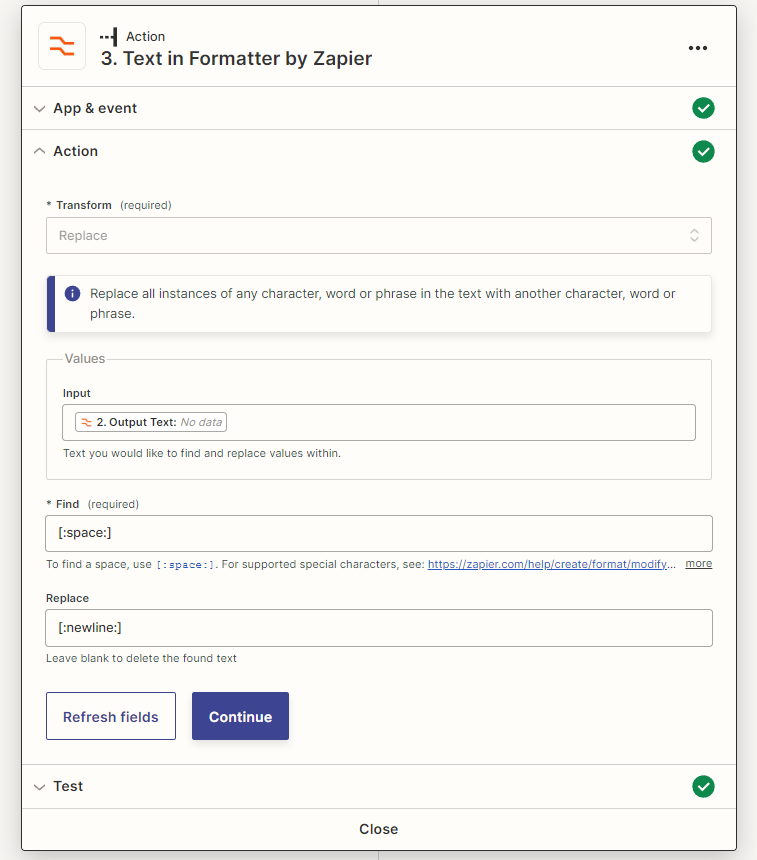
Then use a Formatter (Text > Replace) action to separate each image urls from the text output by the previous Formatter action onto a new line. For example:
188439e1a45e8b2394d55f51f3cdcd34.png
 

Then you can select the output from the second Formatter action in the Message Text field on the Discord action.

Hope that helps. If you run into any troubles on setting that up just let us know, happy to help further! 🙂


0th
  • Author
  • New
  • May 23, 2023

Hey, what should I do if there’s no data in the output text?


ken.a
Forum|alt.badge.img+6
  • Zapier Staff
  • May 24, 2023

Hi there @0th,

I’m jumping in to see if I can help!

Before we dig deeper into this, could you please share a detailed screenshot showing how your Zap is configured? This will help us ensure that the Formatter step is in the correct step. Please don't include personal information in the screenshot, or be sure blur out any personal information.

Thanks! 😊