Question

Difficulty mapping duplicate-labeled fields from Elfsight form submissions into GorillaDesk CRM

  • January 14, 2026
  • 7 replies
  • 31 views

Hi Zapier Community,

When I made my Zap live and submitted a new submission from my connected Elfsight form, Zapier was able to differentiate between the fields that share the same label in the output. However, all of the fields came through jumbled in GorillaDesk (my CRM software). This appears to be because, during the Zap setup, there is no way for me to tell which field is which. In the editor, the fields are displayed with identical names and do not show the unique Field ID, nor are they listed in the order they appear in my form, so I cannot map them correctly—even though the live submission shows that they are distinct in the backend. The AI assistant is unable to do it either as it appears it too cannot differentiate between them.

In other words, the form works correctly once it’s live, but the setup process itself is extremely difficult to complete because I cannot identify which duplicate-labeled field corresponds to which one in the Zap editor. See accompanying screenshots attached showing the issue.

For reference, the four addresses I submitted in the Elfsight form test submission were:

  • 1 Test Street, Test Address Line 1, Suburb1 State1 5001 – Daycare 1 – Owned by us 1
  • 2 Test Street, Test Address Line 2, Suburb2 State2 5002 – Daycare 2 – Owned by us 2
  • 3 Test Street, Test Address Line 3, Suburb3 State3 5003 – Daycare 3 – Owned by us 3
  • Billing Address: B Test Street, Test Address Line B, SuburbB StateB 5004

Do you have any suggestions on how I can correctly configure the Zap when I’m unable to differentiate between fields that share the same label during setup? I’m on the free Zapier plan, FYI.

Thank you for any assistance you can provide.

This post has been edited by a moderator to remove potentially personally identifiable information (PII). Please remember that this is a public forum and avoid sharing personal or potentially sensitive details.


7 replies

drtanvisachar
Forum|alt.badge.img+3

Hello ​@K9 Pooper Troopers 

This happens when your form sends multiple fields with the same label. Zapier can read them in live runs, but in the setup screen it can’t tell which is which.

Best fix: rename the fields in Elfsight so each one is unique, like “Service Address 1 Street”, “Service Address 2 Street”, “Billing Street”.

If you can, add a hidden field like “Address Type” or “Address Number” to help identify each group.

On the Free plan, changing the labels is the simplest solution.


Dr. Tanvi Sachar
Monday Certified Partner, Monday Wizard


Troy Tessalone
Zapier Orchestrator & Solution Partner
Forum|alt.badge.img+14
  • Zapier Orchestrator & Solution Partner
  • January 14, 2026

Hi ​@K9 Pooper Troopers 

Issue may be related to repeated sections in Elfsight.

If you can rename the fields to each be unique, then that should help you be able to configure the Zap action steps.


For more advanced handling of the data from Elfsight, that would require more Zap steps, which requires a Zapier paid plan to be able to turn the Zap ON.


If you are looking to hire help, there is a directory of Zapier Partners: https://zapier.com/partnerdirectory


Hi ​@drtanvisachar and ​@Troy Tessalone,

Thanks for your insights! I just wanted to clarify—if I were to upgrade to a paid Zapier plan, would that allow me to differentiate between fields that have identical labels but unique field IDs in the backend? In other words, would the Zap editor display them in a way that lets me map them correctly without having to rename all the fields in Elfsight?

Appreciate any clarification.

Thanks,
Michael


Troy Tessalone
Zapier Orchestrator & Solution Partner
Forum|alt.badge.img+14
  • Zapier Orchestrator & Solution Partner
  • January 14, 2026

@K9 Pooper Troopers 

Zapier displays the data field label based on how Zapier receives the data from Elfsight.

So that depends on if you are able to rename fields in Elfsight to then have those field names flow into Zapier.


If you can rename the fields to each be unique, then that should help you be able to configure the Zap action steps.

Issue may be related to repeated sections in Elfsight. (unsure because we do not know how your Elfsight form is configured)


Advanced approaches may involve using a custom code step or AI step in a Zap to take the raw JSON payload and transform it to relabel the field names for more clarity before mappings variables.


Common factors that require a Zapier paid plan:

  • Zaps with 3+ steps
  • Zap Run activity that causes Task usages to be over 100 for a billing cycle
    • e.g. 2 step Zap that would be 101+ form submissions
  • Premium Apps used in Zap steps


If you are looking to hire help, there is a directory of Zapier Partners: https://zapier.com/partnerdirectory


@K9 Pooper Troopers 

Zapier displays the data field label based on how Zapier receives the data from Elfsight.

So that depends on if you are able to rename fields in Elfsight to then have those field names flow into Zapier.


If you can rename the fields to each be unique, then that should help you be able to configure the Zap action steps.

Issue may be related to repeated sections in Elfsight. (unsure because we do not know how your Elfsight form is configured)


Advanced approaches may involve using a custom code step or AI step in a Zap to take the raw JSON payload and transform it to relabel the field names for more clarity before mappings variables.


Common factors that require a Zapier paid plan:

  • Zaps with 3+ steps
  • Zap Run activity that causes Task usages to be over 100 for a billing cycle
    • e.g. 2 step Zap that would be 101+ form submissions
  • Premium Apps used in Zap steps


If you are looking to hire help, there is a directory of Zapier Partners: https://zapier.com/partnerdirectory


Thanks, Troy, I appreciate your help. It sounds like this is a current limitation in Zapier. Hopefully, in the future, functionality will be added to allow differentiation between fields that share the same label but have unique field IDs.


Troy Tessalone
Zapier Orchestrator & Solution Partner
Forum|alt.badge.img+14
  • Zapier Orchestrator & Solution Partner
  • January 14, 2026

@K9 Pooper Troopers 

To clarify, it may not be a limitation of Zapier, it may depend on how Elfsight is sending data to Zapier.

NOTE: Most Zap app integrations are created and managed by the app developer, not Zapier.


The only way to know for sure is to look at the raw JSON output of the Zap trigger step.

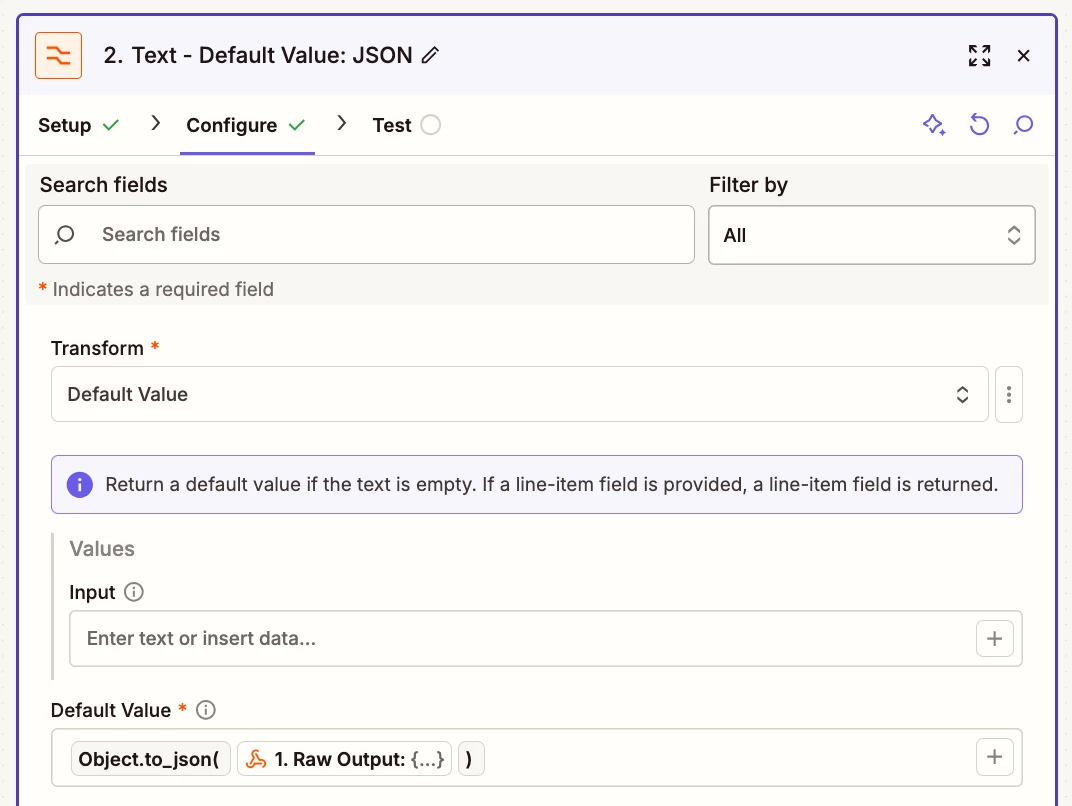
You can add this temp Zap step: Formatter > Text > Default Value

Configure as shown in the screenshot below and share the output raw JSON.


Help: https://help.zapier.com/hc/en-us/articles/38445061177229-New-Raw-Step-field-returns-a-step-s-entire-output-in-a-single-value


Hi ​@Troy Tessalone,

I’ve set up the temporary Zap step as instructed and submitted a new test entry through my Elfsight form. Below is the raw JSON output from that submission. What insights can we gather from this?

{"id": "1768525280", "bc873330-7e72-4341-b8dc-a82e9ba8d204": "Yes", "0dcedc8c-2c28-4307-a8e0-b964b82b99a7": "Commercial", "8b94c9e6-7c46-459a-bbbc-c816da3fbf07": "Dog Waste Removal, Dog Waste Bag Dispenser Replenishment, Sanitising & Deodorising", "b7b5ea2d-4601-4ea6-88ae-45dc90fb065f": "Dog Waste Removal, Dog Waste Bag Dispenser Replenishment, Sanitising & Deodorising", "e5a0e4a0-1403-4446-ab40-0c1a432faace": "New customer", "73cacef2-3a91-499e-9cb2-3375b04dff3e": "Commercial", "937d547e-72bf-4d90-aeae-8c5e367916a7": "Tester", "eeffa2d3-befb-4093-941c-a77c4e02d673": "XXXXXXXX.XXXXXX@outlook.com", "8cb7948d-a3c5-4d0c-993f-8401ea06ece1": "Sample Short Text", "4baefa9c-8f80-4531-843d-6da5955ffe08": "Option 1", "5b926a11-6cdf-4e22-bbed-a49a060f4278": "Option 1", "81519040-07ec-4926-a379-b683f728cee6": "Option 1", "cfc30678-a4ee-4e74-a3ef-6a7fba0a88b4": "Sample Short Text", "8e0d7a19-7c64-4f74-8a85-2cd198827896": "Option 1", "09c748d3-b27f-4b37-8281-b0a141fa78b0": "01.01.2000", "d1d72df2-2961-4f12-a7d3-fa3c4648d190": "Option 1", "b66c047e-78c1-4369-999b-a8f6050ec0a2": "Sample Long Text", "c138230e-7c05-45ca-878a-119e02e6898d": "Option 1", "95493d98-362b-4871-9cf0-d0d2d207a014": "01.01.2000", "c1hba5am": "Commercial", "es7sfdrd": "Tester", "c064de8f-4bb9-4d17-973b-878e22ccc517": "0411111111", "89fs7rqe": "XXXXXXXX.XXXXXX@outlook.com", "70e74412-eddb-478a-bc22-67d923de39a3": "Testing Limited", "1a6fdc19-4d31-4201-b204-e6870211deb0": "XXXXXXXX.XXXXXX.XXXXXX@outlook.com", "edd59eea-1e35-41aa-ac87-7001fdf5950f": "XXXXXXXX.XXXXXX.XXXXXX.XX@outlook.com", "ta8cynal": "Google", "d6feb02c-57fd-4274-86a8-0bfc31dfdd44": "Sample Short Text", "04832c01-ba70-4436-b4cd-eaf980bed668": "Sample Short Text", "abcf27a4-86bd-40b2-9b6e-6e5b4af4ba28": "SA1", "c62c8f13-c678-4840-81b3-60be5b2c2ca7": "AL2_1", "ac4342d4-e0de-4857-accb-9ae9aba5a6f9": "Sub1", "3b08e21d-910b-47a3-81b7-95bdbda969f8": "Sta1", "d2191fc7-1b5a-4fa1-b312-8dc8896ed914": "0001", "950b8b34-1a32-4f0c-9c69-0924bada9d22": "PName1", "e334d33b-cefe-4022-9347-670980962bc4": "PNote1", "0aea944d-cb7c-42cb-8f77-2be0d9443a93": "PNote1", "270e2f12-eab2-4654-afd0-27726d0dc7af": "Yes", "3a667774-e75d-46e1-970d-73024edb50fd": "SA1", "e2015456-7c00-4e06-8e3f-326a50233817": "AL2_1", "bbe4efd7-b229-4b65-b215-789f9821fa2d": "Sub1", "9aab2b9b-6e30-4e77-b017-f3be8afdbe1d": "Sta1", "511eb1f4-09d5-4a10-8087-f5a96f87abae": "0001", "89fa8a11-7ace-4b07-ba44-9052da05a4fb": "PName1", "143e322b-1dc6-4c28-9869-85a2c1344fe8": "PNote1", "7e43243b-90fe-40b3-aa04-1268164119a6": "Yes", "62496d07-11c3-489f-916b-5a463c442940": "SA1", "cb21738d-06b4-4dc2-b674-2b8b519c00f1": "AL2_1", "9b452139-3092-4805-9259-98c74702fc66": "Sub1", "fb5a887f-8ed4-4ae1-8838-f1a016f18789": "Sta1", "e730106c-8005-42eb-9df6-8f4081556e18": "0001", "2a19412a-338d-4bad-ba07-c8eeed5e1c83": "PName1", "3d8b998f-871f-4141-a4ce-bfeff2c5241a": "PNote1", "0b8fc691-bc0e-43c9-9fa6-ebc56b7b78c2": "Yes", "010d49b1-2c1b-4a9f-b840-c5bfddefe12d": "Additional Services Address", "5308cb25-6e2d-4309-9617-4ebb84fbcbd9": "No", "59bf157a-2f91-4f8c-a2ca-93704e780788": "SA1", "0829f6d0-a9db-4cd0-886c-0ab850c120b7": "AL2_1", "085db8d4-05d8-4715-ac2d-37a75ecd27ec": "Sub1", "e63eb959-4111-4264-91ee-05adb3e8b3d8": "Sta1", "54c170c2-6111-4158-a0f5-d6ba4fbb0e6e": "0001", "58cd02c0-6f3f-485f-9629-bdb2f7f2c051": "All of them", "cbbe7cfc-60c6-47eb-9cee-f644ab4fea61": "Option 1", "964f5c3d-7997-4b5f-bd38-290203aa6fde": "Moderate \u2013 frequent dog use", "878d1982-d824-4e71-979a-2e3b7c8a8ebf": "Sample Long Text", "f8f739fc-d1f1-48ac-8ca9-c5348793b81c": "Fortnightly", "692ccb44-a10b-4adf-aebe-f6b4969224cb": "Option 1", "260ff5a8-9fd4-44db-96e3-f99c478f716f": "Fortnightly", "401f050a-a219-4687-b25e-50e94b2fcc5e": "Option 1", "ba1c9937-987c-4244-9b41-ee09bbc1f093": "Place it in our bins", "f5c745f8-2b32-47b5-b5a6-7a5cf55aa5a5": "Option 1", "ec2145bb-e656-4237-a12d-43b9004faa6d": "Sample Short Text", "46741671-af34-4fb0-a8a9-de95872c7554": "Next to the grassed areas", "1e2e1bf9-1023-4b0f-81b6-c96bb314d4a8": "Place it in our bins", "18f6cb21-5759-4f2c-98dd-2b51da563a76": "Next to the grassed areas", "7c4c02e9-ceb3-4795-b637-f8ace5418ec4": "Within the last month", "9c4946e5-ffff-4048-8190-7ac2549099e3": "Option 1", "d6128d6e-d3d4-40ac-9a17-18c198f03789": "Option 1", "981e797e-3bee-4313-a558-fbb24cde5794": "Sample Short Text", "04c92785-3625-4422-b46c-63e8df918ab1": "20", "0c62dc05-7b20-4efa-a6e7-cf91b6d0866e": "Attached to the bins", "c66fe5c5-4b82-4392-9a5e-0c618c39355c": "Fortnightly", "b82c142d-4d5e-410d-9ed6-3cec354ee7c1": "Option 1", "cc20e49c-316e-40b4-abc0-2aef4d112463": "These will be supplied by us", "df9d930a-6f8e-4948-958e-ff60111bc268": "Service Address 1", "48c627ab-3a16-46da-8b51-9e1f0d442d2e": "Sample Short Text", "fdeaa9ed-77cd-47b3-857d-8874679879ef": "Key / tool to be provided", "ab91aace-ac6e-40b8-95f8-55009bc20567": "Service Address 1", "40ffc8f8-b7ac-44f7-b4db-4476fd372ad2": "Fortnightly", "98064171-b7a1-4559-9d74-fec4a705dc8f": "Option 1", "9c521b6e-41ba-4c58-bdde-89e1d4ad1b5c": "Fortnightly", "d5b65168-ced1-4715-bde3-c8b617cd0f88": "Option 1", "b4adbf48-ed2b-425e-852a-ec991d70bbf0": "Concrete", "2e9f8e37-2e1e-46c6-8780-ba9dde0acbd3": "Paths next to grassed areas", "9e48e4f6-f741-48fc-811a-d0155e0fbb1b": "Option 1", "1b2f1ba6-b59a-4d85-91fa-0458d63ddd96": "1", "d408ac75-f401-4a33-b511-4b09ae022469": "100 m2 Service Area 1, 80 m2 Service Area 2, 60 m2 Service Area 3, 40 m2 Service Area 4", "a1baed1a-c772-41c4-bce6-66b80718482e": "Yes", "e57e168f-7d44-4ae4-8b1f-38b17080e760": "Option 1", "f98cdb34-c2be-4dbf-8d8d-7904ff52d19e": "Sample Short Text", "816354fa-7550-4392-b388-4f285f6c2a17": "Sample Short Text", "71ecc586-71bb-4dc0-8424-3ca751e9132c": "Sample Short Text", "a28ec5dc-cfc3-4ff9-a798-cb867e1c40c6": "No gates or doors / open access", "79f0db3e-23b2-4eaa-9c16-82336e312a78": "Sample Long Text", "2a8cdf58-49c6-4cf9-a2ef-05177f429f3d": "Sample Long Text", "447b0b8c-b830-48ef-aeab-a9a2fd28b69f": "Sample Long Text", "0f21a9a3-6210-4771-a5fa-7a79e6de8c79": "Sample Long Text", "c86baa69-b863-4000-a297-a1d534cc0138": "Option 1", "f6f25aa4-7d39-44c3-9486-1d46aad0777c": "Option 1", "67ba1c54-0956-4dcf-a092-090ff75d3bc2": "Sample Long Text", "b9e34187-c57f-4dbf-a915-c636b67d0d48": "Negative", "955440db-5b1d-4da1-9da7-df1f7ff6d2be": "Parking available in car parks or on the street", "1373df30-edd9-49b0-9734-71700d6ea37e": "None", "3001ce74-2ddc-4086-a7ef-73fb2f4d5abe": "https://files.elfsightcdn.com/xxxxxxxx-xxxx-xxxx-xxxx-xxxxxxxxxxxx/xxxxxxxx-xxxx-xxxx-xxxx-xxxxxxxxxxxx/2026-01-08-Facebook-Ad-1080-x-1080-px-V2-Car-Glasses-Smiling.jpg", "59f28219-d26a-42e8-9d16-060826c710b6": null, "6a80497e-cc3d-4b8b-985a-603dc9c55234": "Yes"}


FYI, this is what I receive from Elfsight via email:

Form Submission - Get Your Free Quote - Commercial Tester (Commercial) - New customer:

  • Is your service address located within our current service area?:
    Yes
  • Are you a Residential or Commercial customer?:
    Commercial
  • Which services do you require?:
    • Dog Waste Removal
    • Dog Waste Bag Dispenser Replenishment
    • Sanitising & Deodorising
  • Are you a new, current, or former customer?:
    New customer
  • First Name:
    Commercial
  • Last Name:
    Tester
  • Mobile Phone:
    0411111111
  • Email Address:
    XXXXXXXX.XXXXXX@outlook.com
  • Company or Organisation Name (if applicable):
    Testing Limited
  • Billing Email:
    XXXXXXXX.XXXXXX.XXXXXX@outlook.com
  • Billing CC:
    XXXXXXXX.XXXXXX.XXXXXX.XX@outlook.com
  • How did you hear about us?:
    Google
  • Street Address:
    SA1
  • Address Line 2:
    AL2_1
  • Suburb:
    Sub1
  • State:
    Sta1
  • Postcode:
    0001
  • Property Name (if applicable):
    PName1
  • Property Note (if applicable):
    PNote1
  • Do you require services at another service address?:
    Yes
  • Street Address:
    SA2
  • Address Line 2:
    AL2_2
  • Suburb:
    Sub2
  • State:
    Sta2
  • Postcode:
    0002
  • Property Name (if applicable):
    PName2
  • Property Note (if applicable):
    PNote2
  • Do you require services at another service address?:
    Yes
  • Street Address:
    SA3
  • Address Line 2:
    AL2_3
  • Suburb:
    Sub3
  • State:
    Sta3
  • Postcode:
    0003
  • Property Name (if applicable):
    PName3
  • Property Note (if applicable):
    PNote3
  • Are there any more service addresses?:
    Yes
  • Please list any additional service addresses below::
    Additional Services Address
  • Same as the first Service Address?:
    No
  • Street Address:
    SAB
  • Address Line 2:
    AL2_B
  • Suburb:
    SubB
  • State:
    StaB
  • Postcode:
    0004
  • Which specific areas on your property/properties would you like us to service?:
    All of them
  • How much dog waste is typically generated in the areas requiring servicing?:
    Moderate – frequent dog use
  • What service frequency do you require?:
    Fortnightly
  • How would you like us to handle the waste?:
    Place it in our bins
  • Where are your bins located?:
    Next to the grassed areas
  • When was the dog waste last removed?:
    Within the last month
  • How many dog waste bag dispensers require servicing?:
    20
  • Where are they located?:
    Attached to the bins
  • What service frequency do you require?:
    Fortnightly
  • Will you be supplying the dog waste bags for the dispensers, or would you like us to procure them?:
    These will be supplied by us
  • Please specify the proposed pickup location for our technician:
    Service Address 1
  • How will our technicians access the dog waste bag dispensers for replenishment?:
    Key / tool to be provided
  • Please specify the proposed pickup location for our technician:
    Service Address 1
  • What service frequency do you require?:
    Monthly
  • What type of surfaces require treatment?:
    Concrete
  • Can you please specify the locations and extents of the areas requiring treatment?:
    Paths next to grassed areas
  • What is the surface area of each of the treatment areas (m²)?:
    100 m2 Service Area 1, 80 m2 Service Area 2, 60 m2 Service Area 3, 40 m2 Service Area 4
  • Do you have a suitable outdoor water tap available for the treatment areas?:
    Yes
  • How will our technician gain access to the property/properties?:
    No gates or doors / open access
  • Are there any significant known or potential hazards on the property/properties that could pose a risk to our technician during service?:
    Negative
  • Are there any parking requirements for our technicians?:
    Parking available in car parks or on the street
  • Any other relevant details?:
    None
  • Optional: Please attach any relevant site plans, diagrams, or photos here::
    • https://files.elfsightcdn.com/xxxxxxxx-xxxx-xxxx-xxxx-xxxxxxxxxxxx/xxxxxxxx-xxxx-xxxx-xxxx-xxxxxxxxxxxx/2026-01-08-Facebook-Ad-1080-x-1080-px-V2-Car-Glasses-Smiling.jpg
  • I agree to the Terms of Service and consent to the Privacy Policy.:
    Yes

This form was submitted from: https://xxxxxxxxxxxxxxxxxx.com.au/get-your-free-quote

This post has been edited by a moderator to remove personally identifiable information (PII). Please remember that this is a public forum and avoid sharing personal or potentially sensitive details.