
Question

Cloudflare blocking Zapier Formidable Forms API

  • March 19, 2026
  • 2 replies
  • 30 views

I'm trying to connect Formidable Forms to Zapier, but authentication fails because Zapier receives a Cloudflare challenge page instead of the API JSON response.

Setup:

  • Site: https://XXXXXXXXX.us

  • API endpoint: https://XXXXXXXXX.us/frm-api/v1/forms

  • Endpoint works correctly in browser (returns valid JSON)

  • Correct API key and URL confirmed

Error:
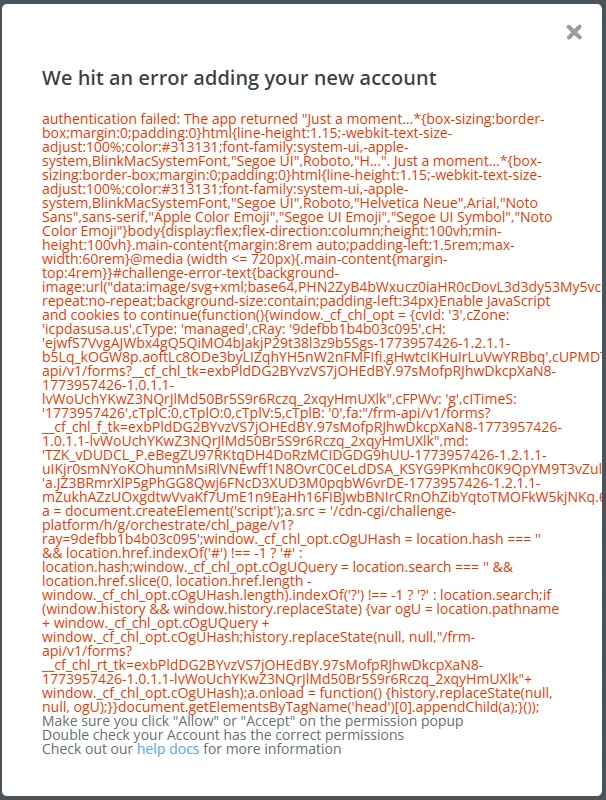
What I’ve tried:

  • Reconnected Zapier account multiple times

  • Verified API is working

  • Created Cloudflare WAF rule to skip security checks for /frm-api/* (including managed rules, rate limiting, browser integrity, etc.)

  • Placed rule at highest priority

This post has been edited by a moderator to remove personally identifiable information (PII). Please remember that this is a public forum and avoid sharing personal or potentially sensitive details.


2 replies

Troy Tessalone
Zapier Orchestrator & Solution Partner
Forum|alt.badge.img+14
  • Zapier Orchestrator & Solution Partner
  • March 20, 2026

Hi ​@icpdaswebdev 

Help links for using Formidable Forms in Zaps: 

https://formidableforms.com/knowledgebase/formidable-zapier/

https://zapier.com/apps/formidable/integrations#help


Prerequisites

To use the Formidable Forms app on Zapier, you must have:

  • A Formidable Forms Business license or higher.
  • The Formidable Forms Zapier add-on installed and activated on your WordPress site (available through Formidable → Add-Ons page after purchasing a qualifying license).
  • Your Formidable Forms API key, which can be found at Formidable → Global Settings → API tab in your WordPress admin. 
  • WordPress permalinks not be set to default. If you need to use any permalink structure other than the default "Plain" option (Settings → Permalinks in WordPress). 


Forum|alt.badge.img+2
  • Zapier Solution Partner
  • March 20, 2026

Hi ​@icpdaswebdev 

I see you've already created a WAF rule to skip security checks for /frm-api/* including browser integrity and managed rules. Since the challenge page is still appearing, here are a few more things to check:

1. Add "JS Challenge" and "Managed Challenge" to your WAF skip list

Even if you're skipping browser integrity and managed rules, Cloudflare has separate challenge types that may still be triggering. In your WAF rule's "Skip" options, make sure these are also selected:

  • JS Challenge

  • Managed Challenge (sometimes listed separately from Managed Rules)

Documentation: Configure a rule with the Skip action — Cloudflare Docs

2. Check if "I'm Under Attack Mode" is enabled

If this is turned on in Security → Settings, it forces a JavaScript challenge on all traffic and can override your WAF rule. Either:

  • Disable it globally, or

  • Add it to your WAF rule's skip list

3. Look for conflicting Page Rules

Page Rules can take precedence over WAF rules. Go to Rules → Page Rules and verify no rule applies to /frm-api/* with security settings like "Security Level: I'm Under Attack."

Documentation: WAF before or after Page Rules — Cloudflare Community

Hope this helps you get it sorted! And let me know how it goes — happy to dig deeper if needed!

And if you'd rather just get it sorted quickly, I offer a free 20-min Zapier troubleshooting call. Book it under Resources on my Zapier Directory profile: https://zapier.com/partnerdirectory/automatemybiz

!-->


