
Question

Calendly appointments showing incorrect times in Zapier

  • December 15, 2024
  • 4 replies
  • 187 views

I have a Zap that creates a row in a Google sheet every time a Calendly appointment is made. It was working perfectly until this week. In Zapier, Google Sheets appeared as Legacy mode and asked me to update it. When I did, the meeting times were off by 5 hours. 

Zapier is set to America/New York as is my Calendly. 

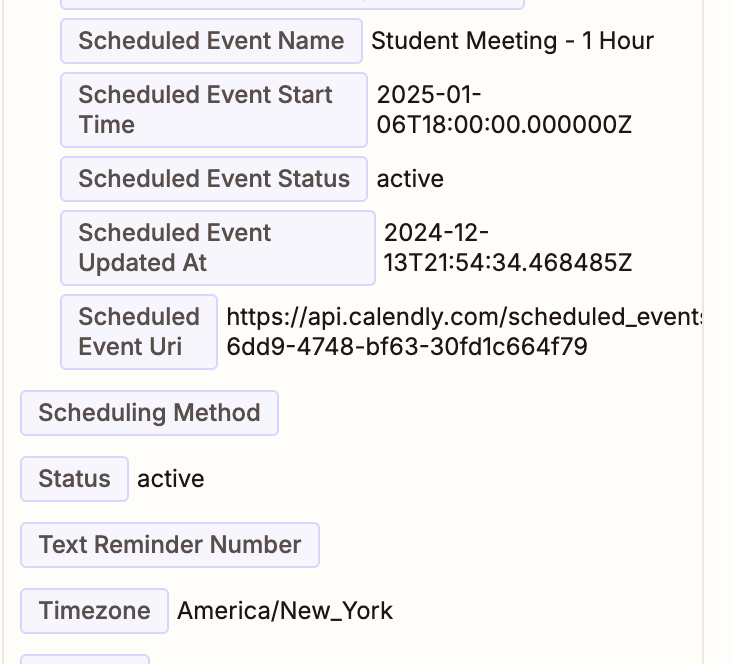
The meeting below is on my calendar for 1:00 pm, but you can see that it is coming into Zapier at 18:00.

Any idea what has changed and how to fix it?


This post has been closed for comments. Please create a new post if you need help or have a question about this topic.

4 replies

Troy Tessalone
Zapier Orchestrator & Solution Partner
Forum|alt.badge.img+14
  • Zapier Orchestrator & Solution Partner
  • December 15, 2024

Hi ​@BetsyMorgan 

I believe Calendly returns timestamps in UTC timezone.

You can use a Formatter > Date & Time > Format step to adjust the timestamp to a different timezone.

Help: https://zapier.com/apps/formatter/help


  • Author
  • New
  • December 16, 2024

Hi ​@BetsyMorgan 

I believe Calendly returns timestamps in UTC timezone.

You can use a Formatter > Date & Time > Format step to adjust the timestamp to a different timezone.

Help: https://zapier.com/apps/formatter/help

Any idea why it was working correctly without the Formatter for years? This just started happening!


Troy Tessalone
Zapier Orchestrator & Solution Partner
Forum|alt.badge.img+14
  • Zapier Orchestrator & Solution Partner
  • December 16, 2024

@BetsyMorgan 

I think Calendly changed their API a couple of months back, which caused there to be a new version of the Calendly Zap app integration.

If you recently updated the Calendly Zap step to the newest Calendly Zap app version, then that would likely be why.


SamB
Community Manager
Forum|alt.badge.img+11
  • Community Manager
  • December 19, 2024

Hi ​@BetsyMorgan 👋

How are things going on this—were you able to get to get the dates converted using that Formatter step?

Looking at the Scheduled Event Start Time field in your screenshot it looks like the date is coming over as UTC as there’s a Z at the end (stands for Zulu time):

5ed946738502df5102ece223550012df.png

I did some digging online and found this thread in the Calendly community that was posted back in April, 2024 which confirmed that Calendly is expected to send over the dates in UTC format: https://community.calendly.com/api-webhook-help-61/how-to-get-the-event-start-time-in-local-timezone-which-my-user-booked-1271 and it’s mentioned in that post there’s an Invitee Timezone field available:

691049675a6dccfa706811c8bf8a5e4a.png

Can you take a look at some recent runs of the Zap from when it was working and confirm whether the time was coming over in UTC format then as well? And if so, can you confirm what the Invitee timezones were?

It seems very strange for it to suddenly not work when it’s been sending over dates in UTC format since at least April time. So I’m wondering if the invitee timezone might be some related to whether the date is converted correctly or not? 🤔 

Looking forward to hearing from you!





