
Question

Attaching a Google Doc file to an outgoing email

  • September 2, 2024
  • 2 replies
  • 27 views

Hello, 

I created an automation using the Google Doc "Create Document from Template". Everything works correctly, a document is generated from the template for each Zap.

I would then like to send the link to this document by email. However, I do not know which item to choose in the "Insert data Attachments" list.
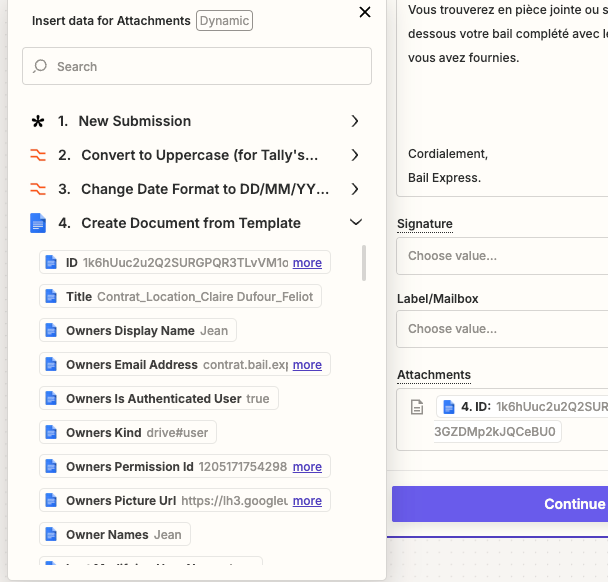


Can you help me please?

Thank you!

This post has been closed for comments. Please create a new post if you need help or have a question about this topic.

2 replies

Troy Tessalone
Zapier Orchestrator & Solution Partner
Forum|alt.badge.img+14
  • Zapier Orchestrator & Solution Partner
  • 34039 replies
  • September 3, 2024

Hi @jeanf92 

Help link about using files in Zaps: https://help.zapier.com/hc/en-us/articles/8496288813453-Send-files-in-Zaps

The variable needs to be a file object (e.g. variable value says “File exists but not shown”) or a publicly accessible direct download link.


SamB
Community Manager
Forum|alt.badge.img+11
  • Community Manager
  • 9676 replies
  • September 17, 2024

Hi @jeanf92 👋

Did you manage to get the Google Doc file attached to the email following Troy’s reply here? 

We’re happy to help further if you’re still stuck at all, just let us know! 🙂




