

Best answer

Airtable create record doesnt appear next to the matching value in the table

  • May 28, 2024
  • 3 replies
  • 32 views

Hello, 


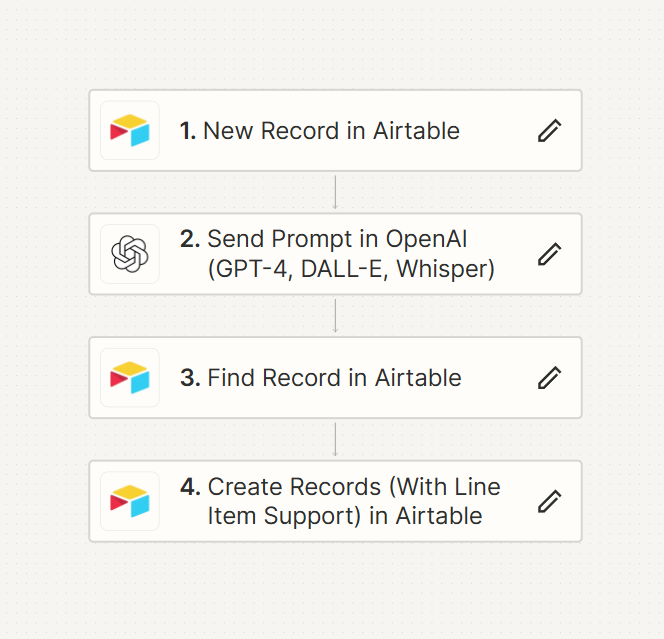
Here is the screenshot of my Zap, basically getting a product name from Airtable, then sent to chatgpt to get info about that product, finally create a new record in Airtable with the chatgpt info in a dedicated column.

The issue I have is that the product info on Airtable is not added in the correct line, next to its corresponding product. Instead it created new lines at the end of the table. Should I update something in the step 4?


Thank you!

Best answer by jayeshkumarbhatia

Hey @Montrachos ,


The 4th action that you should use Update Airtable Record and not create a record.


You will get record id from Trigger event and you can use that to update Update Record Action. 

This post has been closed for comments. Please create a new post if you need help or have a question about this topic.

3 replies

jayeshkumarbhatia
Forum|alt.badge.img+7
  • Zapier Solution Partner
  • 735 replies
  • Answer
  • May 28, 2024

Hey @Montrachos ,


The 4th action that you should use Update Airtable Record and not create a record.


You will get record id from Trigger event and you can use that to update Update Record Action. 


Troy Tessalone
Zapier Orchestrator & Solution Partner
Forum|alt.badge.img+14
  • Zapier Orchestrator & Solution Partner
  • 34068 replies
  • May 28, 2024

Hi @Montrachos 

If you are trying to update the same Airtable record as Step 1, then you probably do not need Zap Step 3.

Just map the Record ID from Step 1 to the Zap step for Airtable Update Record.


  • Author
  • Beginner
  • 1 reply
  • May 29, 2024

Hi @jayeshkumarbhatia  and @Troy Tessalone thank you both so much for your help and responsiveness, you are life-savers!





