
Question

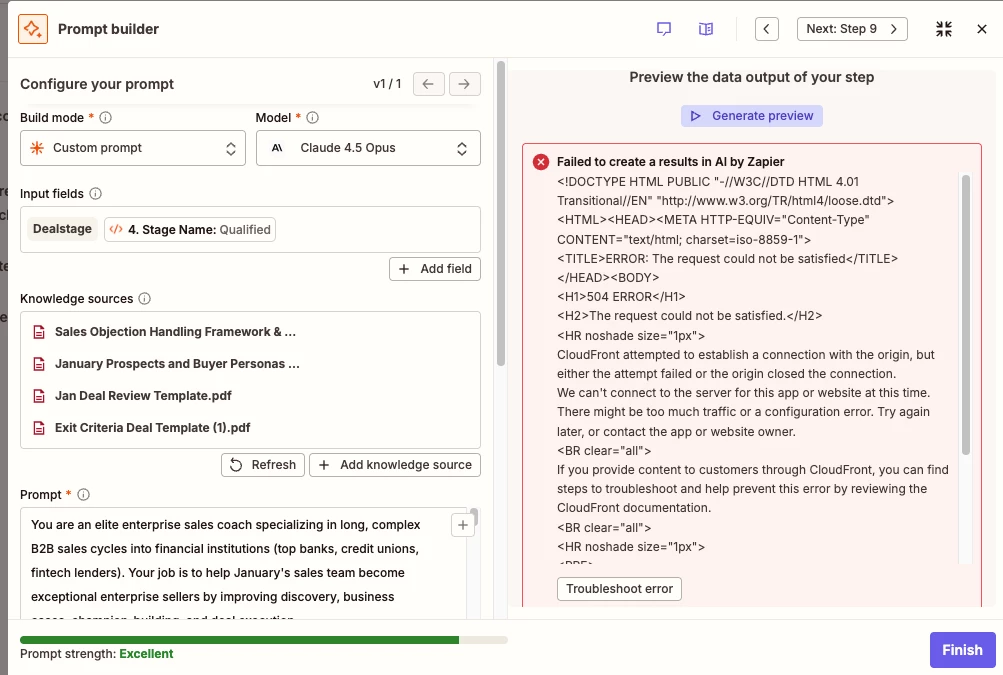
AI by Zapier is producing "Failed to create a results in AI by Zapier" error

  • February 3, 2026
  • 1 reply
  • 7 views

I’m attempting to find a solution for this error. My hypothesis is that this is error is being generated because I’m using Claude 4.5 Opus which is slower than other simpler models and the request is timing out. However, I’m not sure that this is the cause. 

I do not want to make the prompt smaller - I’m providing necessary context to get an effective result. I have tried breaking up the task in 2 steps to no avail. I do not want to use the Anthropic step (Send message) instead of AI Zapier because I found that it does not have the flexibility of uploading documents and specifying specific output formats which are necessary for future steps in my Zap.

  1. Can someone help me diagnose with certainty what the error is?
  2. If it is a time out error, is there any way to get around it? I previously asked Support on chat and I was told they cannot change the time out limits on Zapier for specific Zaps.

Thank you very much! Screenshot of error attached:
 

1 reply

Troy Tessalone
Zapier Orchestrator & Solution Partner
Forum|alt.badge.img+14
  • Zapier Orchestrator & Solution Partner
  • February 3, 2026

Hi ​@sudiksha.dhoot 

Help links for using AI by Zapier in Zap steps: https://zapier.com/apps/ai/integrations#help


What the error means in plain language

Zapier tried to send your prompt to the AI model, but the service on the other end did not respond in time.
The 504 error comes from CloudFront, which sits between Zapier and the AI provider.
CloudFront could not connect to the AI server or the server was too slow or unavailable.
This is not caused by your prompt content itself.

Why this happens

  • The AI provider is temporarily down or overloaded.

  • A network hiccup between Zapier and the AI provider.

  • The request took too long, often due to large prompts or multiple knowledge sources.

  • A transient Zapier infrastructure issue.

What you can do to fix it

  1. Retry the step
    This often works if the issue was temporary.

  2. Switch models
    Try a different AI model in the same step.

    1. If Claude 4.5 Opus is selected, test a lighter or alternate model.

  3. Reduce prompt size
    Shorten the prompt.

    1. Remove extra instructions that are not essential.

  4. Trim knowledge sources
    Remove PDFs or documents you do not strictly need.

    1. Large or multiple documents increase latency.

  5. Split the logic
    Instead of one large AI step, break it into two steps.

    1. For example, summarize inputs first, then run coaching logic in a second step.

  6. Test outside preview
    Sometimes preview fails but the live Zap run succeeds.

    1. Turn the Zap on and test with a real record.

  7. Check Zapier status
    If retries keep failing, check Zapier’s status page and try again later.

Key takeaway

This is a connectivity or timeout failure, not a configuration mistake.
Treat it like a temporary outage first.
Optimize payload size and model choice if it keeps happening.



