



How to set up a WhatsApp Business ↔ Slack routing workflow

  • February 4, 2026
  • 3 replies
  • 23 views

DennisWF
Forum|alt.badge.img+6

I previously had this running through Twilio ↔ Zapier ↔ Slack, which worked but added unnecessary complexity and another service to maintain. Now that Zapier's a direct WhatsApp Business Service Provider, I stripped out the middleware and connected straight through.
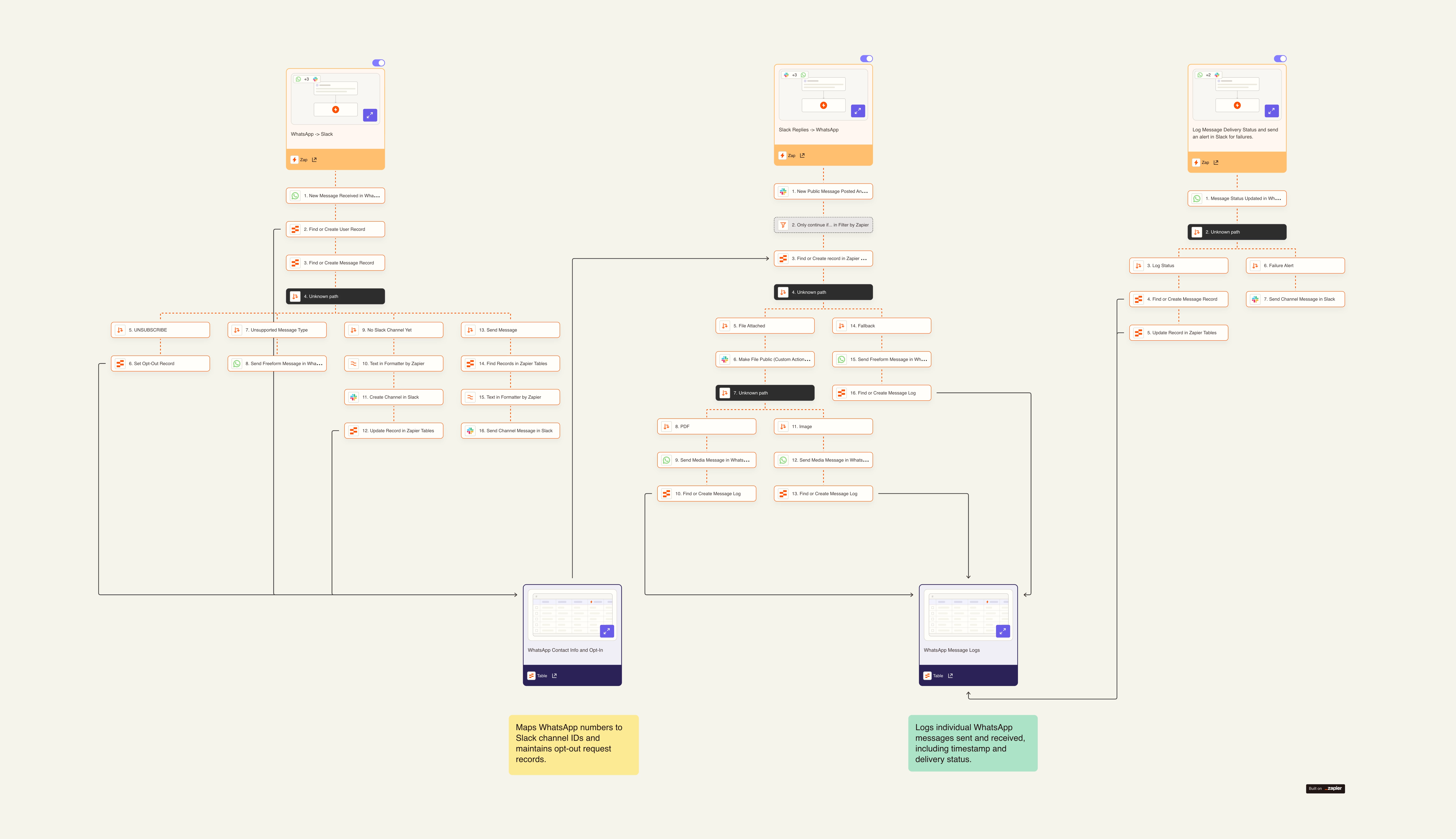
 

What it does:

  • Inbound: WhatsApp messages trigger the workflow → creates/finds user records in Tables → auto-creates dedicated Slack channels for new contacts → posts messages with full context (timestamp, delivery status)
  • Outbound: Slack replies get formatted and sent back through WhatsApp → logs everything to Tables for audit trail

Built in some smart handling too: filters for unsubscribe requests, gracefully handles unsupported message types (stickers, voice notes, etc.), and keeps everything sync'd with proper message threading.

The Zapier Tables handle state management - tracking which WhatsApp number maps to which Slack channel, maintaining opt-out records, and giving me a clean audit log of message delivery status. Took about an afternoon to rebuild what used to be a much more fragile setup. Native integrations win.

The Canvas is publicly viewable here!

3 replies

SamB
Community Manager
Forum|alt.badge.img+11
  • Community Manager
  • February 9, 2026

Love this, ​@DennisWF! So great to see how the new WhatsApp Business app helped you to simplify the setup and make it more efficient. Really appreciate you taking the time to share your approach and the Canvas link. Thanks so much! 🤗


DennisWF
Forum|alt.badge.img+6
  • Author
  • Zapier Solution Partner
  • February 9, 2026

Thanks, ​@SamB, always happy to share! Just a heads-up that there is a bug with the integration - image and other file attachments don’t hydrate properly, and therefore can’t be passed into subsequent steps. I submitted a ticket on this a couple of weeks ago, but don’t know if any work is happening on it. 


SamB
Community Manager
Forum|alt.badge.img+11
  • Community Manager
  • February 10, 2026

Thanks for flagging that ​@DennisWF! I had a look into the bug report you were added to and it’s still not been resolved yet. I can’t give an ETA and there aren’t any updates we can share at the moment, but you’ll definitely get an email notification as soon as it’s been fixed. Thanks for your patience in the meantime 🙏
