


Automatisierter ROI- & Prozess-Audit-Rechner mit Zapier Tables, Python & Gmail


Sebahat Zambak

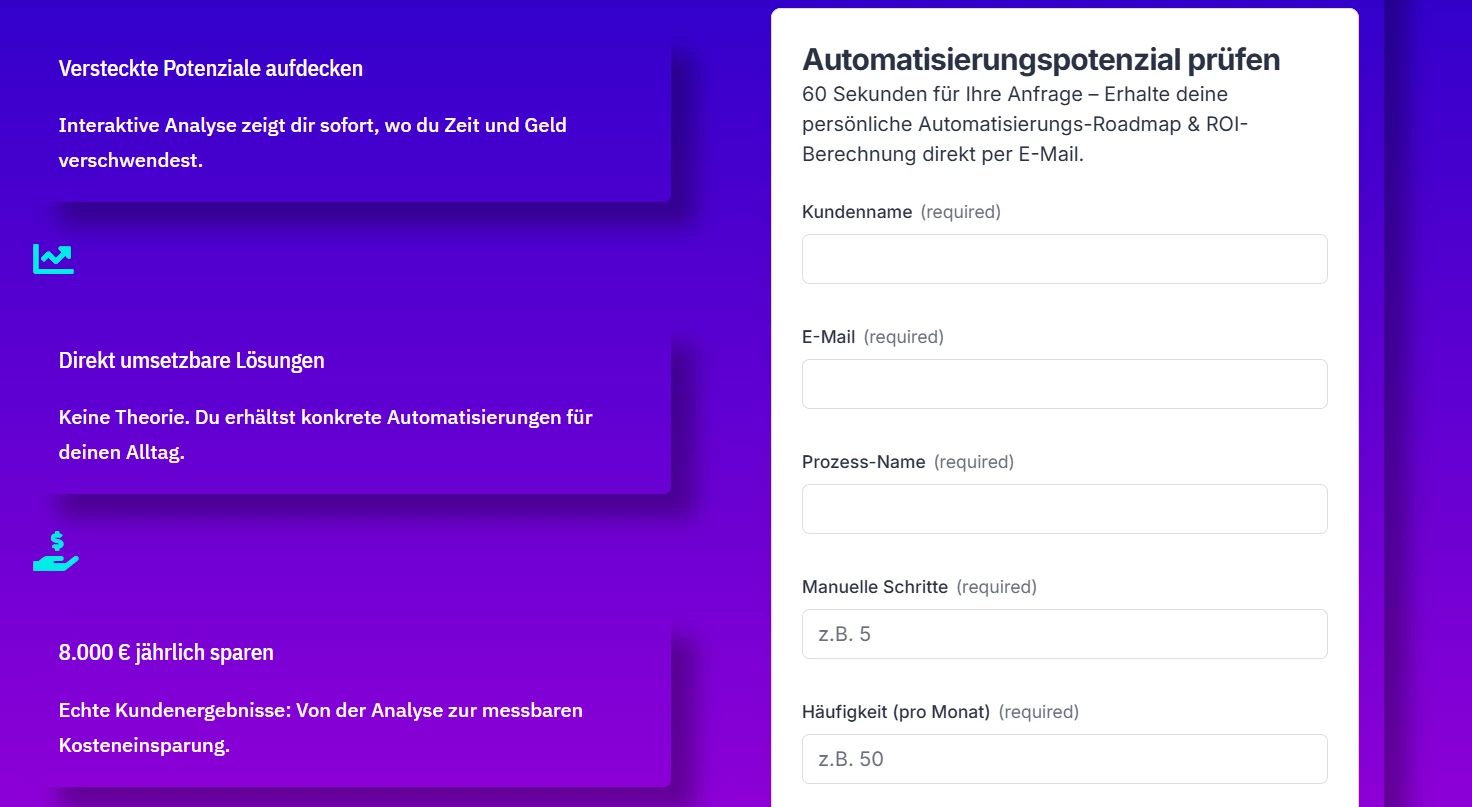
Ich habe für EventDigitalist einen interaktiven Potenzial-Rechner gebaut, der Website-Besuchern in Sekunden ihr persönliches Einsparpotenzial durch Automatisierung berechnet vollständig vollautomatisiert! 🤖⚡

🎯 Das Ziel

Website-Besucher und potenzielle B2B-Kunden sollen über ein kurzes Formular ihre manuellen Aufwände angeben können und sofort eine maßgeschneiderte, datenbasierte Potenzialanalyse per E-Mail erhalten ohne dass ich manuell nachrechnen oder E-Mails abtippen muss.

🛠️ Verwendete Tools & Tech Stack

  • Zapier Tables: Datenerfassung und strukturierte Speicherung der Formular-Eingaben direkt auf der Website.

  • Code by Zapier (Python): Dynamische Berechnung der jährlichen Personalkosten, der Zeitersparnis und des ROIs in Echtzeit.

  • Gmail Integration: Automatisierter Versand des individuellen Audit-Reports direkt an den Lead.

  • WordPress (Divi): Einbettung des interaktiven Rechner-Formulars auf der Homepage.

⚙️ Wie der Prozess aufgesetzt ist (Setup & Logik)

  1. Erfassung (Zapier Tables): Der Website-Besucher füllt das Formular aus (z. B. Arbeitsstunden, Stundensatz, Teamgröße). Die Daten fließen automatisch in meine Zapier Table.

  2. Logik & Berechnung (Python): Ein Python-Skript verarbeitet die Kennzahlen im Hintergrund, berechnet die jährlichen Opportunitätskosten sowie das konkrete Einsparpotenzial in Euro und Arbeitsstunden.

  3. Automatisierter Report (Gmail): Zapier generiert eine personalisierte E-Mail von
     mit den exakten Berechnungsergebnissen und schickt sie direkt an das Postfach des Interessenten.

💡 Das Ergebnis

Ein leistungsstarker Lead-Magnet und ROI-Rechner in einem! Er eliminiert manuelle Datenverarbeitung zu 100 %, bietet Interessenten sofortigen Mehrwert und demonstriert live auf der Website die Möglichkeiten intelligenter Workflow-Automatisierung als Zapier Silver Solution Partnerin! 🎯


Moderator edit to include translation of original message:


I built an interactive potential calculator for EventDigitalist that shows website visitors their personal savings potential through automation in seconds, fully automated! 🤖⚡


🎯 The goal

Website visitors and potential B2B customers can enter their manual effort through a short form and instantly receive a tailored, data-based potential analysis by email, without me having to calculate anything by hand or type out emails.

🛠️ Tools & tech stack

  • Zapier Tables: Data capture and structured storage of the form inputs submitted directly on the website.

  • Code by Zapier (Python): Dynamic calculation of annual personnel costs, time savings, and ROI in real time.

  • Gmail integration: Automated sending of the individual audit report directly to the lead.

  • WordPress (Divi): Embedded the interactive calculator form on the homepage.

⚙️ How the process is set up (setup & logic)

  1. Capture (Zapier Tables): The website visitor fills out the form (e.g. working hours, hourly rate, team size). The data flows automatically into my Zapier Table.

  2. Logic & calculation (Python): A Python script processes the figures in the background and calculates the annual opportunity costs as well as the concrete savings potential in euros and working hours.

  3. Automated report (Gmail): Zapier generates a personalized email from

     with the exact calculation results and sends it straight to the prospect's inbox.

💡 The result

A powerful lead magnet and ROI calculator in one! It eliminates manual data processing by 100%, gives prospects immediate value, and demonstrates live on the website the possibilities of intelligent workflow automation as a Zapier Silver Solution Partner! 🎯

 

5 replies

SamB
Community Manager
Forum|alt.badge.img+11
  • Community Manager
  • October 7, 2026

Hi and welcome to the Community, ​@Sebahat Zambak 👋

Love that you're using Python for the calculations! Would you mind sharing an example of the code being used in the Zap? It could be really useful to anyone trying to replicate a similar setup. Thanks!


Sebahat Zambak
  • Author
  • Zapier Solution Partner
  • October 7, 2026

Hier ist das Python-Codebeispiel aus meinem Zap:

1. Input Data Variablen:

  • zeit_pro_fall_minuten

  • haeufigkeit_pro_monat

  • stundensatz_eur

2. Python-Code (Code by Zapier)

# Parse input values - convert from strings to floats
zeit_pro_fall_minuten = float(input_data.get('zeit_pro_fall_minuten', '0') or 0)
haeufigkeit_pro_monat = float(input_data.get('haeufigkeit_pro_monat', '0') or 0)
stundensatz_eur = float(input_data.get('stundensatz_eur', '0') or 0)

# Calculate monthly costs: (Zeit × Häufigkeit × Stundensatz) / 60
monatliche_kosten_eur = (zeit_pro_fall_minuten * haeufigkeit_pro_monat * stundensatz_eur) / 60

# Calculate annual costs: monthly costs × 12 months
jahreskosten_eur = monatliche_kosten_eur * 12

# Return the calculated values rounded to 2 decimal places
return {
'jahreskosten_eur': round(jahreskosten_eur, 2),
'monatliche_kosten_eur': round(monatliche_kosten_eur, 2)
}


Moderator edit to include translation of original message:


Here is the Python code example from my Zap:


1. Input Data variables:

  • time_per_case_minutes

  • frequency_per_month

  • hourly_rate_eur

2. Python code (Code by Zapier)

# Parse input values - convert from strings to floats
time_per_case_minutes = float(input_data.get('time_per_case_minutes', '0') or 0)
frequency_per_month = float(input_data.get('frequency_per_month', '0') or 0)
hourly_rate_eur = float(input_data.get('hourly_rate_eur', '0') or 0)

# Calculate monthly costs: (time × frequency × hourly rate) / 60
monthly_cost_eur = (time_per_case_minutes * frequency_per_month * hourly_rate_eur) / 60

# Calculate annual costs: monthly costs × 12 months
annual_cost_eur = monthly_cost_eur * 12

# Return the calculated values rounded to 2 decimal places
return {
'annual_cost_eur': round(annual_cost_eur, 2),
'monthly_cost_eur': round(monthly_cost_eur, 2)
}

SamB
Community Manager
Forum|alt.badge.img+11
  • Community Manager
  • October 8, 2026

Thanks so much for sharing the code you used ​@Sebahat Zambak, really appreciate it! 🤗


Lovely build, and pairing Zapier Tables with a short Python step keeps the logic readable rather than buried in spreadsheet formulas. The ROI calculator as a lead magnet is a thoughtful touch, since prospects see value before anyone picks up the phone. One small suggestion, if I may: a gentle sanity check on the hourly rate input would keep odd figures out of the report. Thank you for sharing the code example as well, it will help anyone hoping to replicate this.


Sebahat Zambak
  • Author
  • Zapier Solution Partner
  • October 12, 2026

Lovely build, and pairing Zapier Tables with a short Python step keeps the logic readable rather than buried in spreadsheet formulas. The ROI calculator as a lead magnet is a thoughtful touch, since prospects see value before anyone picks up the phone. One small suggestion, if I may: a gentle sanity check on the hourly rate input would keep odd figures out of the report. Thank you for sharing the code example as well, it will help anyone hoping to replicate this.

Thank you so much for the wonderful feedback! I'm thrilled to hear that you liked the build.

You hit the nail on the head regarding the architecture: combining Zapier Tables with a short Python step keeps things so much cleaner and easier to maintain than digging through complex spreadsheet formulas. And I completely agree about the ROI calculator as a lead magnet—it works so well because prospects can see immediate, tangible value before anyone even picks up the phone.

Also, thank you for the great suggestion regarding a sanity check on the hourly rate! That's a smart tip to filter out odd figures and keep the reports clean. I'll definitely implement that!

I'm really glad the code example is helpful to anyone looking to replicate this approach as well. Thanks again for your time and kind words!

