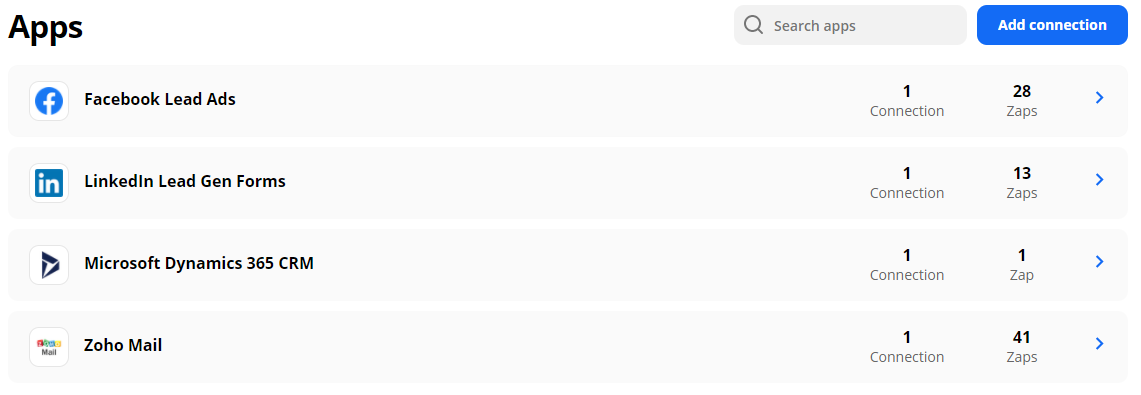
and I added MS Dynamics (premium) but I can’t activate the zap because it says that my plan only allows 3 premium apps…
any idea what’s going on or how to solve it?
Best answer by SamB
Hey @vdelafuente!
I took a look and it seems that our Support team have responded to you and were able to identify the issue. It appears that there was a Zap on your account that had a different Premium app (Google Lead Form Extensions) selected. This wasn’t appearing on the Apps page but was likely the third app preventing you from activating your Microsoft Dynamics Zap.
If you go into the Zap that’s using the Google Lead Form Extensions app and select a non-premium app (assuming you’re not wanting to use the Google Lead Form Extensions app as well?) you should then be able to activate the Microsoft Dynamics Zap. I hope that helps! :)
This post has been closed for comments. Please create a new post if you need help or have a question about this topic.
I took a look and it seems that our Support team have responded to you and were able to identify the issue. It appears that there was a Zap on your account that had a different Premium app (Google Lead Form Extensions) selected. This wasn’t appearing on the Apps page but was likely the third app preventing you from activating your Microsoft Dynamics Zap.
If you go into the Zap that’s using the Google Lead Form Extensions app and select a non-premium app (assuming you’re not wanting to use the Google Lead Form Extensions app as well?) you should then be able to activate the Microsoft Dynamics Zap. I hope that helps! :)
I solved thanks to your tips. Because in “my apps” section doesn’t appear all the apps connected, I didn’t see that I already had Google Lead Form Extensions occupying the third slot for the premium apps.
I checked the spam folders (or other folders for that matter) in my email account and I cannot find the reply from support. I changed also what mails (product feedback, promotions and so on) in my account to allow all the emails, but still I did’nt received any.
Still missing why doesn’t show all the apps connected in my apps section, but solved the other important issues.
That’s fantastic, @vdelafuente! I’m so pleased you were able to activate the Zap. :)
Ah, I’ve just had a thought, was there an account connection set up for the Google Lead Form Extensions app? Or was it just a selected app in the Zap. If the app was selected but no account had been connected that could potentially explain why it wasn’t appearing on the Apps page.
I’ve seen that you opened another thread in Community about not receiving our Support Team’s emails. I’m not sure if you’ve already seen my response in the other thread but it may be helpful to also search your email account for any emails sent from email addresses ending in @zapier.com.