
Question

Zapier Trigger Issues with Invoice Ninja?

  • March 15, 2021
  • 4 replies
  • 82 views

cc_90

I’m trying to create a zap wherein when there’s a new row in my database, invoice ninja would create the invoice.

My trigger apps are the following:

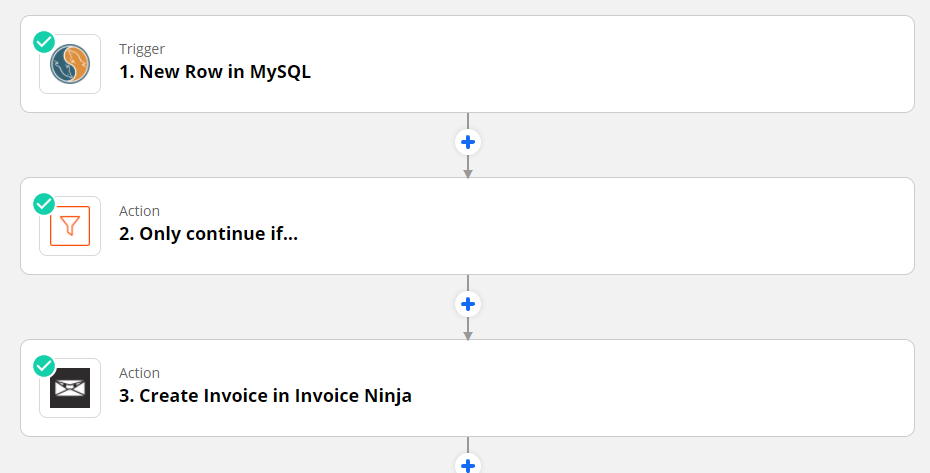
  1. MySQL (New Row)
  2. Filter (So that this will only create invoices for a specific customer)
  3. Invoice Ninja (Create Invoice)


After I’ve set this up, I tried adding a new row but when I ran the zap it kept saying that it couldn’t find any new items even if there is a new row. There’s no error on zapier, and I’m definitely sure there is a new row inserted. Could this be an issue with Invoice Ninja? Have you guys ran into this problem before?




This post has been closed for comments. Please create a new post if you need help or have a question about this topic.

4 replies

Troy Tessalone
Zapier Orchestrator & Solution Partner
Forum|alt.badge.img+14
  • Zapier Orchestrator & Solution Partner
  • 34043 replies
  • March 15, 2021

Hi @cc_90 

Check out this help article: https://zapier.com/help/doc/new-rows-dont-trigger


New Rows Don't Trigger!

Last updated: January 27, 2020

You may setup a Zap and discover that new rows aren't triggering. Or perhaps they were triggering but all of the sudden stopped triggering. What's going on?

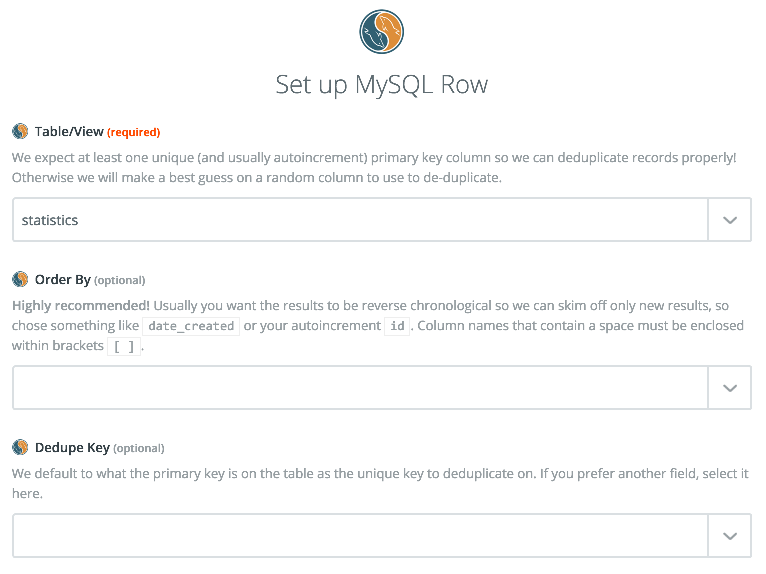
You should double check your Zap's filters to make sure you have selected an Order By field. You can find this where you 'edit options' for the MySQL trigger.

Filters

It is very important that you select a field here. When we query your database we'll only pull a set number of records at a time (since we cannot pull all of them) and with no field to order by we'll most likely get the default ordering.

Your primary key would be an excellent choice here if it is auto incremented. Creation dates are also good candidates as well. But leaving this field empty could lead your Zap to stop triggering on new rows because it can't see them anymore.


cc_90
  • Author
  • Beginner
  • 3 replies
  • March 15, 2021

I have tried and checked that as well but no luck :(


Troy Tessalone
Zapier Orchestrator & Solution Partner
Forum|alt.badge.img+14
  • Zapier Orchestrator & Solution Partner
  • 34043 replies
  • March 15, 2021

@cc_90 You can open a ticket with Zapier Support here: https://zapier.com/app/get-help


SamB
Community Manager
Forum|alt.badge.img+11
  • Community Manager
  • 9691 replies
  • May 21, 2021

Hey @cc_90,

I am not seeing a recent Support ticket for this particular question - were you able to get your MySQL to Invoice Ninja Zap working in the end?

Please let us know!