


Best answer

Workast User not available in selection list

  • January 18, 2021
  • 4 replies
  • 32 views

Shawn-GDCC

I created a Zap that triggers on a Slack Workflow form. The last step is to add a Workast task. When I select a user (Workast) to assign, the one I need doesn’t show on the list, even after Load More.

She is in the system.  I’ve created tasks for her and she’s completed them in the past several weeks.  Any thoughts on why she may not be showing up?


Thanks,

Shawn 
 

Best answer by nicksimard

Hi @Shawn-GDCC!

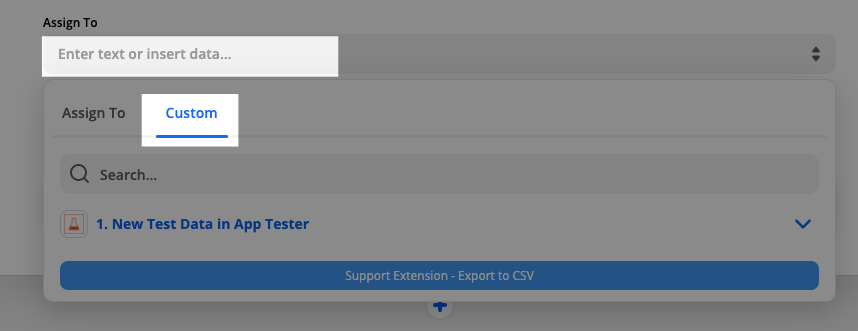
What @Troy Tessalone was referring to is to use the Custom Value option:

I checked Workast, however, and I don’t see a way to get the ID of participants such that you could then use it here. Maybe try reaching out to the Workast support team to see if they can provide that? Lots of apps allow you to click on particular objects and then show the ID in the URL. But I don’t see a place to see an individual participant.

Wish I had a better answer for you.

This post has been closed for comments. Please create a new post if you need help or have a question about this topic.

4 replies

Troy Tessalone
Zapier Orchestrator & Solution Partner
Forum|alt.badge.img+14
  • Zapier Orchestrator & Solution Partner
  • January 18, 2021

Hi @Shawn-GDCC 

Did you try searching for the desired Workast User rather than ‘Loading More’?

One possible workaround is to hardcode the value for the desired User in the field.


Shawn-GDCC
  • Author
  • Beginner
  • January 22, 2021

Hi Troy,

Sorry. I’ve been out of the office for several days.  I did enter the name to search for it, before I tried Load More.  How would I harcode it?


Thanks,

Shawn


nicksimard
Forum|alt.badge.img+11
  • Zapier Staff
  • Answer
  • January 28, 2021

Hi @Shawn-GDCC!

What @Troy Tessalone was referring to is to use the Custom Value option:

I checked Workast, however, and I don’t see a way to get the ID of participants such that you could then use it here. Maybe try reaching out to the Workast support team to see if they can provide that? Lots of apps allow you to click on particular objects and then show the ID in the URL. But I don’t see a place to see an individual participant.

Wish I had a better answer for you.


Shawn-GDCC
  • Author
  • Beginner
  • March 31, 2021

Thank you @Troy Tessalone !  I’ll check that out.





