Hello
I am trying to pass a url from cognitoform to google sheets. How can use the formatter to pass the url in the format <a href="https://xxx">View</a>
Many thanks
B

Hello
I am trying to pass a url from cognitoform to google sheets. How can use the formatter to pass the url in the format <a href="https://xxx">View</a>
Many thanks
B
Best answer by andywingrave
Hello! Just to expand on what Troy has said here.
Troy is correct that you can add a URL into your row in the following way:
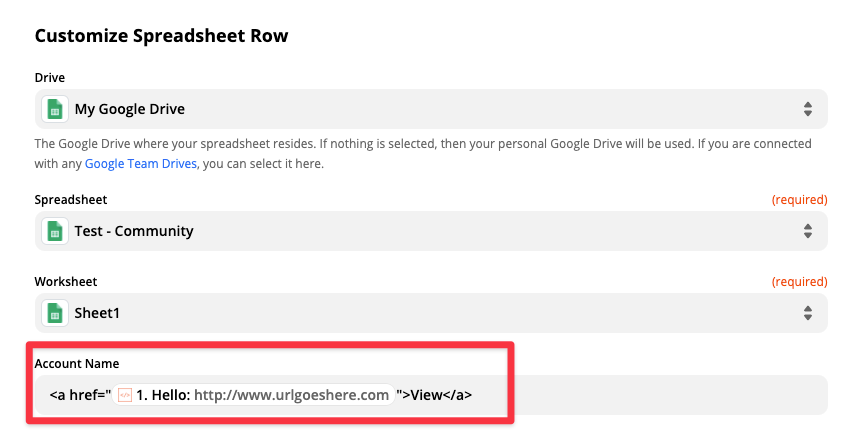
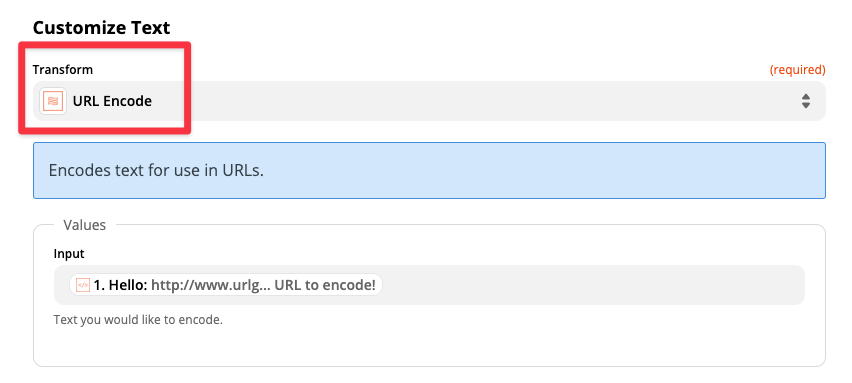
However you absolutely will need a formatter step if you want to encode special characters as part of your URL, and for that you can use the “URL encode step” as shown below:


Build and deploy automations from AI tools you already use. With Agentic Management, if anything breaks, the agent diagnoses the issue and proposes a fix.
Enter your E-mail address. We'll send you an e-mail with instructions to reset your password.