Best answer

Update Podio item with URL from newly created Jira Issue


Hello,

I’ve just created my first zap. This Zap automatically creates a new Jira issue when a Podio item is created. Now I want to add the URL from the Jira issue to a field in my Podio item. 

How can I do this? How can I make Zapier find the right issue to connect with?

Best answer by Leinad1989

@Troy Tessalone 


thanks, that didn't work. But I managed to get it fixed. All I had to do is type the beginning of the URL (which is always the same) and put the ID behind it.

View original
This post has been closed for comments. Please create a new post if you need help or have a question about this topic.

5 replies

Troy Tessalone
Zapier Orchestrator & Solution Partner
Forum|alt.badge.img+14
  • Zapier Orchestrator & Solution Partner
  • August 10, 2021

Hi @Leinad1989 

Add another step in your Zap.

Map the ID of the trigger step to the Podio Update Item step.

Help article: https://zapier.com/help/create/basics/set-up-your-zap-action#set-up-your-action


Hi @Troy Tessalone ,


Thank you for your reaction. Seems to be working now, just one question, maybe you can help me. I want to return the Jira Issue URL, but I can’t seem to figure out which field to use. Do you have any idea?


Troy Tessalone
Zapier Orchestrator & Solution Partner
Forum|alt.badge.img+14
  • Zapier Orchestrator & Solution Partner
  • August 10, 2021

@Leinad1989 

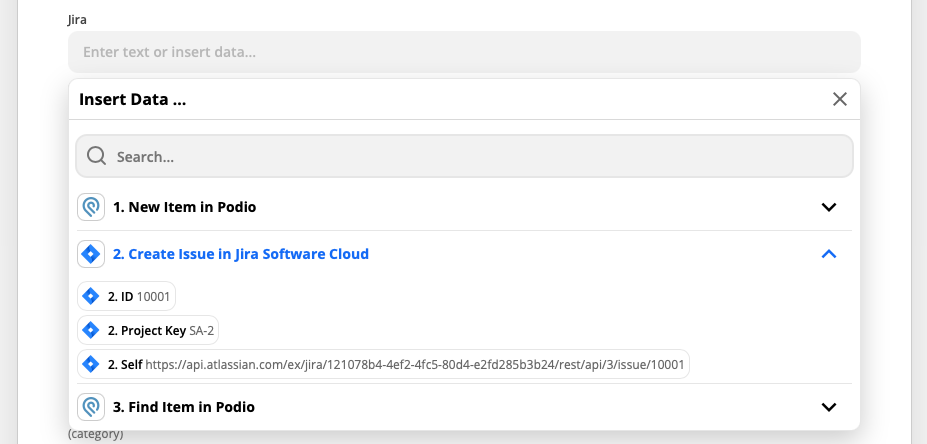
Search for http

Looks to be the Self parameter value

Notice the /issue/ at the end


  • Author
  • New
  • Answer
  • August 11, 2021

@Troy Tessalone 


thanks, that didn't work. But I managed to get it fixed. All I had to do is type the beginning of the URL (which is always the same) and put the ID behind it.


SamB
Community Manager
Forum|alt.badge.img+11
  • Community Manager
  • August 11, 2021

Hey @Leinad1989, that’s great news! Thanks for sharing your solution with the Community! :)