Hello,I'm having some difficulty setting up a ZAP:I would like to connect Hubspot to a Google Sheet to feed a report, for example as soon as there is a new contact, that in a cell of the google sheet, that's +1, which is added each time.I can't first target a specific cell: we can update rows, columns but a specific cell...And then add it with the value already present in this cell.Thank you for your help,
Best answer by GetUWired
Hi @Brunoleclerc
You can target 1 specific cell by updating just 1 value in the row with the cell. i.e if i wanted to update cell C3 in Zapier, i would use an update row action and target the input for column C.
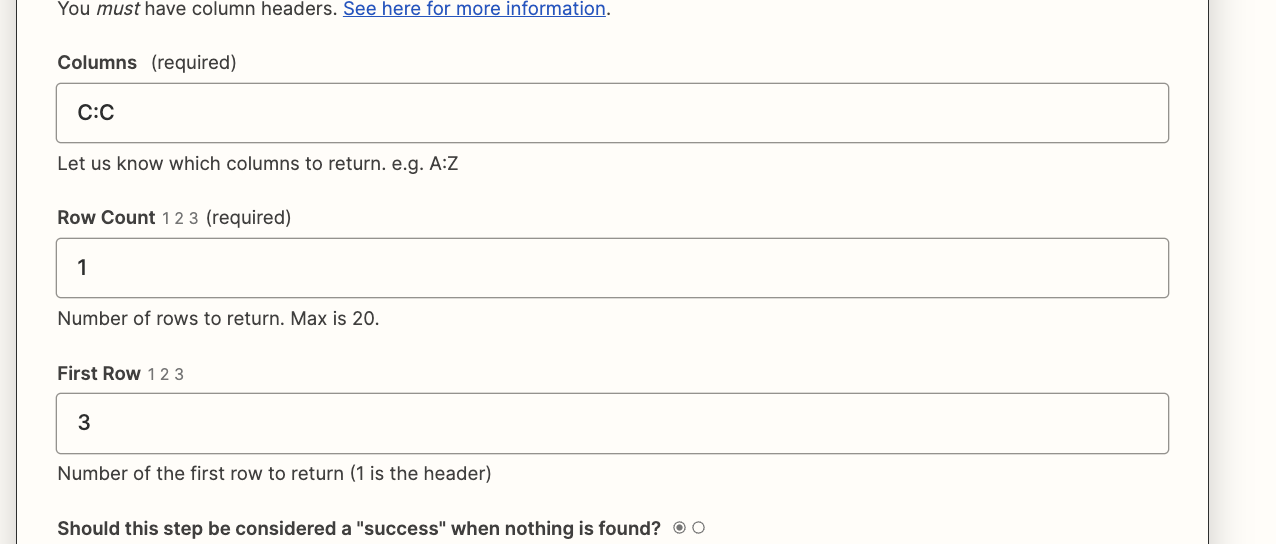
In order for you to reference the number that is already there, you need a lookup spreadsheet row action or a get spreadsheet rows action. Since you know the row with the cell, i would use the Get Many Spreadsheet Rows action. You can configure the input to only return 1 specific row. Consistent with my above example i would use the following set up to just get the value in C3
You can then pass the output into an Update Spreadsheet Row action as a formula
You can target 1 specific cell by updating just 1 value in the row with the cell. i.e if i wanted to update cell C3 in Zapier, i would use an update row action and target the input for column C.
In order for you to reference the number that is already there, you need a lookup spreadsheet row action or a get spreadsheet rows action. Since you know the row with the cell, i would use the Get Many Spreadsheet Rows action. You can configure the input to only return 1 specific row. Consistent with my above example i would use the following set up to just get the value in C3
You can then pass the output into an Update Spreadsheet Row action as a formula
Early access
Next Gen Zaps
Build and deploy automations from AI tools you already use. With Agentic Management, if anything breaks, the agent diagnoses the issue and proposes a fix.