
I am trying to send information to a custom field on a trello card (action is when a Microsoft To Do task is created). The custom field is a drop down menu type, with three options: low, medium, and high. The information coming over from Microsoft To Do has the words “low”, “medium”, or “high” in the task as one of the pieces of data tied to the to do task, so when building the zap action, it shows that I can pipe that word into the appropriate custom field. However, when I test the zap, the custom field did not update (aka, no drop down item was selected, even though I zapped in the word that matches one of the field’s selections). Does anyone know if it’s possible to set up a zap where a specific item in a drop down custom field would be selected upon triggering of a zap?

Best answer
Trello custom drop down field not updating
- Beginner
Best answer by ShannonKasperson
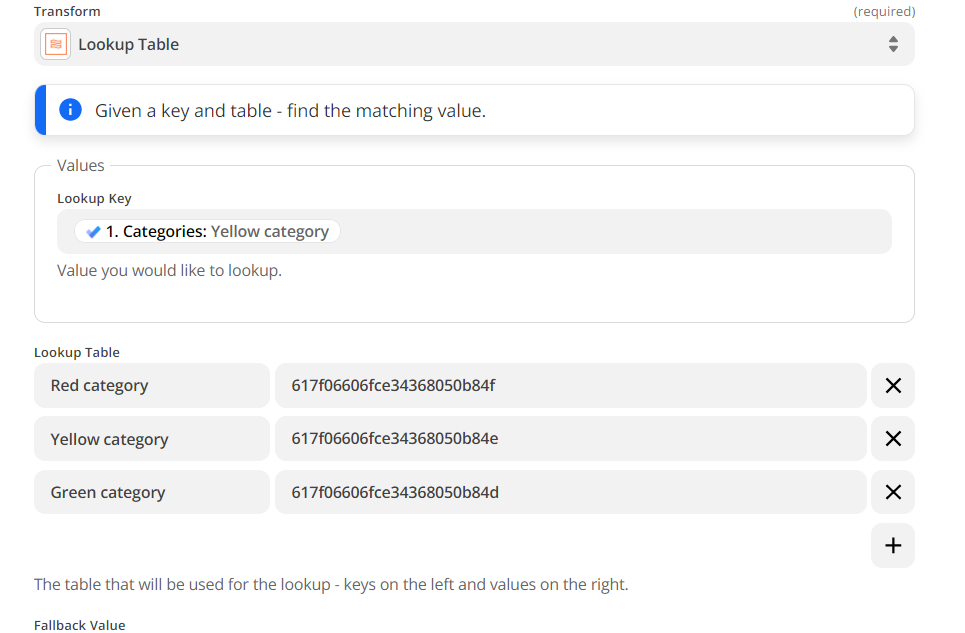
Actually, I figured it out. I guess each drop down item in Trello had it’s own custom number system, so that’s what I needed to program into the lookup table (see below). The red category is now taking on the code of “high”, yellow is now the “medium”, and green is now the “low” options in my trello custom field. When I piped in this transformed text it worked.
This post has been closed for comments. Please create a new post if you need help or have a question about this topic.







ZapConnect 2026 is coming
Join us September 23rd, 2026 for a free, one-day virtual event with 30+ sessions on AI automation. Get live build-alongs, playbooks, and strategies to lead AI transformation at your organization.
Log in to the Community
No account yet? Create an account
Use your Zapier credentials
Log in with ZapierEnter your E-mail address. We'll send you an e-mail with instructions to reset your password.